PowerProtect: Oracle Discoveries는 Oracle 상자에 없는 Oracle 데이터베이스에 대한 중요 알림을 생성합니다.
Summary: 이 문서에서는 존재하지 않는 Oracle 데이터베이스에 대한 알림을 방지하는 방법에 대한 해결 방법을 설명합니다.
This article applies to
This article does not apply to
This article is not tied to any specific product.
Not all product versions are identified in this article.
Symptoms
PowerProtect Data Manager는 Oracle 시스템에 없는 Oracle 데이터베이스에 대한 중요 알림을 생성합니다.
아래의 예를 참조하십시오.
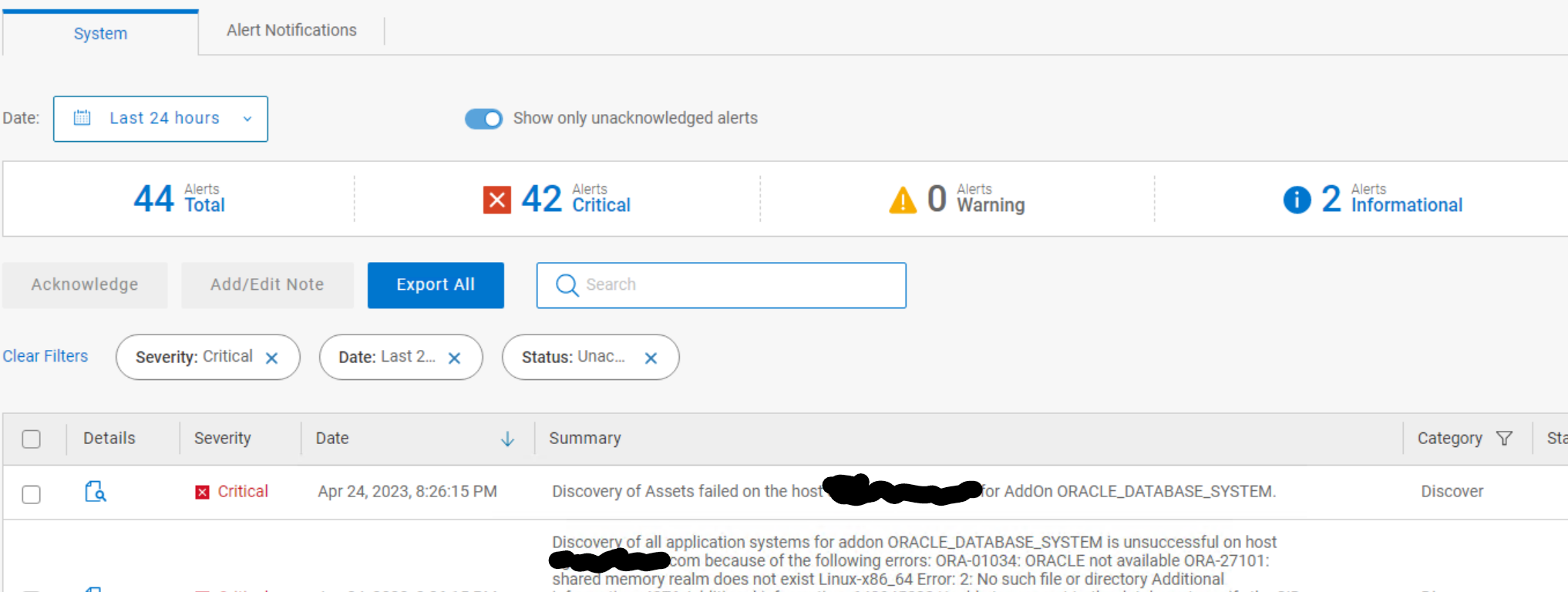
아래의 예를 참조하십시오.
그림 1: PowerProtect Data Manager에 표시되는 Oracle 알림입니다.
Cause
Oracle 시스템에 없는 oratab 에 Oracle 데이터베이스가 있는 경우 이 문제가 발생할 수 있습니다.
Resolution
데이터베이스가 유효한 데이터베이스인 경우:
RMAN 에이전트 구성 파일의 기본 위치는 다음과 같습니다. PowerProtect Data Manager 19.14부터는 RMAN 에이전트 구성 파일에서 IGNORE_ORATAB_INACTIVE_SID 매개변수를 활성화할 수 있습니다.
이를 통해 ddbmcon은 oratab 파일에서 비활성 ORACLE_SID 데이터베이스를 무시할 수 있습니다.
- Oracle 데이터베이스를 시작합니다.
- oratab 파일에서 비활성 데이터베이스(ORACLE_SID)를 삭제합니다.
- EXCLUDE_SID 매개변수를 설정하여 해당 ORACLE_SID RMAN 에이전트 구성의 검색에서 제외합니다.
RMAN 에이전트 구성 파일의 기본 위치는 다음과 같습니다.
/home/oracle/opt/dpsapps/rmanagent/config/rman_agent.cfg
이를 통해 ddbmcon은 oratab 파일에서 비활성 ORACLE_SID 데이터베이스를 무시할 수 있습니다.
Article Properties
Article Number: 000214726
Article Type: Solution
Last Modified: 19 Jun 2023
Version: 3
Find answers to your questions from other Dell users
Support Services
Check if your device is covered by Support Services.