Avamar: 'USE certificate authentication for REST communication' 확인란을 선택하면 AUI에서 DD 시스템을 편집할 수 없음
Resumen: Avamar: 'USE certificate authentication for REST communication' 확인란을 선택하면 AUI에서 DD 시스템을 편집할 수 없음
Este artículo se aplica a
Este artículo no se aplica a
Este artículo no está vinculado a ningún producto específico.
No se identifican todas las versiones del producto en este artículo.
Síntomas
Avamar 버전 19.x
Avamar: 'USE certificate authentication for REST communication' 확인란이 선택된
경우 AUI에서 DD 시스템을 편집할 수 없습니다. 이 문제는 Java GUI가 아니라 AUI에만 있습니다.
이 문제는 AUI -> System -> Data Domain -> Edit DD로 이동하여 ddboost 자격 증명을 입력하고 다음 오류 메시지와 함께 실패하는 유효성 검사를 클릭합니다.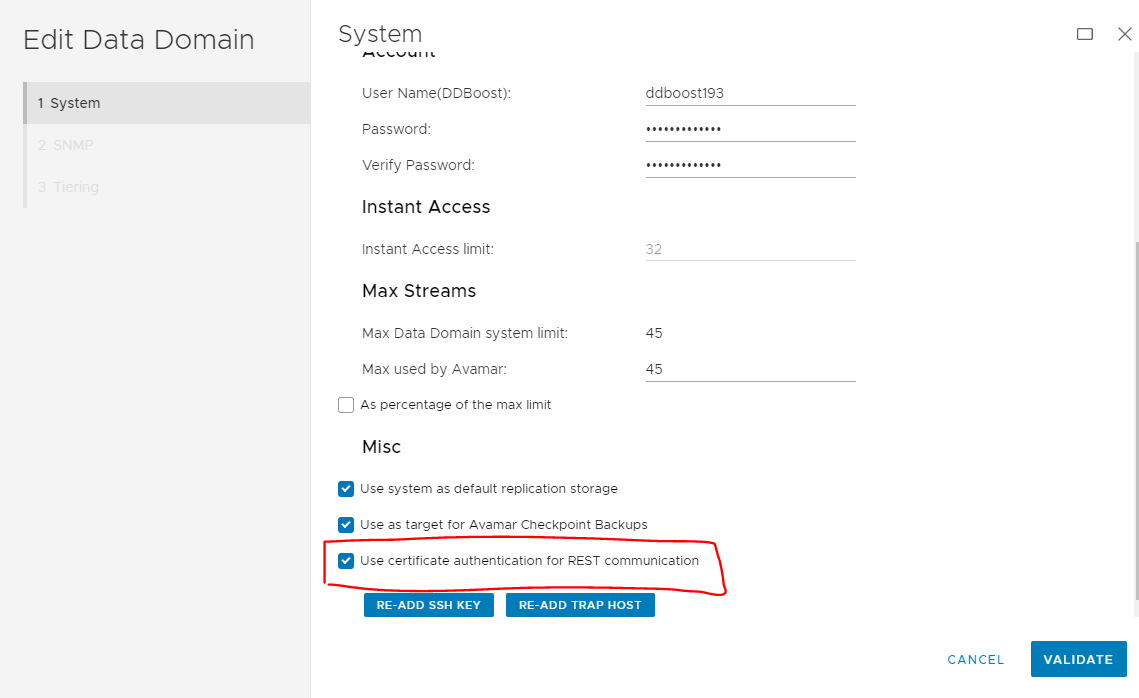
Avamar: 'USE certificate authentication for REST communication' 확인란이 선택된
경우 AUI에서 DD 시스템을 편집할 수 없습니다. 이 문제는 Java GUI가 아니라 AUI에만 있습니다.
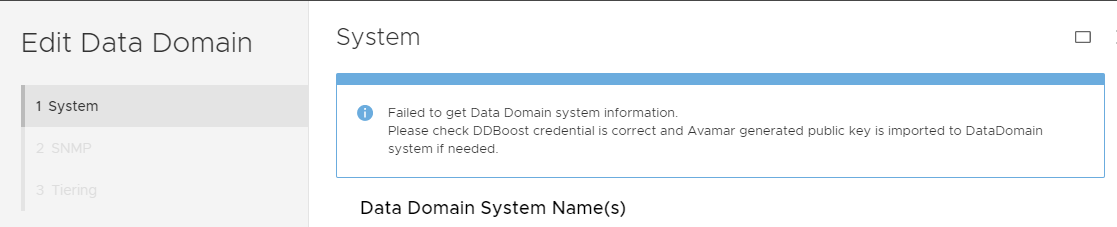
이 문제는 AUI -> System -> Data Domain -> Edit DD로 이동하여 ddboost 자격 증명을 입력하고 다음 오류 메시지와 함께 실패하는 유효성 검사를 클릭합니다.
Failed to get Data Domain system information.
Please check DDBoost credential is correct and Avamar generated public key is imported to DataDomain system if needed.
Causa
'REST 통신에 인증서 인증 사용' 기능은 Avamar Session Security 기능이 활성화된 경우에만 지원됩니다.
Avamar Session Security가 비활성화된 경우 증상 섹션에서 오류가 발생합니다.
Avamar Session Security가 비활성화된 경우 증상 섹션에서 오류가 발생합니다.
Resolución
Avamar 서버에서 루트로 다음 명령을 사용하여 현재 세션 보안 설정이 무엇인지 확인합니다.
세션 보안이 비활성화된 경우 다음이 표시됩니다.
세션 보안이 활성화된 경우 다음과 같은 내용이 표시됩니다.
작업
Session Security가 비활성화된 경우 AUI DD Edit에서 'USE certificate authentication for REST communication' 확인란을 선택 취소하기만 하면 됩니다.
Session Security가 활성화된 경우 이 확인란을 선택할 수 있습니다.
enable_secure_config.sh --showconfig
세션 보안이 비활성화된 경우 다음이 표시됩니다.
Current Session Security Settings
----------------------------------
"encrypt_server_authenticate"                           ="false"
"secure_agent_feature_on"                               ="false"
"session_ticket_feature_on"                             ="false"
"secure_agents_mode"                                    ="unsecure_only"
"secure_st_mode"                                        ="unsecure_only"
"secure_dd_feature_on"                                  ="false"
"verifypeer"                                            ="no"

Client and Server Communication set to Default (Workflow Re-Run) mode with No Authentication.
Client Agent and Management Server Communication set to unsecure_only mode.
Secure Data Domain Feature is Disabled.
세션 보안이 활성화된 경우 다음과 같은 내용이 표시됩니다.
Current Session Security Settings
----------------------------------
"encrypt_server_authenticate"                           ="true"
"secure_agent_feature_on"                               ="true"
"session_ticket_feature_on"                             ="true"
"secure_agents_mode"                                    ="mixed"
"secure_st_mode"                                        ="mixed"
"secure_dd_feature_on"                                  ="true"
"verifypeer"                                            ="no"
작업
Session Security가 비활성화된 경우 AUI DD Edit에서 'USE certificate authentication for REST communication' 확인란을 선택 취소하기만 하면 됩니다.
Session Security가 활성화된 경우 이 확인란을 선택할 수 있습니다.
Productos afectados
Avamar, Data DomainPropiedades del artículo
Número del artículo: 000203336
Tipo de artículo: Solution
Última modificación: 15 may. 2026
Versión: 7
Encuentre respuestas a sus preguntas de otros usuarios de Dell
Servicios de soporte
Compruebe si el dispositivo está cubierto por los servicios de soporte.