Dell Security Management Server管理コンソールで多要素認証を管理する方法
Résumé: Dell Security Management Serverは、管理コンソールにログインするために二要素認証(2FA)を要求するように設定できます。
Cet article concerne
Cet article ne concerne pas
Cet article n’est associé à aucun produit spécifique.
Toutes les versions du produit ne sont pas identifiées dans cet article.
Instructions
多要素認証は、Dell Security Management ServerまたはDell Security Management Server Virtualで管理できます。
対象製品:
- Dell Security Management Server
- Dell Security Management Server Virtual
影響を受けるバージョン:
- 11.4.0以降
多要素認証は、ユーザー グループまたは個々のユーザーのいずれかのレベルで管理できます。詳細については、次の適切なセクションを選択してください。
ユーザーグループ
- アカウント管理者のロールを持つアカウントを使用して、Dell Data Security管理コンソールにログインします。詳細については、「 Dell Data Security Server管理コンソールにアクセスする方法」を参照してください。
メモ: 管理者役割の詳細については、「 Dell Encryptionマニュアルおよび文書のサポート」にある『AdminHelp - Security Management Server』PDFの「管理者の役割」セクションを参照してください。
- 左側のメニュー ペインから、[ Populations ]タブを展開し、[ User Groups]をクリックします。

- リストから 編集するユーザー グループ を選択します。
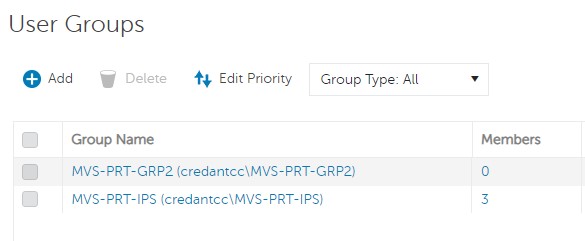 メモ: このリスト内のグループの位置によって、グループの優先度が決まります。詳細については、「 Dell Encryptionマニュアルおよび文書のサポート」にある『AdminHelp - Security Management Server』PDFの「Edit User Group Priority」セクションを参照してください。
 - [Admin]タブを選択します。
![[Admin]タブ](https://supportkb.dell.com/img/ka0Do0000005tybIAA/ka0Do0000005tybIAA_ja_3.jpeg)
- [MFA Configuration]から、次の手順を実行します。
- 有効 を選択します。
- [Email]または[Google Authenticator]のいずれかを選択します。
- [Update]ボタンをクリックします。

個々のユーザー
- アカウント管理者のロールを持つアカウントを使用して、Dell Data Security管理コンソールにログインします。詳細については、「 Dell Data Security Server管理コンソールにアクセスする方法」を参照してください。
メモ: 管理者役割の詳細については、「 Dell Encryptionマニュアルおよび文書のサポート」にある『AdminHelp - Security Management Server』PDFの「管理者の役割」セクションを参照してください。
- 左側のメニュー ペインから、[ Populations]タブを展開し、[Users]をクリックします。

- リストから 編集するユーザー を選択します。
- [Admin]タブを選択します。
![[Admin]タブ](https://supportkb.dell.com/img/ka0Do0000005tybIAA/ka0Do0000005tybIAA_ja_6.jpeg)
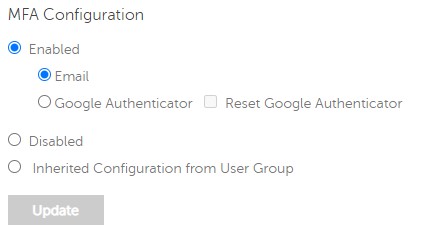
- [MFA Configuration]から、次の手順を実行します。
- 有効 を選択します。
- [Email]、[Google Authenticator]、または[Inherited Configuration from User Group]のいずれかを選択します。
- アップデート ボタンをクリックします。
Produits concernés
Dell EncryptionPropriétés de l’article
Numéro d’article: 000200440
Type d’article: How To
Dernière modification: 21 Jul 2026
Version: 7
Trouvez des réponses à vos questions auprès d’autres utilisateurs Dell
Services de support
Vérifiez si votre appareil est couvert par les services de support.