Latitude ST Visuel vejledning til dockingstationen
Résumé: Denne artikel er en visuel vejledning til Latitude ST-tablet-Docken og peger på de eksterne porte og funktioner.
Cet article concerne
Cet article ne concerne pas
Cet article n’est associé à aucun produit spécifique.
Toutes les versions du produit ne sont pas identifiées dans cet article.
Symptômes
Bemærk: For at få en mere detaljeret beskrivelse af hver placering skal du gå til systemmanualerne på www.dell.com/support
Indholdsfortegnelse:
Set forfra
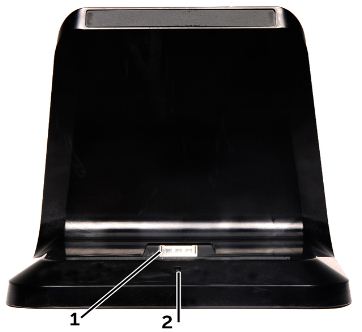
(Fig.1 SFF set forfra)
| 1 | Stik til dockingstation | 2 | LED-indikator for strøm |
Cause
Set bagfra
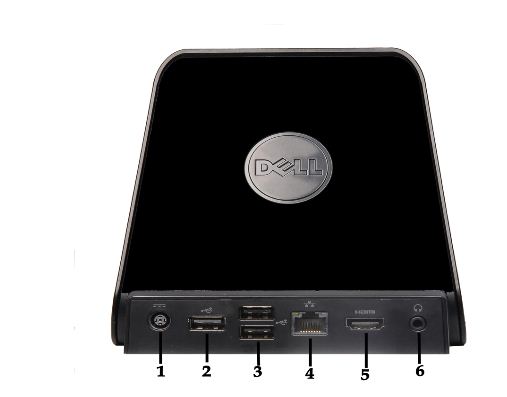
(Fig. 2 SFF, set bagfra)
| 1 | AC-adapter-stik | 2 | USB 2.0-stik |
| 3 | USB 2.0-stik x2 | 4 | Netværksstik (RJ45) |
| 5 | HDMI-stik | 6 | Lydstik |
Résolution
Tilslut system til dockingstation
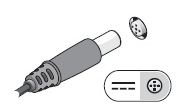
(Fig. 3.1 DC i forbindelse)
Juster computeren med docking-Stations porten, og tryk ned indtil den klikker på plads.

(Fig. 3.2 tablet-justering)
Produits concernés
Latitude STPropriétés de l’article
Numéro d’article: 000140342
Type d’article: Solution
Dernière modification: 09 juin 2022
Version: 5
Trouvez des réponses à vos questions auprès d’autres utilisateurs Dell
Services de support
Vérifiez si votre appareil est couvert par les services de support.