PowerFlex: How to correlate ESXi RDM to hard drive at iDRAC
Summary: This article discusses determining how to find which hard drive is a failed disk on an HBA330 SAS controller from the ScaleIO Virtual Machine (SVM) to the physical device that must be replaced. ...
Ez a cikk a következő(k)re vonatkozik:
Ez a cikk nem vonatkozik a következő(k)re:
Ez a cikk nem kapcsolódik egyetlen konkrét termékhez sem.
Ez a cikk nem azonosítja az összes termékverziót.
Instructions
R630 ScaleIO Ready Node HBA330 SAS controller only RDM:
- Identify the disk in the ScaleIO UI, and get the SDS device current path.
Example: /dev/sdh
- SSH to SVM run the following command to map
/dev/sdX dev to NAA # mapping:
ls -l /dev/disk/by-id/ |grep wwn
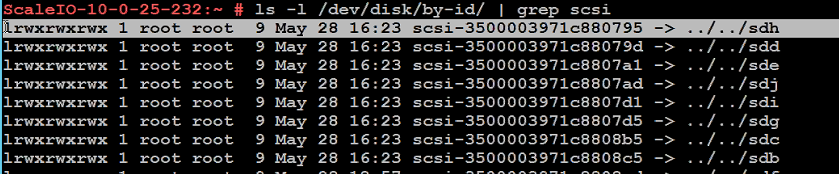
- Record the disk in question's scli address or
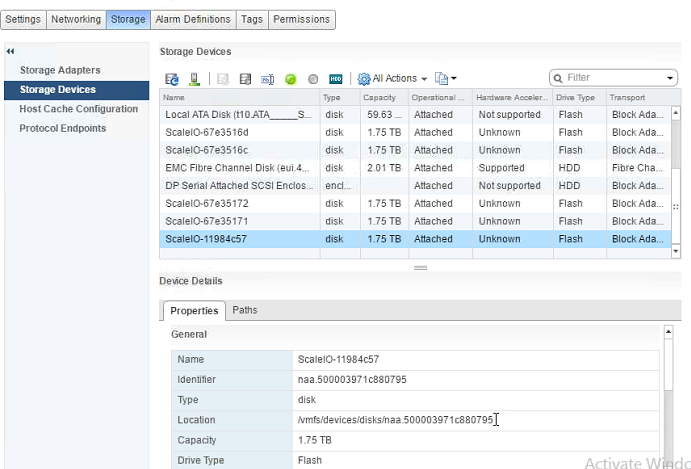
NAA #(it starts with 500*). - In vCenter, select the ESXi host in question and go to Manage -> Storage -> Storage Devices.
- Select each disk present and inspect the Identifier field of the Properties tab (under the Device Details section) for the NAA number in question:
- Once identified, select the Paths tab of the Device Details section, and record the Runtime Name of the disk in question:
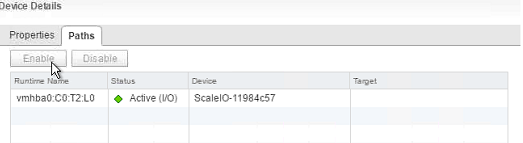
- ESXi Runtime name T-value numbering starts at 1, and not 0 as iDRAC's does (Example:
vmhba0:C0:T2:L0). - In iDRAC, go to Storage -> Physical Disks, and select the disk with the name "
Solid-State Disk 0:1:X," where X is 1 less than the T-value of the disk in question's ESXi runtime name.
Example: (ESXi vmhba0:C0:T2:L0 = iDRAC Solid-State Disk 0:1:1)

Érintett termékek
PowerFlex rack, ScaleIOTermék tulajdonságai
Article Number: 000004305
Article Type: How To
Utoljára módosítva: 20 nov. 2025
Version: 10
Választ kaphat kérdéseire más Dell-felhasználóktól
Támogatási szolgáltatások
Ellenőrizze, hogy a készüléke rendelkezik-e támogatási szolgáltatással.