NetWorker: Windows Client Failing With "The process cannot access the file because it is being used by another process (Win32 error 0x20))"
Summary: Windows Client Failing With "The process cannot access the file because it is being used by another process (Win32 error 0x20))"
Symptoms
Windows client is failing to backup certain save sets, and the following error is being displayed: "The process cannot access the file because it is being used by another process (Win32 error 0x20)"
Cause
This is not a NetWorker error, this is indicated by the Windows OS error code: (Win32 error 0x20)
|
|
The process cannot access the file because it is being used by another process. |
See the following Microsoft Document: Win32 Error Codes

Resolution
This should not occur on clients where Volume Shadowcopy Service (VSS) is enabled. To check if VSS is enabled, open the client properties from the NetWorker Management Console (NMC). Under Protection->Clients, in the client properties the Apps & Modules tab, ensure that the "Save Operations" field does not contain VSS:*=OFF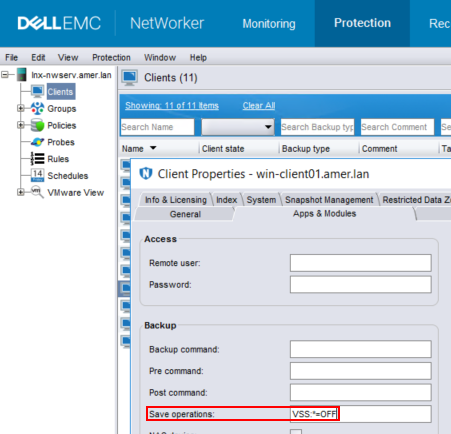
If this option is set, remove it.
Additional Information
On most standard Windows File System clients VSS should not be disabled. This should only be done for troubleshooting purposes to identify Windows VSS as another failure cause. Persistent VSS failures require Microsoft support engagement for root cause and solution.
If enabling VSS does not resolve the issue, or you do not want to enable VSS you have two other options:
- Try to schedule this clients backup during a period when access activity on it is reduced.
- Use NetWorker directives to skip these files, so the backup does not indicate a failure; however, this means that the data is not backed up. This resolution depends on the importance of the directories/files which are failing with this message. Typically this error occurs on .log and .dat files. The NetWorker Command Reference Guide provides information about directives. Support for NetWorker | Manuals & Documents
For more information about VSS and its uses, review the following: Volume Shadow Copy Service
NetWorker: Troubleshooting Backup Failures Due to VSS Issues