How to Identify the Dell Data Protection Security Tools Version
Summary: Learn how to identify the version of Dell Data Protection Security Tools by following these instructions.
Ez a cikk a következő(k)re vonatkozik:
Ez a cikk nem vonatkozik a következő(k)re:
Ez a cikk nem kapcsolódik egyetlen konkrét termékhez sem.
Ez a cikk nem azonosítja az összes termékverziót.
Instructions
Note: As of February 2018, Dell Data Protection Security Tools has reached End of Support. This product and its articles are no longer updated by Dell. For more information, reference Product Life Cycle (End of Support and End of Life) Policy for Dell Data Security. If you have any questions on alternative articles, either reach out to your sales team or contact endpointsecurity@dell.com.
Knowing the version of Dell Data Protection Security Tools allows you to:
- Identify known issues
- Determine requirement changes
Affected Products:
- Dell Data Protection Security Tools
Affected Versions:
- v1.0 - v1.12.0
- Expand the Windows system tray by clicking the up arrow.
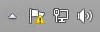
- Right-click the Dell Data Protection icon and then select About.

- Record the version number.
 Note: The version of your client may differ from the above screenshot.
To contact support, reference Dell Data Security International Support Phone Numbers.
Go to TechDirect to generate a technical support request online.
For additional insights and resources, join the Dell Security Community Forum.
Érintett termékek
Dell Security ToolsTermék tulajdonságai
Article Number: 000124634
Article Type: How To
Utoljára módosítva: 23 ápr. 2025
Version: 10
Választ kaphat kérdéseire más Dell-felhasználóktól
Támogatási szolgáltatások
Ellenőrizze, hogy a készüléke rendelkezik-e támogatási szolgáltatással.