How to Enable or Disable the Power On Lid Open Feature on New Dell Laptops
Summary: Some newer laptops have a new feature to turn the computer on automatically when the lid to the computer is opened.
Ez a cikk a következő(k)re vonatkozik:
Ez a cikk nem vonatkozik a következő(k)re:
Ez a cikk nem kapcsolódik egyetlen konkrét termékhez sem.
Ez a cikk nem azonosítja az összes termékverziót.
Instructions
The Power On Lid Open is a new feature that is introduced on some of the newer Dell computers. When a user opens the laptop, the system is awakened or powered on automatically. A user may not like this feature and want to disable it.
To Enable or Disable this feature, perform the following steps:
Note: When the Power On Lid Open option does not appear in the BIOS, your computer does not support this feature.
To Enable or Disable this feature, perform the following steps:
- Restart the computer. When the Dell logo appears, press F2 to go into the Setup Menu.
- Depending on your BIOS version, either:
- Touch or click Power.
- Touch or click the plus sign to the left of Power Management.
- Depending on your BIOS version, either:
- Touch or click Power on Lid Open to switch between enabling or disabling this feature.
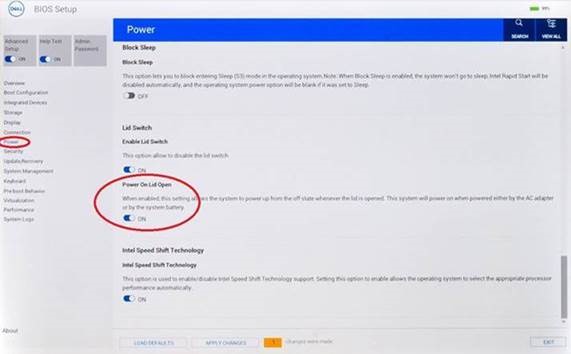
Figure 1: Power on Lid Open
- Touch or click Power on Lid Open to switch between enabling or disabling this feature.
- Touch or click Apply or Apply Changes and then OK.
- Touch or click Exit, and the computer reboots.
Érintett termékek
Dell Pro Max, Dell Pro Premium, Dell G3 15 3500, Dell G5 15 5500, Dell G7 15 7500, Dell G7 17 7700, Inspiron 5390, Inspiron 7506 2-in-1, Inspiron 7590 2-in-1, Inspiron 7590, Inspiron 7591, Latitude 3301, Vostro 5390, Vostro 7590, XPS 13 9300Termék tulajdonságai
Article Number: 000124946
Article Type: How To
Utoljára módosítva: 18 jún. 2025
Version: 14
Választ kaphat kérdéseire más Dell-felhasználóktól
Támogatási szolgáltatások
Ellenőrizze, hogy a készüléke rendelkezik-e támogatási szolgáltatással.