Sound Not Working in Google Chrome
Summary: Resolve no audio issue while playing YouTube on Google Chrome.
Ez a cikk a következő(k)re vonatkozik:
Ez a cikk nem vonatkozik a következő(k)re:
Ez a cikk nem kapcsolódik egyetlen konkrét termékhez sem.
Ez a cikk nem azonosítja az összes termékverziót.
Symptoms
There may be no sound from headphones nor speakers while playing video in YouTube on Google Chrome. The issue does not occur when playing video in different applications.
Cause
Google Chrome comes with a native setting to disable sound.
Resolution
- Type the following command in your browser to open Chrome Sound Settings.
chrome://settings/content/sound
- See if Allow sites to play sound (recommended) is on.
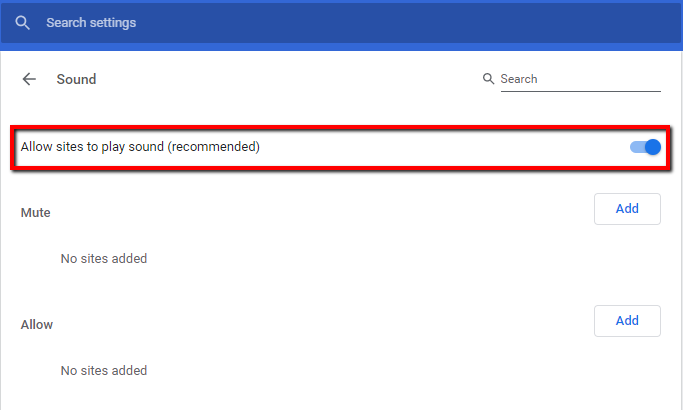
- If Allow sites to play sound (recommended) is on and you are still facing issues, check Chrome as it also allows users to mute individual sites. You might have accidentally pressed the mute button, and that is why there is no sound on Chrome.
- To fix it, open the website having the sound issue, right-click the tab at the top, and select Unmute site.

- In case the option available in Mute site and Allow sites to play sound (recommended) is on, open a tab in Chrome that does not have sound.
- Right-click the Speakers/Headphones icon in the Taskbar and choose Open Volume Mixer.

- Use the scroll bar to locate Chrome under Applications (Chrome is not listed if nothing is playing).
- See if Chrome is not on mute (circle-backslash) and volume levels are reasonably high.
Érintett termékek
Alienware, Inspiron, OptiPlex, Vostro, XPS, G Series, G Series, Alienware, Inspiron, Latitude, Vostro, XPS, Fixed Workstations, Mobile Workstations, Dell Canvas 27Termék tulajdonságai
Article Number: 000127781
Article Type: Solution
Utoljára módosítva: 31 júl. 2025
Version: 8
Választ kaphat kérdéseire más Dell-felhasználóktól
Támogatási szolgáltatások
Ellenőrizze, hogy a készüléke rendelkezik-e támogatási szolgáltatással.