Dell OptiPlex 3040 Visual Guide
Summary: This article provides a Visual Guide for Dell OptiPlex 3040, Micro, SFF, and Mini Tower models.
Ez a cikk a következő(k)re vonatkozik:
Ez a cikk nem vonatkozik a következő(k)re:
Ez a cikk nem kapcsolódik egyetlen konkrét termékhez sem.
Ez a cikk nem azonosítja az összes termékverziót.
Instructions
Table of Contents:
- Micro Chassis (MFF) Front View
- Micro Chassis (MFF) Rear View
- Small Form Factor Chassis (SFF) Front View
- Small Form Factor Chassis (SFF) Rear View
- Mini-Tower Chassis (MT) Front View
- Mini-Tower Chassis (MT) Rear View
Note: For a more detailed description about each location, go to the system manuals at www.dell.com/support/manuals.
1. Micro Chassis (MFF) Front View
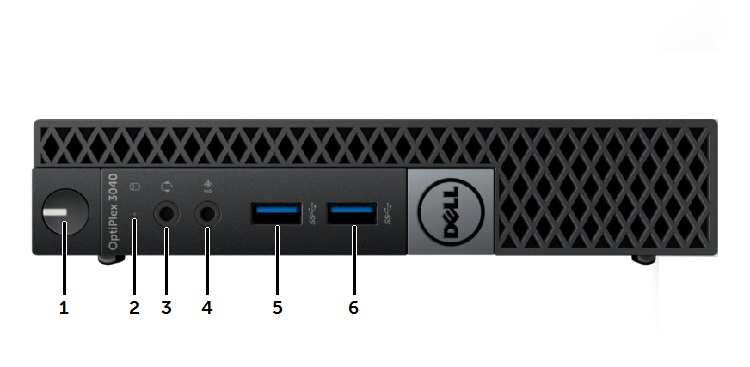
| 1 | Power Button, Power Light | 2 | Drive Activity Light |
| 3 | Universal Audio Jack Connector | 4 | Line-In Microphone Connector |
| 5 | USB 3.0 Connector | 6 | USB 3.0 Connector |
2. Micro Chassis (MFF) Rear View
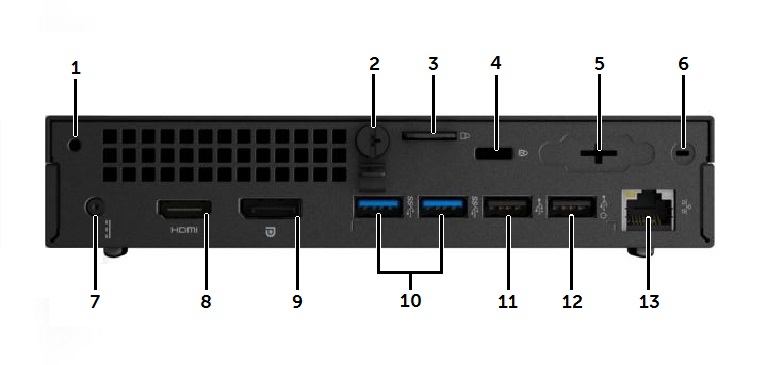
| 1 | Accessory Screw Hole | 2 | Cover Thumb Screw |
| 3 | Padlock Security Ring | 4 | Kensington Lock Slot |
| 5 | Optional VGA connector or I/O port | 6 | Wi-Fi Antenna SMA Connector location |
| 7 | DC-In Power Connector | 8 | HDMI Connector |
| 9 | DisplayPort Connector | 10 | USB 3.0 Connectors (x2) |
| 11 | USB 2.0 Connector | 12 | USB 2.0 Connector with Wake function |
| 13 | RJ45 Network Connector |
3. Small Form Factor Chassis (SFF) Front View
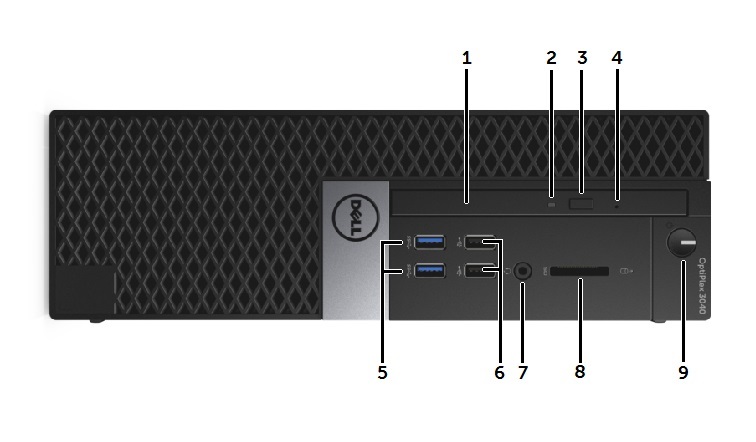
| 1 | Optical Drive | 2 | Optical Drive LED |
| 3 | Optical Drive Eject Button | 4 | Optical Drive Emergency Eject Pin Hole |
| 5 | USB 3.0 Connector (x2) | 6 | USB 2.0 Connector (x2) |
| 7 | Headphone/Mic Combo Connector | 8 | SD Card Slot |
| 9 | Power Button, Power Light |
4. Small Form Factor Chassis (SFF) Rear View

| 1 | Cover Release Thumb Screws | 2 | RJ45 Network Connector |
| 3 | Expansion Slots (x2) | 4 | AC Power Connector |
| 5 | Audio Out Connector | 6 | HDMI Connector |
| 7 | DisplayPort Connector | 8 | Optional VGA Connector or I/O Port |
| 9 | USB 3.0 Connectors (x2) | 10 | USB 2.0 Connectors (x2) with Wake function |
| 11 | Power Supply Test Button and LED |
5. Mini-Tower Chassis (MT) Front View
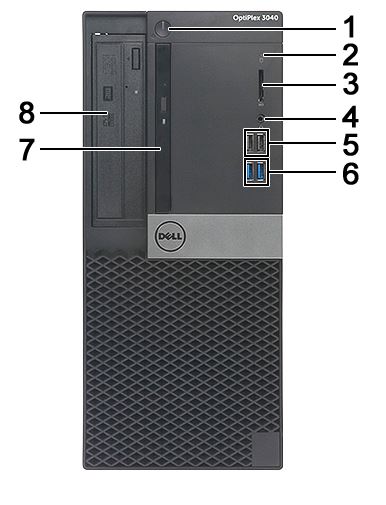
| 1 | Power Button and Power LED | 2 | Hard Drive Activity LED |
| 3 | SD Card Slot | 4 | Combo Audio Connector |
| 5 | USB 2.0 Connectors (x2) | 6 | USB 3.0 Connectors (x2) |
| 7 | Slim Type Drive Bay (optional) | 8 | 5.25 inch Drive Bay (optional) |
6. Mini-Tower Chassis (MT) Rear View
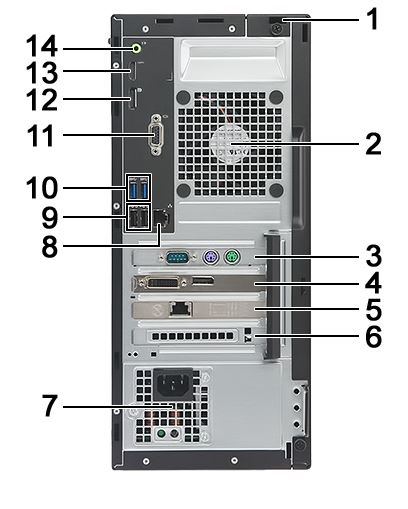
| 1 | Kensington Lock Slot | 2 | System Fan |
| 3 | PCIe x1 Expansion Board Slot | 4 | PCIe x16 Expansion Board Slot |
| 5 | PCIe x1 Expansion Board Slot | 6 | PCIe x1 Expansion Board Slot |
| 7 | Power Supply Unit | 8 | RJ45 Network Connector |
| 9 | USB 2.0 Connectors (x2) | 10 | USB 3.0 Connectors (x2) |
| 11 | Optional VGA Connector or I/O Port | 12 | DisplayPort Connector |
| 13 | HDMI Connector | 14 | Audio Line-out Connector |
Érintett termékek
OptiPlex 3040 Micro, OptiPlex 3040 Small Form Factor, OptiPlex 3040 TowerTermék tulajdonságai
Article Number: 000153057
Article Type: How To
Utoljára módosítva: 19 dec. 2025
Version: 7
Választ kaphat kérdéseire más Dell-felhasználóktól
Támogatási szolgáltatások
Ellenőrizze, hogy a készüléke rendelkezik-e támogatási szolgáltatással.