DPA: Error message 'Error 401: Unauthorized Action' appears in UI
Summary: A 401 Unauthorized Action error appears in the Data Protection Advisor (DPA) UI after a user stays logged in for many hours; it is caused by the session being automatically closed due to inactivity. ...
Ez a cikk a következő(k)re vonatkozik:
Ez a cikk nem vonatkozik a következő(k)re:
Ez a cikk nem kapcsolódik egyetlen konkrét termékhez sem.
Ez a cikk nem azonosítja az összes termékverziót.
Symptoms
User sees an error message on the DPA UI and has to log back in again:
Error 401: Unauthorized Action Cause
This error happens when a user is logged into the DPA UI for hours at a time and the open session is being closed due to inactivity or some other environment factor closes the session.
Resolution
The error can be ignored as it has no impact on DPA functionality.
User can log in to DPA again and continue as normal.
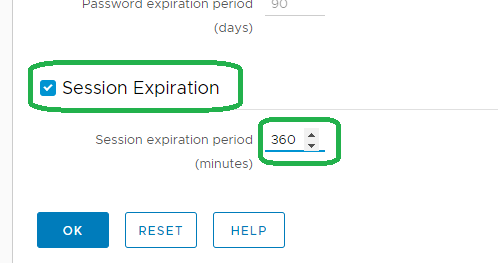
The following setting can be configured on the UI to force a clean logoff after a specific period:
Administration > User & Security > Security Settings
The Session Expiration parameter can be set to example for 6 hours (the default is off):
Note: The above feature was introduced on 18.2.
Contact support for more information.
Contact support for more information.
Érintett termékek
Data Protection AdvisorTermékek
Data Protection AdvisorTermék tulajdonságai
Article Number: 000173588
Article Type: Solution
Utoljára módosítva: 10 jún. 2026
Version: 5
Választ kaphat kérdéseire más Dell-felhasználóktól
Támogatási szolgáltatások
Ellenőrizze, hogy a készüléke rendelkezik-e támogatási szolgáltatással.