PowerEdge: How to clear NVRAM using the Lifecycle Controller Repurpose Process

Summary: Steps on how to clear NVRAM using Lifecycle Controller remotely using the retire and repurpose process.

Ez a cikk a következő(k)re vonatkozik: Ez a cikk nem vonatkozik a következő(k)re: Ez a cikk nem kapcsolódik egyetlen konkrét termékhez sem. Ez a cikk nem azonosítja az összes termékverziót.

Instructions

How clear NVRAM using the LifeCycle Controller


When you do not have physical access or cannot bring the system down to use the NVRAM jumper, you can follow these steps to perform the clear from the LCC using the retire or repurpose process.

•Boot to the Lifecycle controller using the F10 key during boot.
•Once in the LCC select Hardware Configuration on the left and then select Repurpose or Retire System.
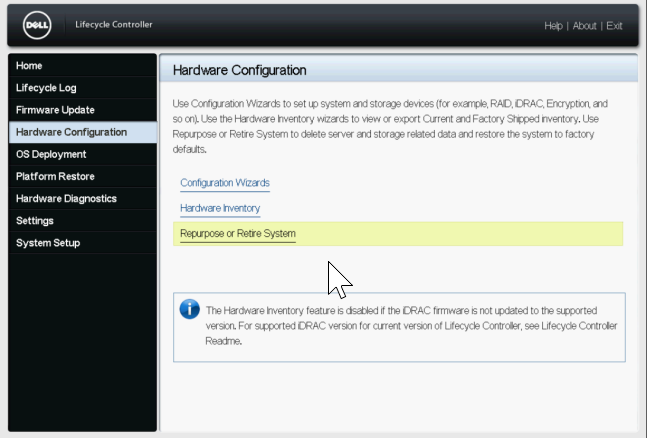
Repurpose or Retire System option from LCC Hardware Configuration 

•On the Select Components screen, ONLY select the box for BIOS (reset default and clear NVRAM)
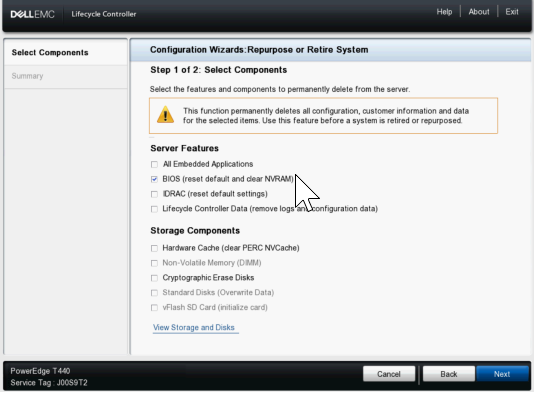
Select BIOS to perform NVRAM clear 

•Next click Next and confirm that only BIOS is listed on the next page and then click Finish.
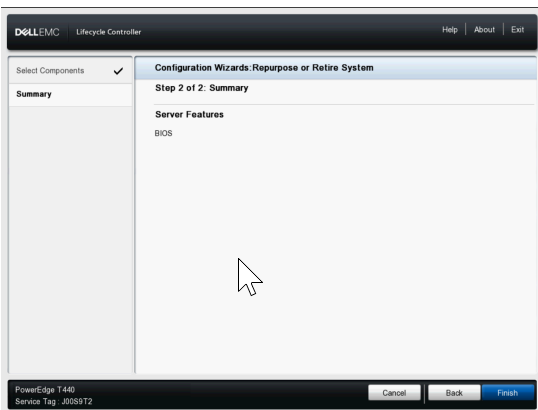
Summary Screen showing BIOS option being cleared 


•Select Yes to proceed with the System Erase process.
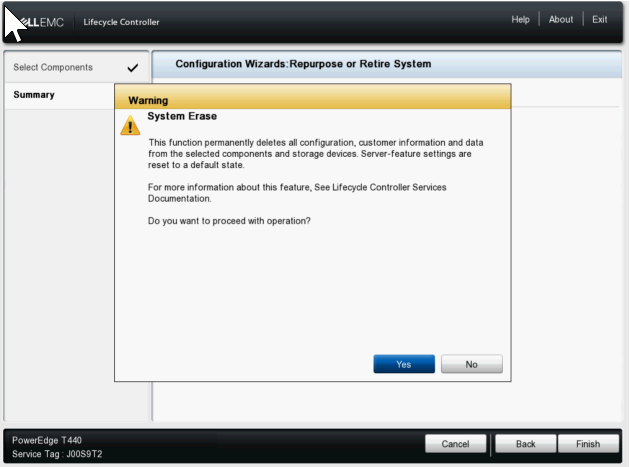
System Erase Warning prompting to select Yes 


•The server then proceeds to restart and enable the NVRAM clear setting, then it restarts again to do the clear and then finally it powers off.
•Next it powers back on boot back to LCC to change the NVRAM setting back to normal and then it shuts down again once completed.
•At this point you must manually power the server on. You can check the Lifecycle logs in the IDRAC to confirm an entry showing System Erase job completed successfully.

Érintett termékek

C Series, Modular Infrastructure, Rack Servers, XE Servers, XR Servers, OEM Server Solutions, PowerEdge T130, PowerEdge T140, PowerEdge T150, PowerEdge T160, PowerEdge T330, PowerEdge T340, PowerEdge T350, PowerEdge T360, PowerEdge T430 , PowerEdge T440, PowerEdge T550, PowerEdge T560, PowerEdge T630, PowerEdge T640 ...

Termékek

PowerFlex appliance R650, PowerFlex appliance R6525, PowerFlex appliance R660, PowerFlex appliance R6625, Powerflex appliance R750, PowerFlex appliance R760, PowerFlex appliance R7625, PowerFlex appliance R640, PowerFlex appliance R740XD , PowerFlex appliance R7525, PowerFlex appliance R840 ...
Termék tulajdonságai
Article Number: 000198446
Article Type: How To
Utoljára módosítva: 13 máj. 2026
Version:  5
Választ kaphat kérdéseire más Dell-felhasználóktól
Támogatási szolgáltatások
Ellenőrizze, hogy a készüléke rendelkezik-e támogatási szolgáltatással.