Intune Fails to Deploy Dell Optimizer Version 4.2.2 When Downloaded from the Microsoft Store
Summary: Information about Intune not deploying Dell Optimizer version 4.2.2 if it is downloaded from the Microsoft Store.
Ez a cikk a következő(k)re vonatkozik:
Ez a cikk nem vonatkozik a következő(k)re:
Ez a cikk nem kapcsolódik egyetlen konkrét termékhez sem.
Ez a cikk nem azonosítja az összes termékverziót.
Symptoms
App Does Not Have a Valid Latest Package Version Error
Intune shows an error message, "The selected app does not have a valid latest package version" (Figure 1).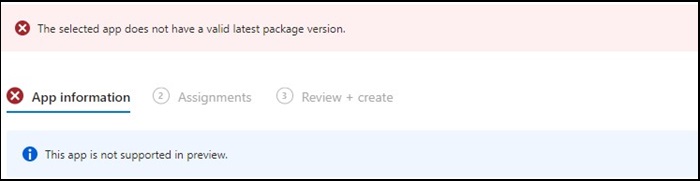
Figure 1
Note: Available exclusively on select Dell Latitude, Precision, OptiPlex, and Rugged PCs.
Cause
Dell Optimizer did not pass the Intune verification that requires apps to install on all hardware (Dell and non-Dell).
Resolution
Manually Deploy Dell Optimizer
As a workaround, IT Admin can try the following to manually deploy Dell Optimizer through Intune.
- Download the Dell Optimizer installer from Dell.com
- Follow the below instructions:
- Install the software using this command:
Install command: Dell-Optimizer-Application_xxxxx_WIN_x.x.x.x_A00.EXE /passthrough /silent /InstallDotNet=true /FACTORY=TRUE

Note: To uninstall, use the following command:
Uninstall command: Dell-Optimizer-Application_xxxxx_WIN_x.x.x.x_A00.EXE /passthrough /silent /remove
Érintett termékek
Alienware, Inspiron, OptiPlex, Vostro, XPS, G Series, G Series, Alienware, Inspiron, Latitude, Vostro, XPS, Fixed Workstations, Mobile WorkstationsTermék tulajdonságai
Article Number: 000224821
Article Type: Solution
Utoljára módosítva: 17 júl. 2025
Version: 7
Választ kaphat kérdéseire más Dell-felhasználóktól
Támogatási szolgáltatások
Ellenőrizze, hogy a készüléke rendelkezik-e támogatási szolgáltatással.