VxRail: vCenter vSphere Client Refresh Button Spinning Continually
Summary: The vSphere Client’s refresh icon never stops rotating because the system is enrolled in VMware Customer Experience Improvement Program while all external network access is blocked.
Ez a cikk a következő(k)re vonatkozik:
Ez a cikk nem vonatkozik a következő(k)re:
Ez a cikk nem kapcsolódik egyetlen konkrét termékhez sem.
Ez a cikk nem azonosítja az összes termékverziót.
Symptoms
The refresh button in the vSphere Client on vCenter servers constantly spins.

Cause
The issue is caused by being joined to the VMware Customer Experience Improvement Program (CEIP), but having all VMware sites/Internet access blocked.
Resolution
To resolve this issue, leave the CEIP and restart the vCenter server to clear up the issue.
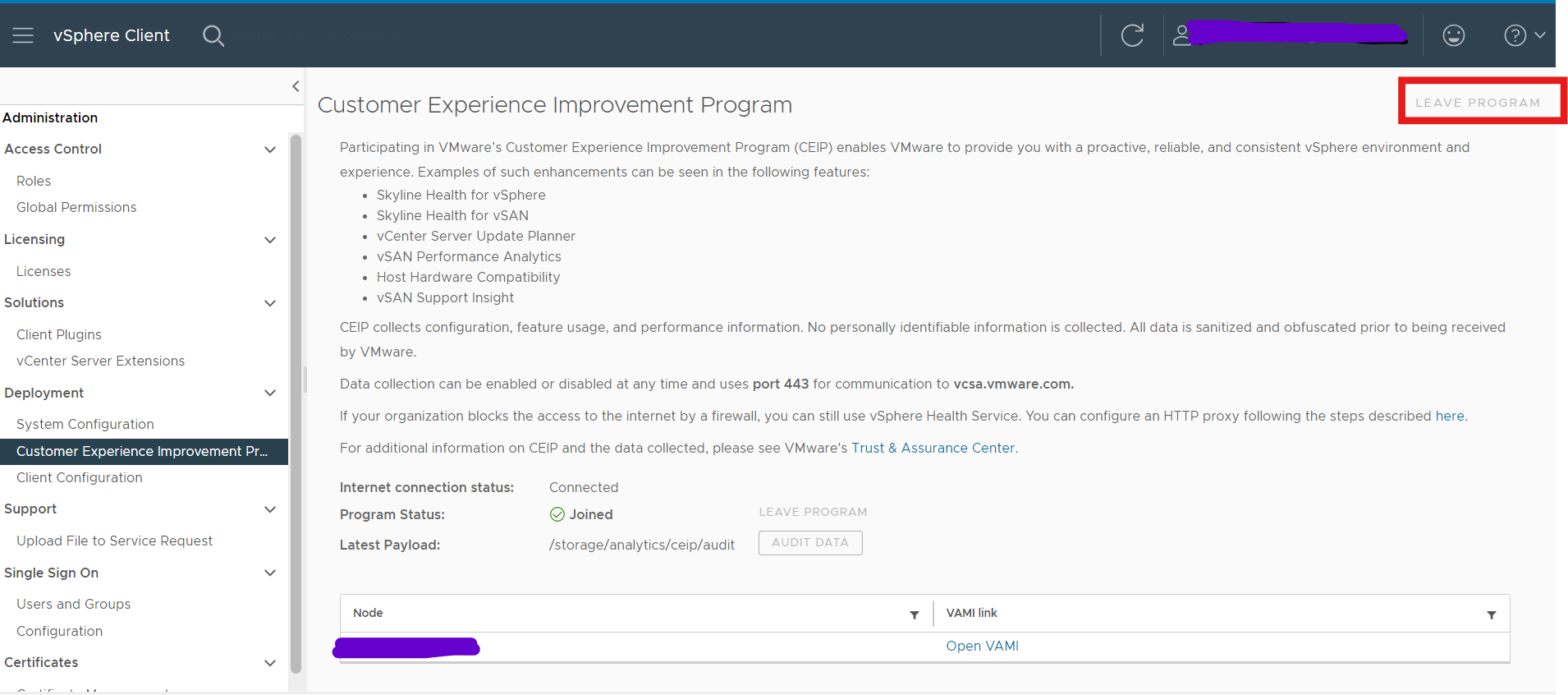
- Log in to vCenter Server by using the credentials of the administrator account.
- On the vSphere Client home page, click Administration.
- Under Deployment, click Customer Experience Improvement Program
- Click Join to join the CEIP or Leave CEIP to leave the Program.
- Restart vCenter server
Érintett termékek
VxRail, VxRail Appliance Family, VxRail Appliance Series, VxRail SoftwareTermék tulajdonságai
Article Number: 000228894
Article Type: Solution
Utoljára módosítva: 05 aug. 2026
Version: 2
Választ kaphat kérdéseire más Dell-felhasználóktól
Támogatási szolgáltatások
Ellenőrizze, hogy a készüléke rendelkezik-e támogatási szolgáltatással.