Azure Stack: HLH Upgrade A Positional Parameter Cannot be Found Inaccessible Network Share
Summary: The PnU tool fails to attach the HLH ISO file to the iDRAC when using a credential similar to "domain\username." A positional parameter cannot be found that accepts argument 'Inaccessible network share.' ...
Ez a cikk a következő(k)re vonatkozik:
Ez a cikk nem vonatkozik a következő(k)re:
Ez a cikk nem kapcsolódik egyetlen konkrét termékhez sem.
Ez a cikk nem azonosítja az összes termékverziót.
Symptoms
The PnU tool fails to attach the HLH ISO file to the iDRAC when using a credential similar to below:
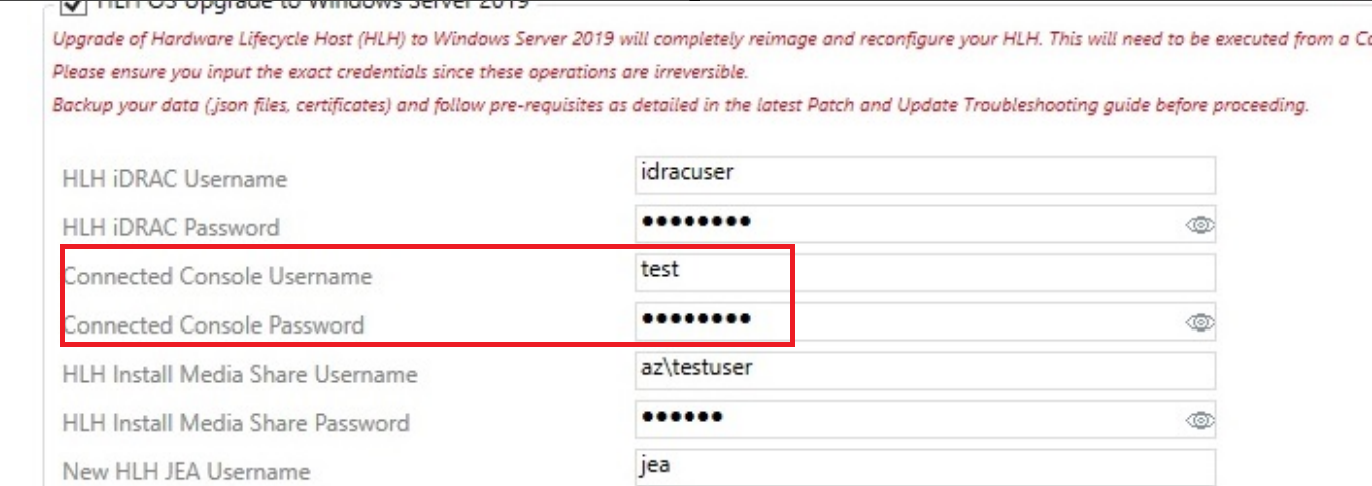
Connected Console Username: domain\username
Error details:
2025-05-08 01:55:04.350 +03:00 [INF] Settings ISO found at C:\Program Files\Dell EMC\VxRack AS Patch and Update Automation\PSScripts\HLH\Windows\OSDShare\PnU-Setup.iso
2025-05-08 01:55:04.356 +03:00 [INF] HLH ISO found at C:\Program Files\Dell EMC\VxRack AS Patch and Update Automation\PSScripts\HLH\Windows\OSDShare\MS2406_Dell2411.4_Redeployment.iso
2025-05-08 01:55:04.362 +03:00 [INF] Attaching HLH OS ISO for iDRAC 172.16.112.2.
2025-05-08 01:55:04.686 +03:00 [INF] OSD initiated successfully.
2025-05-08 01:55:05.693 +03:00 [INF] OSD Task State :
2025-05-08 01:55:05.788 +03:00 [ERR] A positional parameter cannot be found that accepts argument 'Inaccessible network share.'.
2025-05-08 01:55:05.792 +03:00 [INF] Validating iDRAC credentials and creating session
2025-05-08 01:55:05.796 +03:00 [INF] Checking connectivity for HLH iDRAC
Cause
The API for iDRAC does not work if using a domain credential "domain\username" for the Connected Console Username in the PnU automation tool.
Resolution
To work around this issue, use a local administrator account without a domain name.
Connected Console Username: testuser
Érintett termékek
Integrated System for Microsoft Azure Stack Hub 14GTermékek
Integrated System for Microsoft Azure Stack Hub 16GTermék tulajdonságai
Article Number: 000323734
Article Type: Solution
Utoljára módosítva: 15 jan. 2026
Version: 2
Választ kaphat kérdéseire más Dell-felhasználóktól
Támogatási szolgáltatások
Ellenőrizze, hogy a készüléke rendelkezik-e támogatási szolgáltatással.