Data Domain: 네트워크 연결이 예상대로 작동하는지 확인
Riepilogo: 이 문서에서는 DDOS에서 NIC 물리적 연결 및 구성을 확인하여 네트워크에서 CIFS 또는 NFS 공유를 사용할 수 있는지 확인하는 방법에 대한 기본 사항을 다룹니다.
Questo articolo si applica a
Questo articolo non si applica a
Questo articolo non è legato a un prodotto specifico.
Non tutte le versioni del prodotto sono identificate in questo articolo.
Istruzioni
네트워크 연결이 제대로 작동하는지 확인
증상:
- 네트워크 연결이 예상대로 작동하지 않으면 백업 성능에 문제가 있거나 네트워크를 통해 CIFS 또는 NFS 공유에 액세스할 수 없는 것입니다.
- 복원 프로그램을 사용할 수 없습니다.
- 백업 애플리케이션이 쓰기 오류를 보고합니다.
- 네트워크 경로를 찾을 수 없습니다.
- 알림 메시지:
Error: : RPC: Unable to send; errno = Broken pipe
적용 대상:
- 모든 Data Domain 시스템
- 모든 소프트웨어 릴리스
해상도:
물리적 연결:
DDR의 유효한 NIC 포트에 네트워크 케이블을 연결합니다. NIC는 마더보드 또는 선택 사양인 확장 카드에 있을 수 있습니다. 복원 프로그램의 위치는 모델에 따라 약간 다를 수 있지만 상대적 위치는 동일합니다.
참고: 범주 5e 또는 6이 권장됩니다.
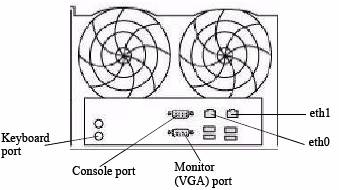
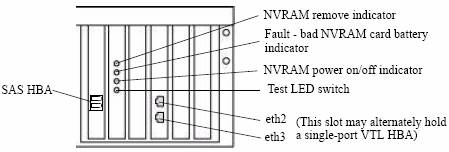
DDR 상자의 eth0에 네트워크 케이블을 연결했다고 가정해 보겠습니다.
- eth0는 DDR의 후면에서 볼 때 왼쪽 포트에 연결됩니다.
- 다른 쪽 끝은 스위치에 연결됩니다.
IP 주소 설정 및 확인:
이 예에서 eth0은 다음 정보로 구성됩니다.
- IP 주소 = 192.168.4.138
- 서브넷 = 255.255.255.0
- 게이트웨이 = 192.168.4.1
- DNS = 192.168.4.2, 192.168.4.3
참고: IP 주소를 할당하기 전에 주소가 네트워크에 이미 할당되어 있지 않은지 확인합니다.
다른 컴퓨터에서 eth0으로 구성할 IP 주소에 대해 "ping" 명령을 사용합니다(중지하려면 Ctrl+C 사용).
ping 192.168.4.138

PING 192.168.4.138 (192.168.4.138) 56(84) bytes of data.
From 192.168.4.138 icmp_seq=1 Destination Host Unreachable
From 192.168.4.138 icmp_seq=2 Destination Host Unreachable
From 192.168.4.138 icmp_seq=3 Destination Host Unreachable
^C
IP 주소가 응답하면 해당 IP 주소는 사용 중인 것이므로 다른 IP 주소를 할당해야 합니다.
DDR 상자에서 "net" 명령을 사용하여 NIC 포트 eth0의 상태를 확인합니다.
- 아래 명령은 물리적 케이블(연결 여부), NIC가 10/100/10/100/1000인지 여부, NIC 포트의 MAC 주소, 속도, 이중 및 NIC 카드 유형에 대한 정보를 제공합니다.
net show hardware

Port    Speed      Duplex    Supp Speeds    Hardware Address    Physical   Cable
-----   --------   --------  ------------   ------------------  -------    -----
eth0    1000Mb/s   full      10/100/1000    00:xx:xx:xx:xx:4c   Copper     yes
eth1    unknown    unknown   10/100/1000    00:xx:xx:xx:xx:e1   Copper     no
-----   --------   --------  ------------   ------------------  -------    -----
위의 예에서 eth0은 1000MB/s 전이중을 지원할 수 있고 물리적 유형은 Copper이며 네트워크 케이블이 연결되어 있음을 알 수 있습니다.
- "net config" 명령은 eth0을 구성하는 데 사용됩니다. "net config set?" 명령을 입력하면 DDOS 버전에 적합한 구문이 제공됩니다. 예:
net config set ?

Commands matching "net config":
  net config <ifname> [type {floating | fixed}]
                {[<ipaddr>] [netmask <mask>] | [<ipv6addr>] |
                [dhcp {yes [ipversion {ipv4|ipv6}]|no}]}
                {[autoneg] | [duplex {full | half} speed {10|100|1000|10000}]}
                [up | down] [mtu {<size> | default}]
                [txqueuelen <size>]
                                       Configure an Ethernet interface. Create
                                       an alias by giving an address to a new
                                       alias number. Destroy an alias by
                                       giving an address of zero. "Note:
                                       Change of link parameters like speed,
                                       duplex or autoneg on the DD VE is not
                                       supported."
  net config addresses [type {floating | fixed}]
                                       Convert IP addresses to another type.
- 이 예에서는 다음과 같습니다.
- 아래 명령은 IP 주소 및 서브넷 마스크를 설정하는 데 사용됩니다.
net config eth0 192.168.4.138 netmask 255.255.255.0
- 아래 명령은 기본 게이트웨이를 설정하는 데 사용됩니다.
route set gateway 192.168.4.1기본 게이트웨이는 다음과 같습니다. 192.168.4.1
- 아래 명령은 DNS를 설정하는 데 사용됩니다
net set dns 192.168.4.2, 192.168.4.3

The Name (DNS) server list is:
        192.168.4.2, 192.168.4.3
IP 주소 확인
인터페이스 eth0이 작동 중이고 올바른 IP 주소와 넷마스크가 있는지 확인하려면 아래 명령을 사용합니다.
net show config eth0

eth0      Link encap:Ethernet  HWaddr 00:xx:xx:xx:xx:4c
          inet addr:192.168.4.138  Bcast:192.168.4.255  Mask:255.255.255.0
          inet6 addr: beef::250:56ff:abcd:954c/64 Scope:Link
          UP BROADCAST RUNNING MULTICAST  MTU:1500  Metric:1
          RX packets:6564330 errors:0 dropped:0 overruns:0 frame:0
          TX packets:3156402 errors:0 dropped:0 overruns:0 carrier:0
          collisions:0 txqueuelen:1000
          RX bytes:1614169232 (1.5 GiB)  TX bytes:3093309111 (2.8 GiB)
네트워크에 있는지 확인하려면 다음을 수행합니다.
- 동일한 서브넷/넷마스크에 있는 다른 컴퓨터의 "ping" 명령 사용(게이트웨이가 좋은 대상임) Ctrl+C를 사용하여 중지합니다.
ping 192.168.4.1

PING 192.168.4.1 (192.168.4.1) 56(84) bytes of data.
64 bytes from 192.168.4.1: icmp_seq=1 ttl=64 time=0.512 ms
64 bytes from 192.168.4.1: icmp_seq=2 ttl=64 time=0.296 ms
64 bytes from 192.168.4.1: icmp_seq=3 ttl=64 time=0.284 ms
64 bytes from 192.168.4.1: icmp_seq=4 ttl=64 time=0.275 ms
64 bytes from 192.168.4.1: icmp_seq=5 ttl=64 time=0.295 ms
^C
- 네트워크의 다른 컴퓨터에서 eth0 IP로 ping합니다(예: IP 주소가 사용 중이 아닌지 확인하기 위해 이전에 사용한 컴퓨터).
ping 192.168.4.138

PING 192.168.4.138 (192.168.4.138 ) 56(84) bytes of data.
64 bytes from 192.168.4.138 : icmp_seq=1 ttl=64 time=0.512 ms
64 bytes from 192.168.4.138 : icmp_seq=2 ttl=64 time=0.316 ms
64 bytes from 192.168.4.138 : icmp_seq=3 ttl=64 time=0.294 ms
64 bytes from 192.168.4.138 : icmp_seq=4 ttl=64 time=0.285 ms
64 bytes from 192.168.4.138 : icmp_seq=5 ttl=64 time=0.295 ms
^C
Prodotti interessati
Data DomainProdotti
Data DomainProprietà dell'articolo
Numero articolo: 000015001
Tipo di articolo: How To
Ultima modifica: 17 apr 2026
Versione: 8
Trova risposta alle tue domande dagli altri utenti Dell
Support Services
Verifica che il dispositivo sia coperto dai Servizi di supporto.