檔案系統的 SourceOne - 使用「新增至還原清單」還原檔案時,Isilon SMB 共用失敗
Riepilogo: SourceOne-for-檔案系統-還原-檔案-使用-新增-至-還原-清單-失敗-的-Isilon-SMB-共用
Questo articolo si applica a
Questo articolo non si applica a
Questo articolo non è legato a un prodotto specifico.
Non tutte le versioni del prodotto sono identificate in questo articolo.
Sintomi
對於位於 Isilon SMB 共用上的檔案,使用「新增到還原清單」還原檔案會失敗,而適用於位於 Windows 共用資料夾上的檔案。
在 ExJBRestore 上,會顯示下列錯誤:CExFileSystem::iWriteFileProperties|
VERBOSE|
iWriteFileProperties calling ::CreateDirectory with perm for \\?\UNC\SMBPath\sourceone_test\|
CExFileSystem::iWriteFileProperties|
VERBOSE|
Checking that user 'SourceOneServiceAccount' has write permissions to the directory '\\\?\UNC\SMBPath\sourceone_test\'|
CExFileSystem::iWriteFileProperties|
ERROR|
Error encountered checking permissions (0x80072147)|
CoExFileProvider::StoreDoc|
ERROR|
Failed to restore file to original location (MessageID). (0x86044701) The specified property 20 does not exist (0x86044002)|
CExRestoreThread::ProcessRun|
WARNING|
Failed restore item: Unable to verify that the user has required file system permissions to restore the file. Try restoring to an alternate location. (0x86044710)|
CExRestoreThread::ProcessRun|
ERROR|
CExRestoreThread failed msgid: MessageID result hr=86044710|
Causa
連線至 OneFS 並檢查 SMB 共用。SourceOne 共用中不存在 SourceOne 服務帳戶的任何使用者。服務帳戶必須在那裡。
這是由於 Isilon 端缺乏 SourceOne 服務帳戶的權限所造成。Isilon 需要驗證的參考點,可以是 LDAP、NIS 或本機使用者。它需要在 UID 上有一個來源才能識別。
這是由於 Isilon 端缺乏 SourceOne 服務帳戶的權限所造成。Isilon 需要驗證的參考點,可以是 LDAP、NIS 或本機使用者。它需要在 UID 上有一個來源才能識別。
Risoluzione
連線至 OneFS。如果 SourceOne 服務帳戶沒有使用者,您必須使用下列程序
來建立:建立 SourceOne 使用者的步驟:
1- 從您的 OneFS,前往「存取」,然後按一下「 成員與角色」
2- 選取目前存取區域:系統
3- 按一下「使用者」標籤,然後選取您的提供者:「LOCAL:系統“
4- 單擊右側 的創建使用者 。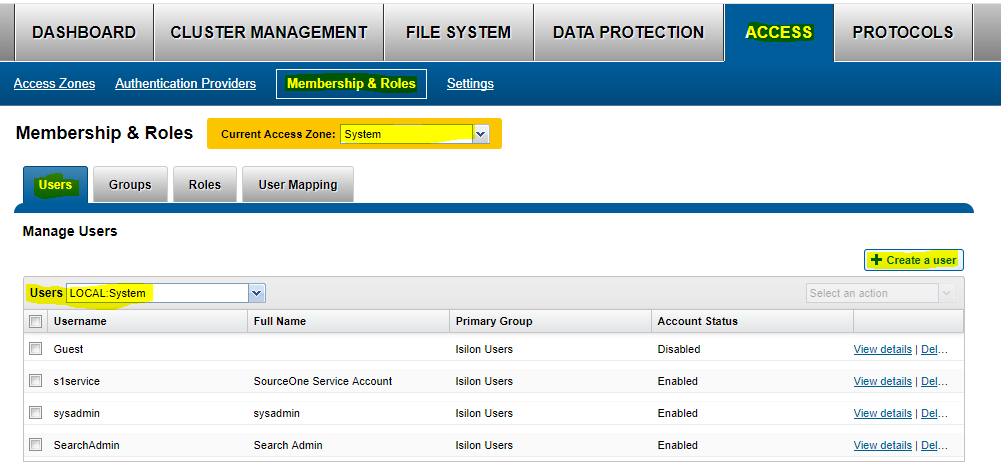
5- 填入下列資訊:
使用者名稱:「service Account name」
密碼:「服務帳戶密碼」
全名:SourceOne 服務帳戶
主要群組:--->按一下 選取群組, 然後選取提供者 「LOCAL:system」 並開始搜尋。在這裡,選取 「Isilon 使用者」
按一下 建立使用者。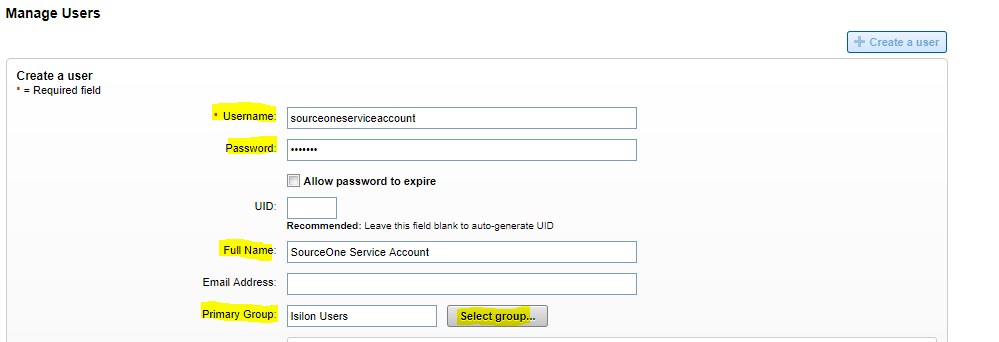
6- 啟用使用者
現在您需要將該使用者新增至 SMB 共用:
1- 前往 通訊協定,然後前往 SMB 共用。
2- 選取目前存取區域:系統
3- 在 SourceOne SMB 共用上,選取 編輯
4- 編輯使用者和群組,然後選取「新增使用者或群組」。選取「本機:」系統供應商,您會找到先前建立的 SourceOne 服務帳戶。提供完全許可權並添加使用者。首先輸入服務帳戶並保存。
5- 現在 OneFS 端的權限良好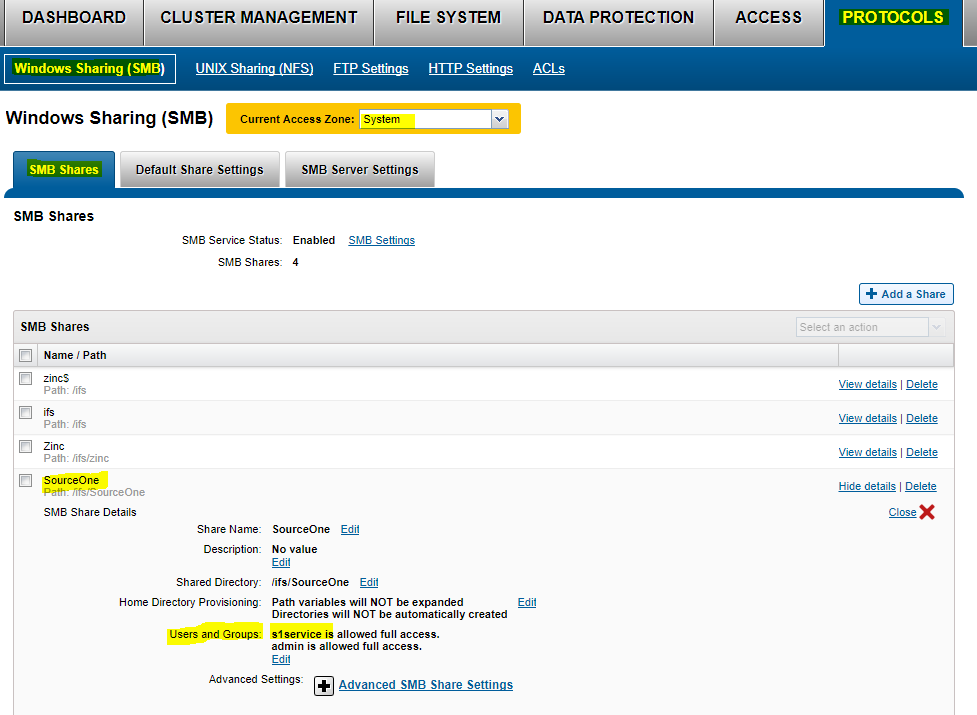
Prodotti interessati
SourceOne for File SystemsProdotti
SourceOne for File SystemsProprietà dell'articolo
Numero articolo: 000064614
Tipo di articolo: Solution
Ultima modifica: 27 giu 2025
Versione: 3
Trova risposta alle tue domande dagli altri utenti Dell
Support Services
Verifica che il dispositivo sia coperto dai Servizi di supporto.