Afzonderlijke moderne apps inbegrepen in Windows 10 opnieuw installeren
Riepilogo: Dit artikel bevat informatie over het opnieuw installeren van afzonderlijke moderne applicaties die zijn meegeleverd met Windows 10.
Questo articolo si applica a
Questo articolo non si applica a
Questo articolo non è legato a un prodotto specifico.
Non tutte le versioni del prodotto sono identificate in questo articolo.
Sintomi
Causa
Er is geen informatie over de oorzaak beschikbaar.
Risoluzione
Afzonderlijke moderne apps opnieuw installeren
Deze handleiding dient alleen te worden gebruikt voor het oplossen van problemen met afzonderlijke apps.
Een afzonderlijke app opnieuw installeren
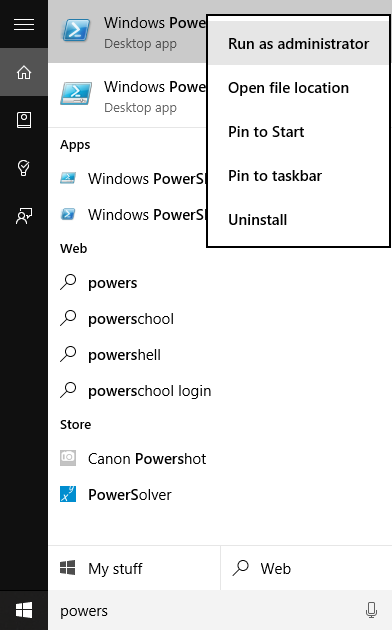
- Open Windows PowerShell als administrator door Bevoegdheden te typen in het zoekvak op de taakbalk. Klik naast de startknop (zie onderstaande afbeelding) met de rechtermuisknop of houd deze ingedrukt en selecteer Als administrator uitvoeren in de vervolgkeuzelijst.
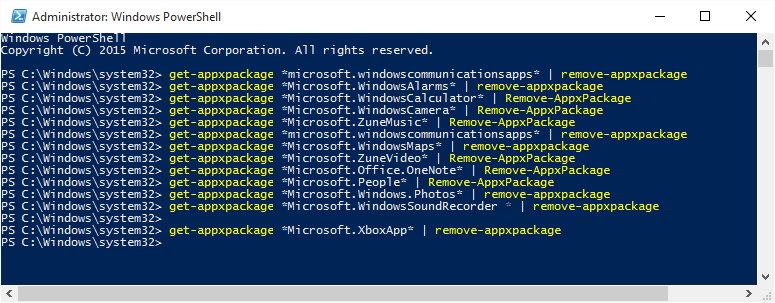
- Typ de volgende opdracht in de onderstaande tabel onder de kolom "Remove PowerShell Command" om de bijbehorende native app te verwijderen.
| Systeemeigen app | PowerShell-opdracht Remove | App-naam in de Store |
|---|---|---|
| Alarmen en klok | get-appxpackage *Microsoft.WindowsAlarms* | remove-appxpackage |
Windows Alarmen en Klok  |
| Rekenmachine | get-appxpackage *Microsoft.WindowsCalculator* | remove-appxpackage |
Windows-rekenmachine |
| Camera | get-appxpackage *Microsoft.WindowsCamera* | remove-appxpackage |
Windows Camera |
| Groove Muziek | get-appxpackage *Microsoft.ZuneMusic* | remove-appxpackage |
Groove Muziek |
| Mail en Agenda | get-appxpackage *microsoft.windowscommunicationsapps* | remove-appxpackage |
Mail en Agenda |
| Kaarten | get-appxpackage *Microsoft.WindowsMaps* | remove-appxpackage |
Windows Maps |
| Films en tv | get-appxpackage *Microsoft.ZuneVideo* | remove-appxpackage |
Films & TV |
| OneNote | get-appxpackage *Microsoft.Office.OneNote* | remove-appxpackage |
OneNote |
| Volk | get-appxpackage *Microsoft.People* | remove-appxpackage |
Microsoft People |
| Foto 's | get-appxpackage *Microsoft.Windows.Photos* | remove-appxpackage |
Microsoft Foto's |
| Voicerecorder | get-appxpackage *Microsoft.WindowsSoundRecorder * | remove-appxpackage |
Windows Voice Recorder |
| Xbox | get-appxpackage *Microsoft.XboxApp* | remove-appxpackage |
Xbox |
U kunt de app opnieuw installeren via de Store-app of door de koppeling te volgen die staat vermeld in de onderstaande tabel. Sluit de Store-app af als deze al is geopend voordat u de app opnieuw installeert.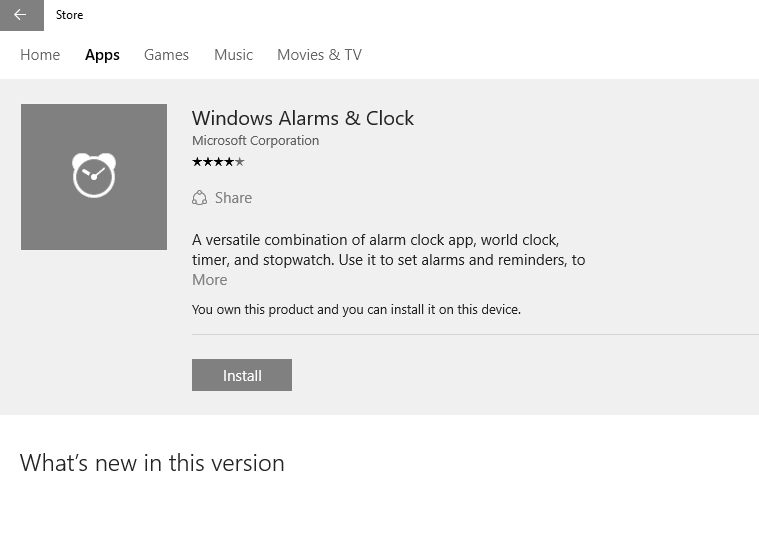
Prodotti interessati
Alienware, Dell All-in-One, Dell Pro All-in-One, Dell Pro Max Micro, Dell Pro Max Slim, Dell Pro Max Tower, Dell Pro Micro, Dell Pro Slim, Dell Pro Tower, Dell Slim, Dell Tower, Inspiron, OptiPlex, Vostro, XPS, G Series, G Series, Alienware
, Dell Laptops, Dell Plus, Dell Pro, Dell Pro Max, Dell Pro Plus, Dell Pro Premium, Inspiron, Latitude, Dell Pro Rugged, Vostro, XPS, Fixed Workstations, Mobile Workstations, Dell Pro Max Micro XE FCM2250, Dell Pro Max Slim XE FCS1250, Dell Pro Max Tower T2 XE FCT2250, Dell Pro Max 16 XE MC16250, Dell Pro Micro Plus XE QBM1250, Dell Pro Slim Plus XE5 QBS1250, Dell Pro Tower Plus XE5 QBT1250
...
Proprietà dell'articolo
Numero articolo: 000125529
Tipo di articolo: Solution
Ultima modifica: 16 lug 2025
Versione: 7
Trova risposta alle tue domande dagli altri utenti Dell
Support Services
Verifica che il dispositivo sia coperto dai Servizi di supporto.