Windows 10 啟用錯誤代碼0xC004C008
Riepilogo: 從 Dell 收到的新系統上的 Windows 10 啟用錯誤代碼0xC004C008問題
Questo articolo si applica a
Questo articolo non si applica a
Questo articolo non è legato a un prodotto specifico.
Non tutte le versioni del prodotto sono identificate in questo articolo.
Sintomi
N/A
Causa
N/A
Risoluzione
請遵循本文提供的指導方針,在系統開箱 (OOB) 時,解決 Windows 10 啟動錯誤代碼 0xC004C008 (產品金鑰已在使用中)。
錯誤代碼0xC004C008
您可能會在從 Dell 收到的新系統上遇到 Windows 10 啟用問題。在初始系統開機時,您可能會看到下列錯誤 (圖 1):
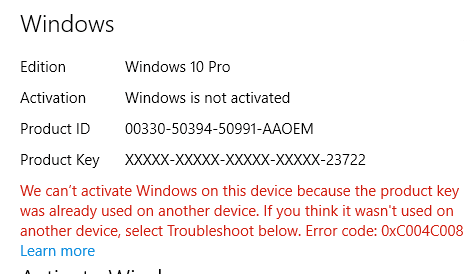
圖 1:Windows 10 啟用錯誤,產品金鑰已在使用中
啟動伺服器發現 Windows 10 產品金鑰可能已用於多部個人電腦時,才會產生此錯誤。當您安裝 Windows 8.1 或 Windows 10 作業系統產品特定次數時,錯誤代碼0xC004C008出現,因為 Windows 8.1 或 Windows 10 授權只能安裝在單一裝置上。
解決方案
 註:執行幾次系統重新開機,然後重試啟動順序,即可解決某些啟動錯誤。參考資料:Microsoft Windows IT Center 文章:
您也可以參閱 啟用故障診斷工具 ,以嘗試解決此問題。故障診斷程式會加速下載 OA3 (OEM 啟用程序 3.0) 所需的更新。
如果問題持續發生,Microsoft請撥打啟用畫面上列出的支援號碼 (「例如,在美國和加拿大:1-800-936-5700“),並說明您收到的錯誤訊息是在新的 Dell 電腦上。
Microsoft可以提供電話啟動。
Prodotti interessati
Alienware, Inspiron, Legacy Desktop Models, OptiPlex, Vostro, XPS, G Series, G Series, Alienware, Inspiron, Latitude, Vostro, XPS, Legacy Laptop Models, Fixed Workstations, Mobile WorkstationsProprietà dell'articolo
Numero articolo: 000130292
Tipo di articolo: Solution
Ultima modifica: 17 lug 2025
Versione: 6
Trova risposta alle tue domande dagli altri utenti Dell
Support Services
Verifica che il dispositivo sia coperto dai Servizi di supporto.