Precision 7550: visuele handleiding bij uw computer
Riepilogo: Dit artikel is een visuele gids voor de externe poorten en functies van het Precision Mobile Workstation 7550.
Questo articolo si applica a
Questo articolo non si applica a
Questo articolo non è legato a un prodotto specifico.
Non tutte le versioni del prodotto sono identificate in questo articolo.
Istruzioni
Het volgende artikel biedt een visuele handleiding voor uw Precision Mobile Workstation 7550 en geeft een overzicht van de externe poorten en functies van uw laptop.
OPMERKING: Voor een meer gedetailleerde beschrijving, zie de productgids op www.dell.com/support
Inhoudsopgave:
- Vooraanzicht
- Bovenaanzicht
- Onderaanzicht
- Achteraanzicht
- Linkerzijaanzicht
- Rechterzijaanzicht
- Aanzicht voedingsadapter
- Aanvullende info:
Vooraanzicht
Aanzicht beeldscherm met RGB-camera
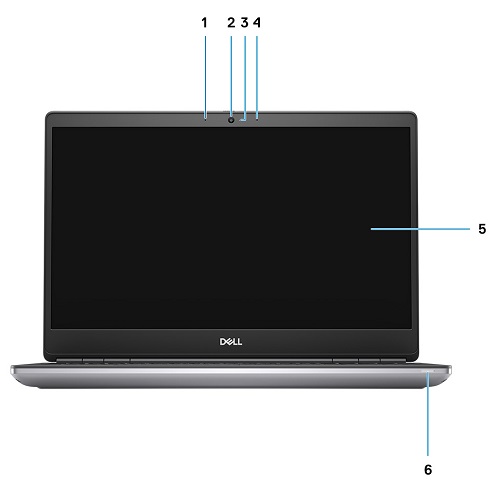
Afbeelding 1: Vooraanzicht: Beeldscherm met RGB-camera
| 1 | Microfoon | 2 | Camera |
| 3 | Camera-LED | 4 | Microfoon |
| 5 | Beeldscherm | 6 | LED-lampje batterijstatus |
Aanzicht beeldscherm met IR-camera
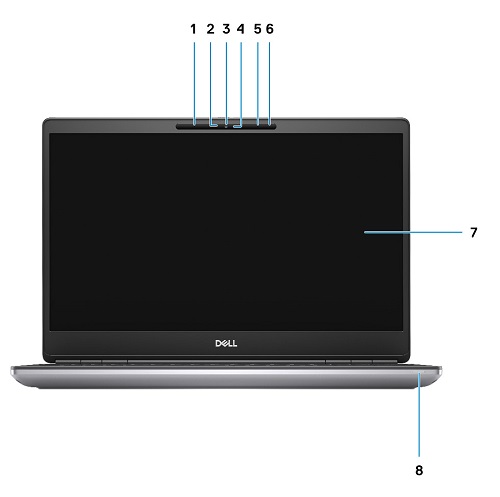
Afbeelding 2: Vooraanzicht: Beeldscherm met IR-camera
| 1 | Microfoon | 2 | Sensor IR-camera |
| 3 | Camera | 4 | Camera-LED |
| 5 | Microfoon | 6 | Nabijheidssensor |
| 7 | Beeldscherm | 8 | Batterijstatus-LED |
Bovenaanzicht

Afbeelding 3: Bovenaanzicht
| 1 | Camerasluiter | 2 | Aan/uit-knop (met optionele vingerafdruklezer) |
| 3 | Touchpad |
Onderaanzicht

Afbeelding 4: Onderaanzicht
| 1 | Servicetag-label | 2 | Ventilatieopening |
Achteraanzicht
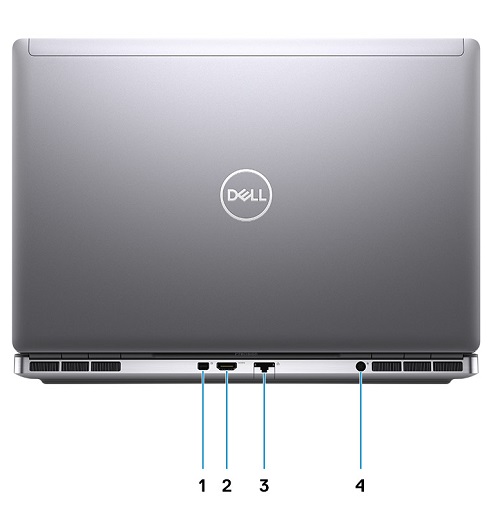
Afbeelding 5: Achteraanzicht
| 1 | Mini DisplayPort 1.4 | 2 | HDMI 2.0-poort |
| 3 | Netwerkpoort | 4 | Voedingsadapterpoort |
Linkerzijaanzicht
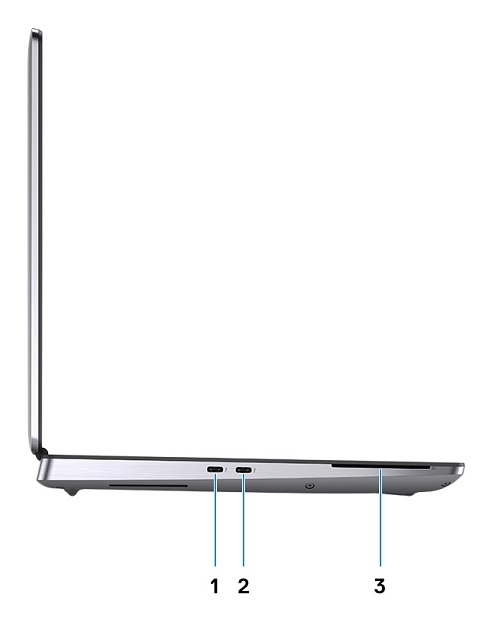
Afbeelding 6: Linkerzijaanzicht
| 1 | USB 3.2 Gen 2 Type-C Thunderbolt 3-poort | 2 | USB 3.2 Gen 2 Type-C Thunderbolt 3-poort |
| 3 | Smartcardlezer (optioneel) |
Rechterzijaanzicht
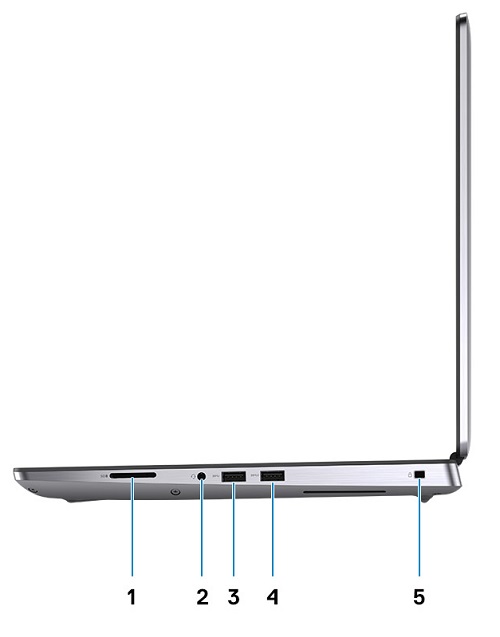
Afbeelding 7: Rechterzijaanzicht
| 1 | SD-kaartslot | 2 | Headset- en/of microfoonpoort |
| 3 | USB 3.2 Gen 1 Type-A poort | 4 | USB 3.2 Gen 1 Type-A poort met PowerShare |
| 5 | Wigvormig slot voor vergrendeling |
Aanzicht voedingsadapter
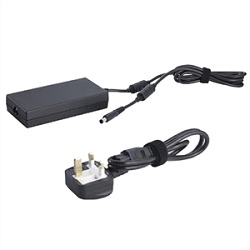
Afbeelding 8: Voedingsadapter 180 W cilindertype
| Beschrijving | Waarden |
| Typ | Voedingsadapter van 180 W |
| Ingangsspanning | 100 VAC tot 240 VAC |
| Uitgangsstroom | 9,23 A |
| Uitgangsvermogen | 180 W |
| Uitgangsspanning | 19,50 V gelijkspanning |
Aanvullende info:
Prodotti interessati
Precision 7550Proprietà dell'articolo
Numero articolo: 000130468
Tipo di articolo: How To
Ultima modifica: 04 giu 2025
Versione: 5
Trova risposta alle tue domande dagli altri utenti Dell
Support Services
Verifica che il dispositivo sia coperto dai Servizi di supporto.