Sådan administreres storage i PowerPath til Windows
Riepilogo: Hvis kunden rapporterer, at diskene ikke er synlige og i Powermt-skærmindstillinger, hvis du bemærker, at storagesystemet ikke er administreret, Sådan administreres det
Questo articolo si applica a
Questo articolo non si applica a
Questo articolo non è legato a un prodotto specifico.
Non tutte le versioni del prodotto sono identificate in questo articolo.
Istruzioni
I visse scenarier, når en kunde rapporterer, at vedkommende ikke kan bemærke nogen diske, der leveres fra et storagesystem i PowerPath. Når du kører Powermt-skærmindstillinger, og du bemærker, at storagesystemet er "Ikke-administreret", så I et Windows-miljø med PowerPath. Følg den anbefalede handlingsplan i denne KB for at gøre det samme som "Administreret".
Her er et scenarie, hvor kunden har præsenteret diske fra Symmetrix Storage-systemet og har rapporteret, at de ikke kan finde nogen diske i PowerPath efter opgraderingen.
Resultatet af " powermt-skærmindstillinger " viser:
** POWERMT-SKÆRMINDSTILLINGER **
Vis CLARiiON LUN-navne: True
Path Latency Monitor: Oplysninger om Off
Persist Path: On
Performance Monitor: deaktiveret
Autostandby: IO er pr. fejl (iopf): aktiveret
iopf-ældningsperiode: 1 d
IOPF grænse : 6000
Auto Host Registration: disabled
Storage
System Class Attributes
------------ ----------
Symmetrix periodic autorestore = on
reactive autorestore = on
status = unmanaged
proximity based autostandby = on
proximity based autostandby threshold = default
CLARiiON periodic autorestore = on
reactive autorestore = on
status = unmanaged
proximity based autostandby = N/A
Invista periodic autorestore = on
reactive autorestore = on
status = managed
proximity based autostandby = N/A
Hitachi periodic autorestore = on
reactive autorestore = on
status = unmanaged
proximity based autostandby = N/A
HP xp periodic autorestore = on
reactive autorestore = on
status = unmanaged
proximity based autostandby = N/A
Ess periodic autorestore = on
reactive autorestore = on
status = unmanaged
proximity based autostandby = N/A
Generic periodic autorestore = on
reactive autorestore = on
status = managed
proximity based autostandby = N/A
VPLEX periodic autorestore = on
reactive autorestore = on
status = managed
proximity based autostandby = on
proximity based autostandby threshold = default
VNX periodic autorestore = on
reactive autorestore = on
status = unmanaged
proximity based autostandby = N/A
NetApp periodic autorestore = on
reactive autorestore = on
status = unmanaged
proximity based autostandby = N/A
XtremIO periodic autorestore = on
reactive autorestore = on
status = managed
proximity based autostandby = N/A
Unity periodic autorestore = on
reactive autorestore = on
status = unmanaged
proximity based autostandby = N/A
SC periodic autorestore = on
reactive autorestore = on
status = managed
proximity based autostandby = off
Notice how some of the storage array and especially Symmetrix here is "unmanaged"
Here are the steps along with the screenshot from our lab server , how to make it "Managed"
Open Control Panel :
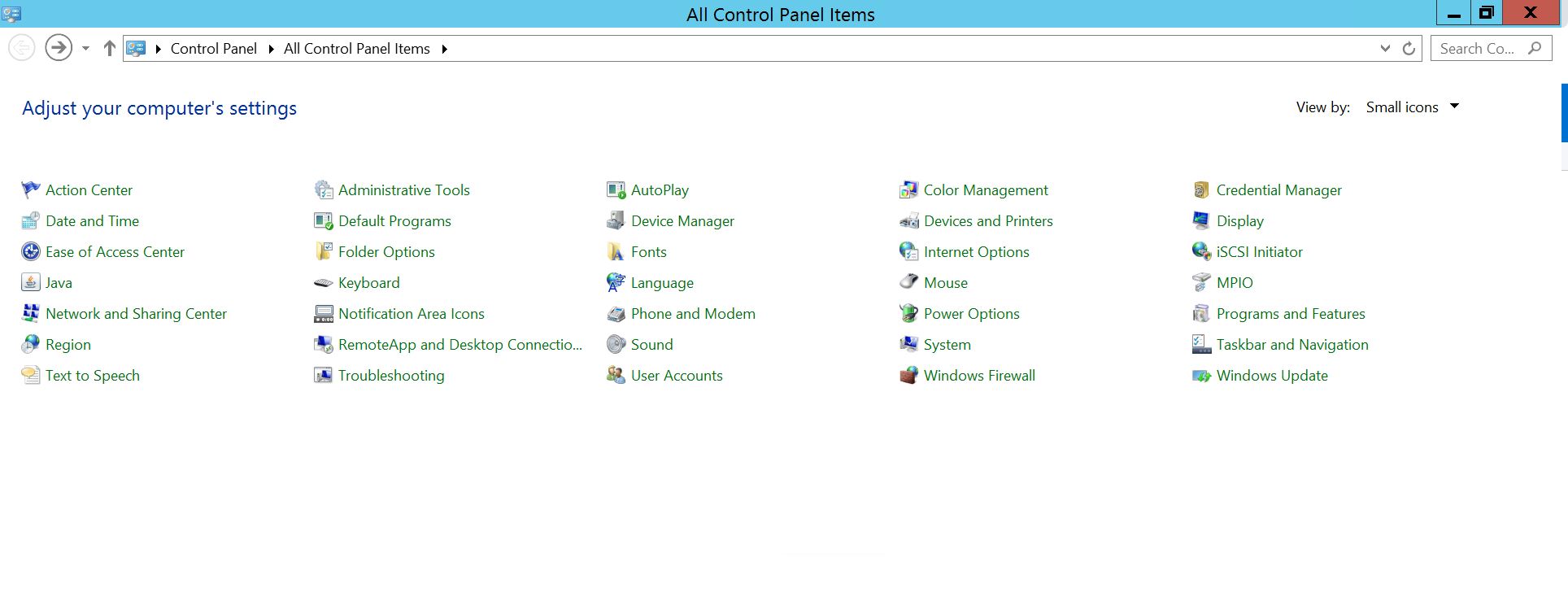
Vælg Program og funktioner
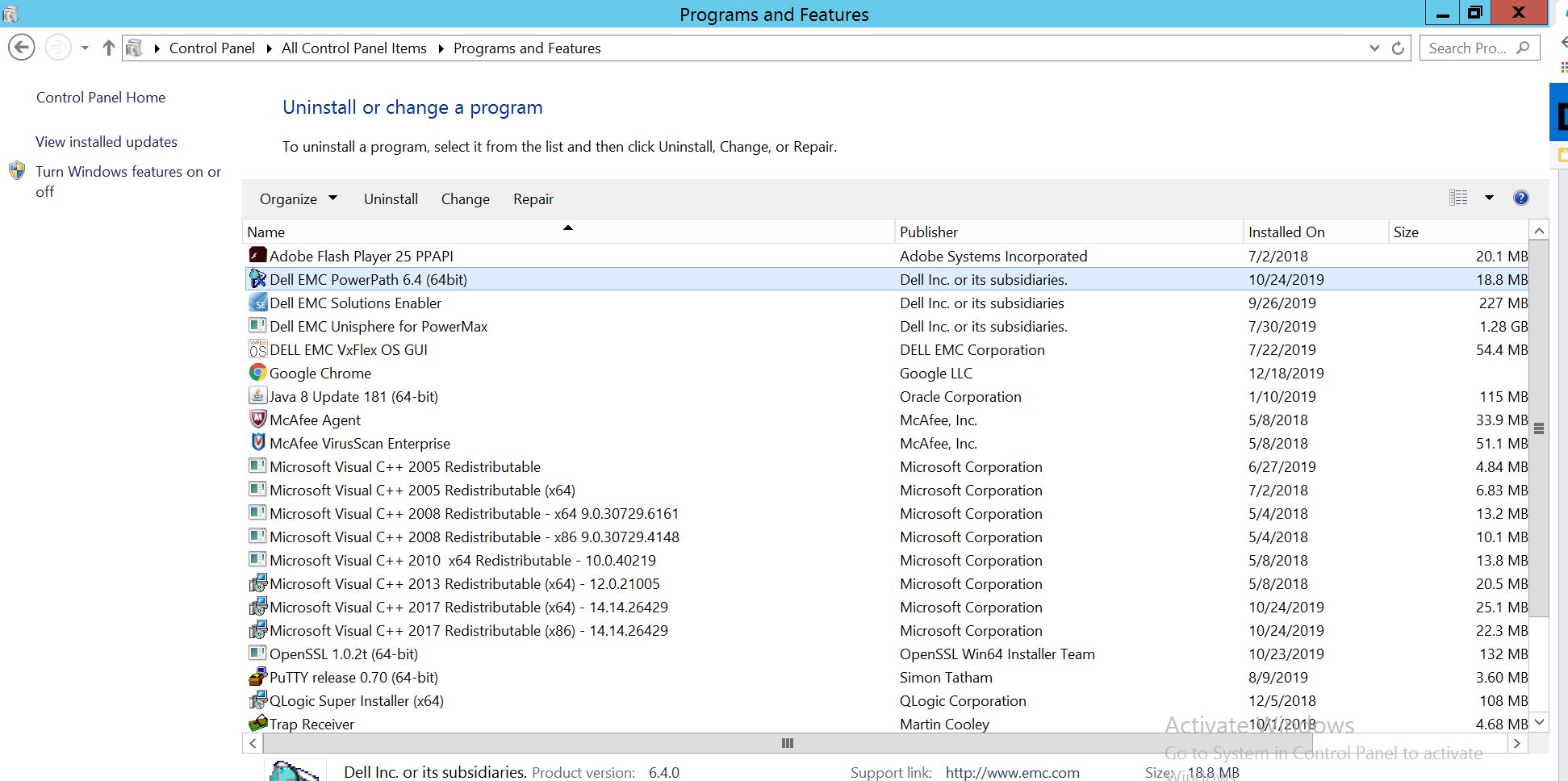
Vælg PowerPath, og vælg Rediger/Skift, som åbner installationsprompten:
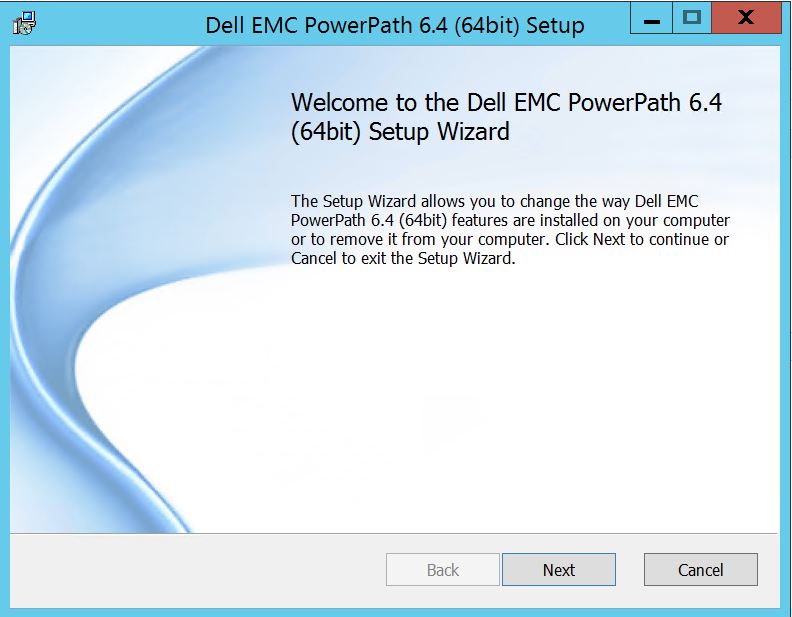
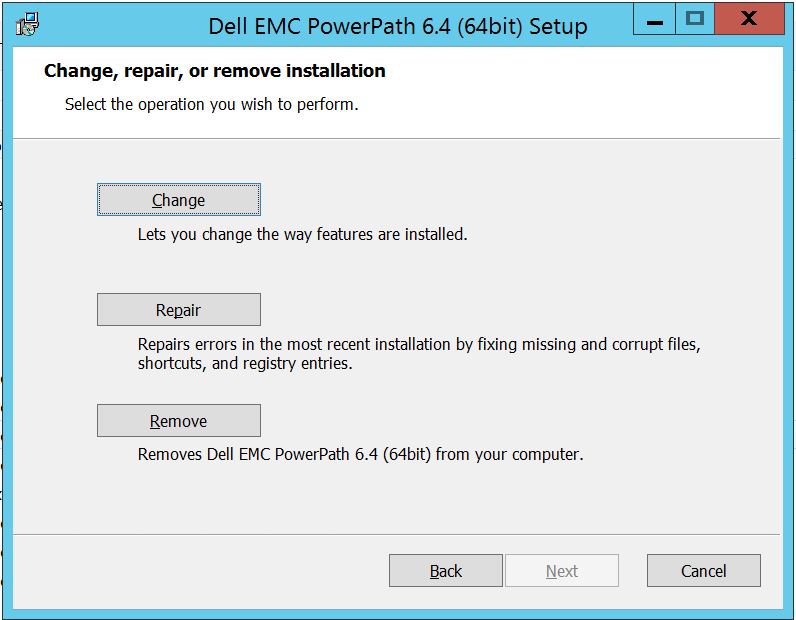
Klik på Næste og følg vælg ændring:
Hvilket fører dig til brugerdefineret opsætning:
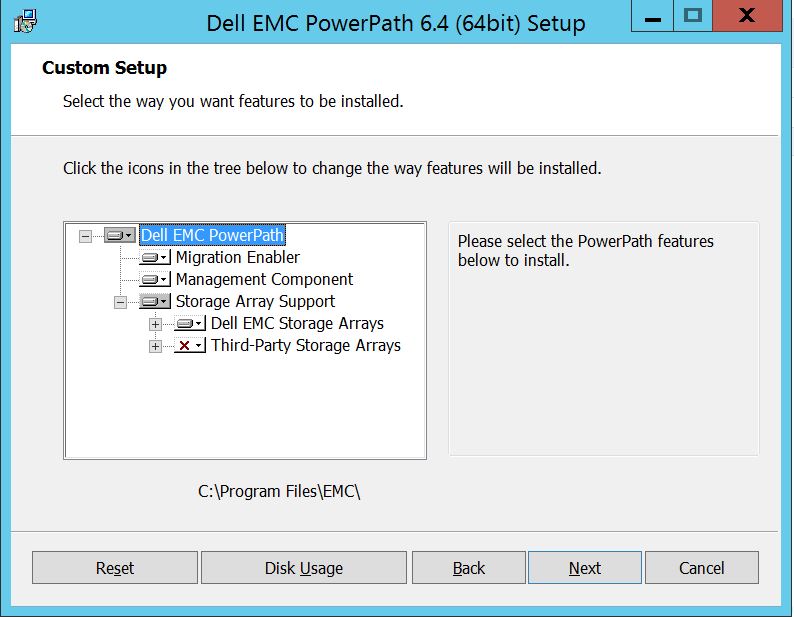
Du kan nu udvide understøttelsen af storagesystemet, hvis det ikke allerede er og også udvide Dell EMC-storagesystemer, som viser alle de storagesystemer, der understøttes under PowerPath:
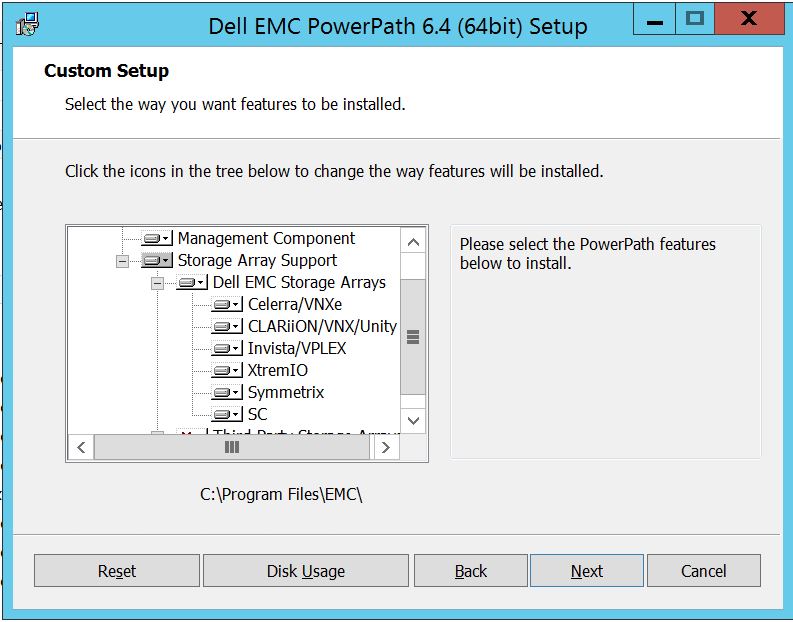
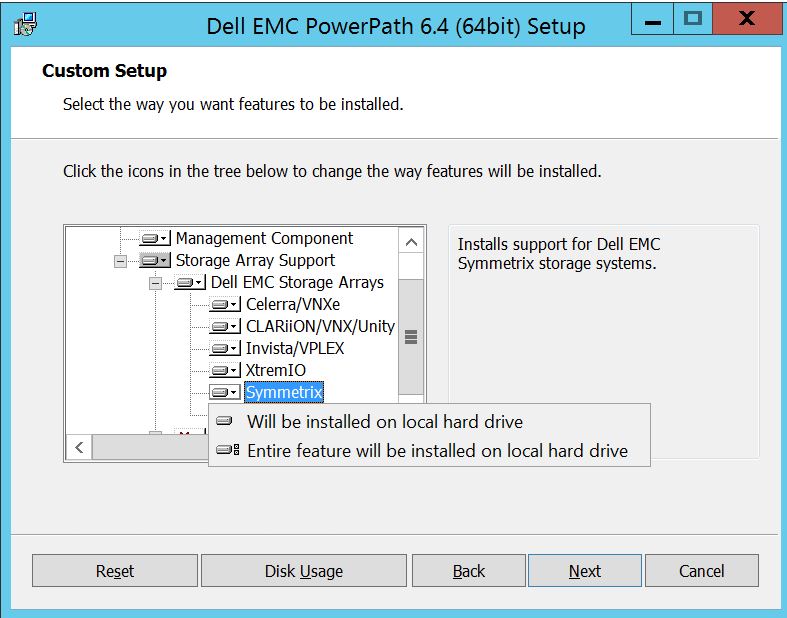
Derefter kan du yderligere bruge den lille downkey i nærheden af et hvilket som helst af storageelementerne. Lad os for eksempel tage Symmetrix her. Det vil yderligere vise 2 muligheder :
1. Vil blive installeret på lokal harddisk
2. Hele funktionen vil blive installeret på lokal harddisk
Hvis du ønsker, at hele Dell EMC Storage-systemet skal administreres (hvilket i bund og grund er standardindstillingen),
kan du gøre det samme på rullelisten Dell EMC Storage Array: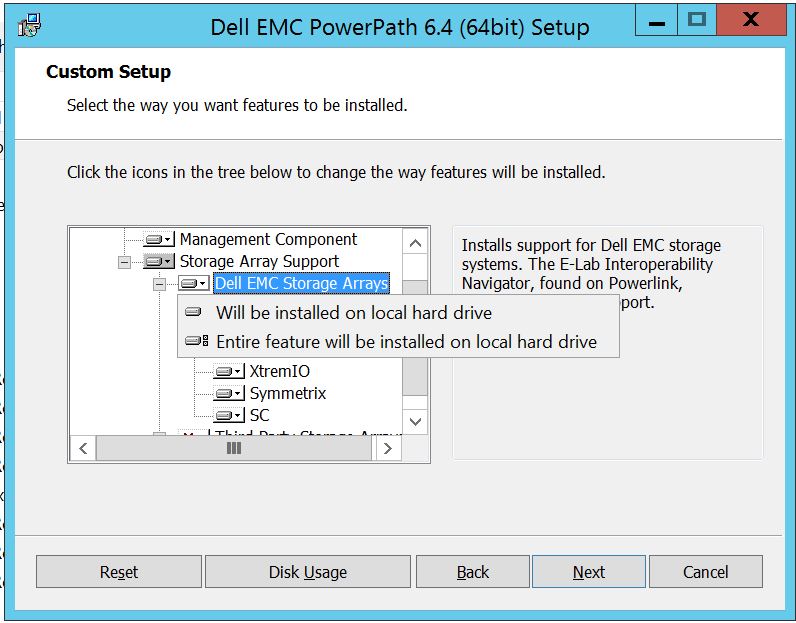
Når du er færdig, skal du vælge næste
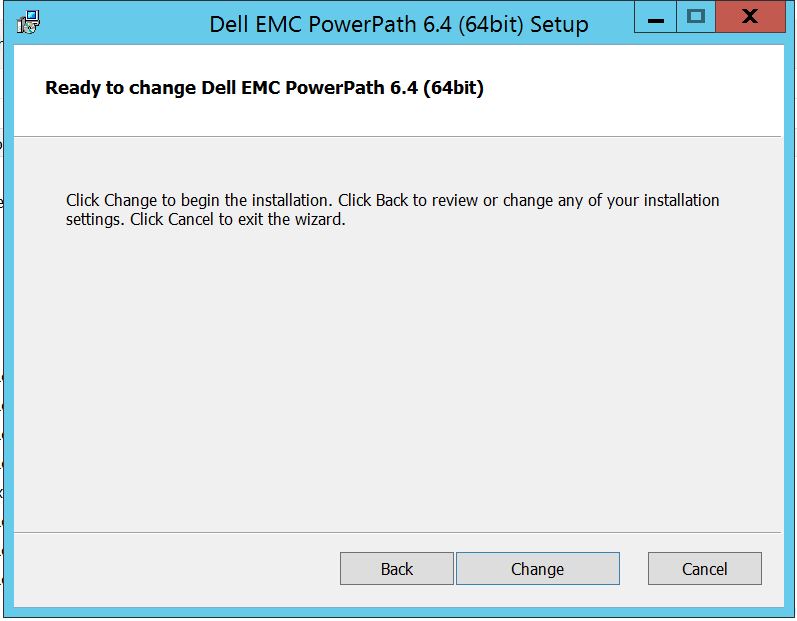
Klik på Skift, hvilket vil fuldføre de nødvendige ændringer:
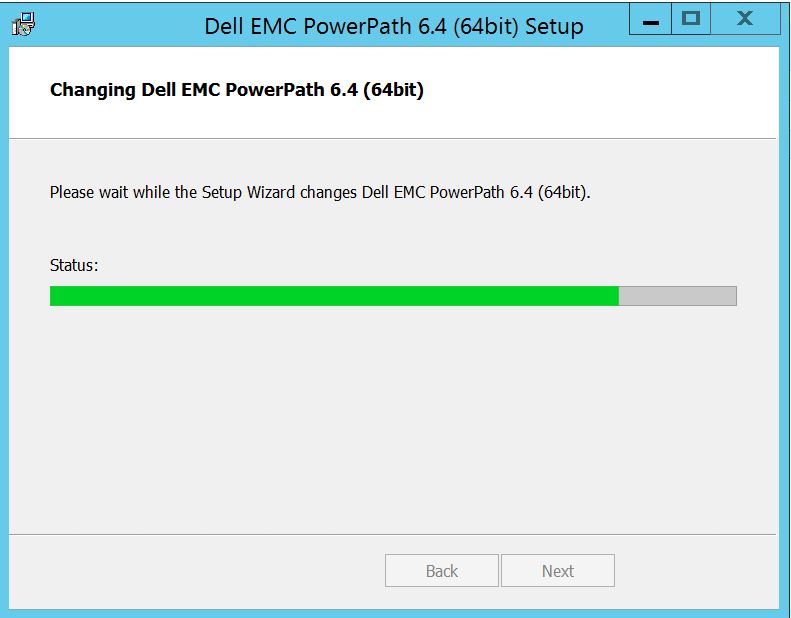
Post, som du skal se dette, hvor i du kan vælge "Afslut "
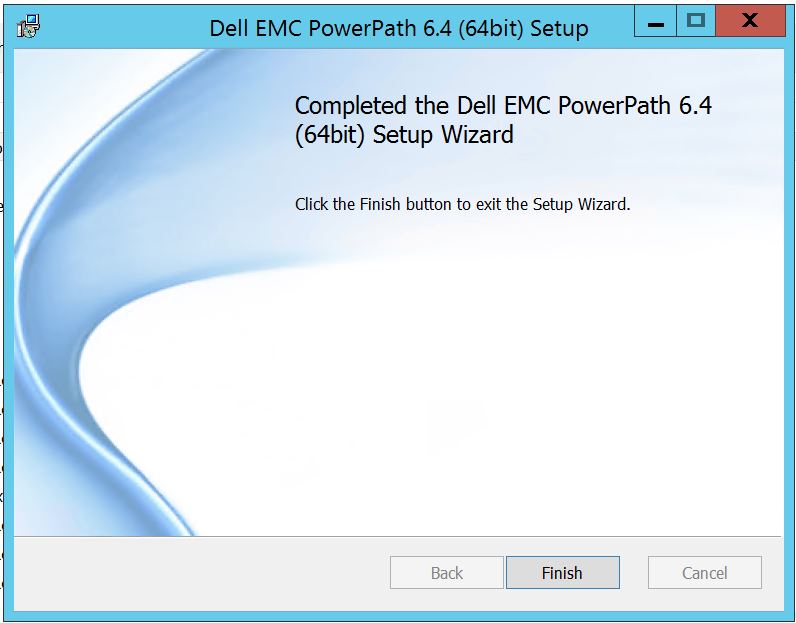 Efter færdig, får du en pop op, der beder om genstart, skal du vælge at genstarte serveren, da ændringerne skal implementeres på serverniveau, som derefter vil gøre lagersystemdiskene synlige i PowerPath.
Efter genstart, når du kører powermt-visningsindstillinger, Sådan ser outputtet ud:
** POWERMT-SKÆRMINDSTILLINGER **
Vis CLARiiON LUN-navne: True
Path Latency Monitor: Oplysninger om Off
Persist Path: On
Performance Monitor: deaktiveret
Autostandby: IO er pr. fejl (iopf): aktiveret
iopf-ældningsperiode: 1 d
IOPF grænse : 6000
Storage
System Class Attributes
------------ ----------
Symmetrix periodic autorestore = on
reactive autorestore = on
status = managed
proximity based autostandby = off
auto host registration = enabled
app finger printing = enabled
device to array performance report = enabled
device in use to array report = enabled
CLARiiON periodic autorestore = on
reactive autorestore = on
status = managed
proximity based autostandby = N/A
auto host registration = disabled
app finger printing = N/A
device to array performance report = N/A
device in use to array report = N/A
Invista periodic autorestore = on
reactive autorestore = on
status = managed
proximity based autostandby = N/A
auto host registration = N/A
app finger printing = N/A
device to array performance report = N/A
device in use to array report = N/A
Hitachi periodic autorestore = on
reactive autorestore = on
status = unmanaged
proximity based autostandby = N/A
auto host registration = N/A
app finger printing = N/A
device to array performance report = N/A
device in use to array report = N/A
HP xp periodic autorestore = on
reactive autorestore = on
status = unmanaged
proximity based autostandby = N/A
auto host registration = N/A
app finger printing = N/A
device to array performance report = N/A
device in use to array report = N/A
Ess periodic autorestore = on
reactive autorestore = on
status = unmanaged
proximity based autostandby = N/A
auto host registration = N/A
app finger printing = N/A
device to array performance report = N/A
device in use to array report = N/A
Generic periodic autorestore = on
reactive autorestore = on
status = managed
proximity based autostandby = N/A
auto host registration = N/A
app finger printing = N/A
device to array performance report = N/A
device in use to array report = N/A
VPLEX periodic autorestore = on
reactive autorestore = on
status = managed
proximity based autostandby = on
proximity based autostandby threshold = default
auto host registration = N/A
app finger printing = N/A
device to array performance report = N/A
device in use to array report = N/A
VNX periodic autorestore = on
reactive autorestore = on
status = managed
proximity based autostandby = N/A
auto host registration = disabled
app finger printing = N/A
device to array performance report = N/A
device in use to array report = N/A
NetApp periodic autorestore = on
reactive autorestore = on
status = unmanaged
proximity based autostandby = N/A
auto host registration = N/A
app finger printing = N/A
device to array performance report = N/A
device in use to array report = N/A
XtremIO periodic autorestore = on
reactive autorestore = on
status = managed
proximity based autostandby = N/A
auto host registration = N/A
app finger printing = N/A
device to array performance report = N/A
device in use to array report = N/A
Unity periodic autorestore = on
reactive autorestore = on
status = managed
proximity based autostandby = N/A
auto host registration = disabled
app finger printing = N/A
device to array performance report = N/A
device in use to array report = N/A
SC periodic autorestore = on
reactive autorestore = on
status = managed
proximity based autostandby = N/A
auto host registration = N/A
app finger printing = N/A
device to array performance report = N/A
device in use to array report = N/A
Her er et scenarie, hvor kunden har præsenteret diske fra Symmetrix Storage-systemet og har rapporteret, at de ikke kan finde nogen diske i PowerPath efter opgraderingen.
Resultatet af " powermt-skærmindstillinger " viser:
** POWERMT-SKÆRMINDSTILLINGER **
Vis CLARiiON LUN-navne: True
Path Latency Monitor: Oplysninger om Off
Persist Path: On
Performance Monitor: deaktiveret
Autostandby: IO er pr. fejl (iopf): aktiveret
iopf-ældningsperiode: 1 d
IOPF grænse : 6000
Auto Host Registration: disabled
Storage
System Class Attributes
------------ ----------
Symmetrix periodic autorestore = on
reactive autorestore = on
status = unmanaged
proximity based autostandby = on
proximity based autostandby threshold = default
CLARiiON periodic autorestore = on
reactive autorestore = on
status = unmanaged
proximity based autostandby = N/A
Invista periodic autorestore = on
reactive autorestore = on
status = managed
proximity based autostandby = N/A
Hitachi periodic autorestore = on
reactive autorestore = on
status = unmanaged
proximity based autostandby = N/A
HP xp periodic autorestore = on
reactive autorestore = on
status = unmanaged
proximity based autostandby = N/A
Ess periodic autorestore = on
reactive autorestore = on
status = unmanaged
proximity based autostandby = N/A
Generic periodic autorestore = on
reactive autorestore = on
status = managed
proximity based autostandby = N/A
VPLEX periodic autorestore = on
reactive autorestore = on
status = managed
proximity based autostandby = on
proximity based autostandby threshold = default
VNX periodic autorestore = on
reactive autorestore = on
status = unmanaged
proximity based autostandby = N/A
NetApp periodic autorestore = on
reactive autorestore = on
status = unmanaged
proximity based autostandby = N/A
XtremIO periodic autorestore = on
reactive autorestore = on
status = managed
proximity based autostandby = N/A
Unity periodic autorestore = on
reactive autorestore = on
status = unmanaged
proximity based autostandby = N/A
SC periodic autorestore = on
reactive autorestore = on
status = managed
proximity based autostandby = off
Notice how some of the storage array and especially Symmetrix here is "unmanaged"
Here are the steps along with the screenshot from our lab server , how to make it "Managed"
Open Control Panel :
Vælg Program og funktioner
Vælg PowerPath, og vælg Rediger/Skift, som åbner installationsprompten:
Klik på Næste og følg vælg ændring:
Hvilket fører dig til brugerdefineret opsætning:
Du kan nu udvide understøttelsen af storagesystemet, hvis det ikke allerede er og også udvide Dell EMC-storagesystemer, som viser alle de storagesystemer, der understøttes under PowerPath:
Derefter kan du yderligere bruge den lille downkey i nærheden af et hvilket som helst af storageelementerne. Lad os for eksempel tage Symmetrix her. Det vil yderligere vise 2 muligheder :
1. Vil blive installeret på lokal harddisk
2. Hele funktionen vil blive installeret på lokal harddisk
Hvis du ønsker, at hele Dell EMC Storage-systemet skal administreres (hvilket i bund og grund er standardindstillingen),
kan du gøre det samme på rullelisten Dell EMC Storage Array:
Når du er færdig, skal du vælge næste
Klik på Skift, hvilket vil fuldføre de nødvendige ændringer:
Post, som du skal se dette, hvor i du kan vælge "Afslut "
Efter færdig, får du en pop op, der beder om genstart, skal du vælge at genstarte serveren, da ændringerne skal implementeres på serverniveau, som derefter vil gøre lagersystemdiskene synlige i PowerPath.
Efter genstart, når du kører powermt-visningsindstillinger, Sådan ser outputtet ud:
** POWERMT-SKÆRMINDSTILLINGER **
Vis CLARiiON LUN-navne: True
Path Latency Monitor: Oplysninger om Off
Persist Path: On
Performance Monitor: deaktiveret
Autostandby: IO er pr. fejl (iopf): aktiveret
iopf-ældningsperiode: 1 d
IOPF grænse : 6000
Storage
System Class Attributes
------------ ----------
Symmetrix periodic autorestore = on
reactive autorestore = on
status = managed
proximity based autostandby = off
auto host registration = enabled
app finger printing = enabled
device to array performance report = enabled
device in use to array report = enabled
CLARiiON periodic autorestore = on
reactive autorestore = on
status = managed
proximity based autostandby = N/A
auto host registration = disabled
app finger printing = N/A
device to array performance report = N/A
device in use to array report = N/A
Invista periodic autorestore = on
reactive autorestore = on
status = managed
proximity based autostandby = N/A
auto host registration = N/A
app finger printing = N/A
device to array performance report = N/A
device in use to array report = N/A
Hitachi periodic autorestore = on
reactive autorestore = on
status = unmanaged
proximity based autostandby = N/A
auto host registration = N/A
app finger printing = N/A
device to array performance report = N/A
device in use to array report = N/A
HP xp periodic autorestore = on
reactive autorestore = on
status = unmanaged
proximity based autostandby = N/A
auto host registration = N/A
app finger printing = N/A
device to array performance report = N/A
device in use to array report = N/A
Ess periodic autorestore = on
reactive autorestore = on
status = unmanaged
proximity based autostandby = N/A
auto host registration = N/A
app finger printing = N/A
device to array performance report = N/A
device in use to array report = N/A
Generic periodic autorestore = on
reactive autorestore = on
status = managed
proximity based autostandby = N/A
auto host registration = N/A
app finger printing = N/A
device to array performance report = N/A
device in use to array report = N/A
VPLEX periodic autorestore = on
reactive autorestore = on
status = managed
proximity based autostandby = on
proximity based autostandby threshold = default
auto host registration = N/A
app finger printing = N/A
device to array performance report = N/A
device in use to array report = N/A
VNX periodic autorestore = on
reactive autorestore = on
status = managed
proximity based autostandby = N/A
auto host registration = disabled
app finger printing = N/A
device to array performance report = N/A
device in use to array report = N/A
NetApp periodic autorestore = on
reactive autorestore = on
status = unmanaged
proximity based autostandby = N/A
auto host registration = N/A
app finger printing = N/A
device to array performance report = N/A
device in use to array report = N/A
XtremIO periodic autorestore = on
reactive autorestore = on
status = managed
proximity based autostandby = N/A
auto host registration = N/A
app finger printing = N/A
device to array performance report = N/A
device in use to array report = N/A
Unity periodic autorestore = on
reactive autorestore = on
status = managed
proximity based autostandby = N/A
auto host registration = disabled
app finger printing = N/A
device to array performance report = N/A
device in use to array report = N/A
SC periodic autorestore = on
reactive autorestore = on
status = managed
proximity based autostandby = N/A
auto host registration = N/A
app finger printing = N/A
device to array performance report = N/A
device in use to array report = N/A
Prodotti interessati
PowerPath for WindowsProdotti
PowerPath for WindowsProprietà dell'articolo
Numero articolo: 000158477
Tipo di articolo: How To
Ultima modifica: 17 ott 2025
Versione: 4
Trova risposta alle tue domande dagli altri utenti Dell
Support Services
Verifica che il dispositivo sia coperto dai Servizi di supporto.