升級後系統管理員 UI 遺失導覽節點或功能表圖示
Riepilogo: 升級後,系統管理員 UI 遺失功能表項目或節點,請檢查檔案中的 url 是否遺失一般內容。
Questo articolo si applica a
Questo articolo non si applica a
Questo articolo non è legato a un prodotto specifico.
Non tutte le versioni del prodotto sono identificate in questo articolo.
Sintomi
在 Admin UI 中的導覽節點或功能表項目遺失
首頁
探索
且組態的警示、Solution Pack、群組與標籤、更新系統、設定等遺失導覽節點。
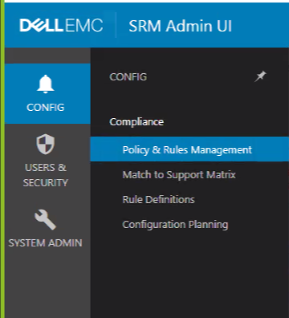
首頁
探索
且組態的警示、Solution Pack、群組與標籤、更新系統、設定等遺失導覽節點。
Causa
前端主機在 opt\APG\Web-Applications 下的模組遺失 URL
Risoluzione
在前端主機上 [winscp 會很方便執行下列步驟];
前往 \opt\APG\Web-Applications 檢查 UI 中遺失的模組/導覽節點
範例:
\Centralized-Management\centralized-management\conf\common.properties
檔案遺失 url,如下所示:
apg.centralized-management.url=
新增 URL:
apg.centralized-management.url=/centralized-management/
然後儲存檔案。
在我的案例中遺失 url 的其他節點如下:
apg.alerting-frontend.url=
apg.compliance-frontend.url=
apg.device-discovery.url=
提供的 URL 如下所示:
apg.alerting-frontend.url=/alerting-frontend/
apg.compliance-frontend.url=/compliance-frontend/
apg.device-discovery.url=/device-discovery/
重新啟動 tomcat APG/bin/manage-module.(sh/cmd) 服務重新啟動 tomcat 預設值
前往 \opt\APG\Web-Applications 檢查 UI 中遺失的模組/導覽節點
範例:
\Centralized-Management\centralized-management\conf\common.properties
檔案遺失 url,如下所示:
apg.centralized-management.url=
新增 URL:
apg.centralized-management.url=/centralized-management/
然後儲存檔案。
在我的案例中遺失 url 的其他節點如下:
apg.alerting-frontend.url=
apg.compliance-frontend.url=
apg.device-discovery.url=
提供的 URL 如下所示:
apg.alerting-frontend.url=/alerting-frontend/
apg.compliance-frontend.url=/compliance-frontend/
apg.device-discovery.url=/device-discovery/
重新啟動 tomcat APG/bin/manage-module.(sh/cmd) 服務重新啟動 tomcat 預設值
Prodotti interessati
SRM, SRMProprietà dell'articolo
Numero articolo: 000187298
Tipo di articolo: Solution
Ultima modifica: 03 nov 2021
Versione: 4
Trova risposta alle tue domande dagli altri utenti Dell
Support Services
Verifica che il dispositivo sia coperto dai Servizi di supporto.