Applications Deployed Using ClickOnce Fail to Launch on Computers Running Dell Encryption Enterprise or Dell Encryption Personal
Riepilogo: Applications that are deployed using ClickOnce may fail to launch after a reboot on computers running Dell Encryption Enterprise or Dell Encryption Personal.
Questo articolo si applica a
Questo articolo non si applica a
Questo articolo non è legato a un prodotto specifico.
Non tutte le versioni del prodotto sono identificate in questo articolo.
Sintomi
Affected Products:
- Dell Encryption Enterprise
- Dell Encryption Personal
Affected Versions:
- v10.2 to 11.0
Affected Operating Systems:
- Windows
It has been observed that applications deployed using ClickOnce fail to launch on computers with Dell Encryption after a reboot with the error that the application has failed to start because its side-by-side configuration is incorrect. The error below may be displayed when users attempt to launch applications:
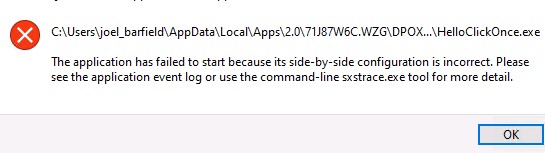
Figure 1: (English Only) Error attempting to launch applications
Causa
This is due to the files used by ClickOnce application .config or .manifest having end of file corruption. The encryption driver cannot hard link these metadata files properly.
Risoluzione
This issue is resolved in v11.1 of Dell Encryption Enterprise and Dell Encryption Personal Edition.
To contact support, reference Dell Data Security International Support Phone Numbers.
Go to TechDirect to generate a technical support request online.
For additional insights and resources, join the Dell Security Community Forum.
Prodotti interessati
Dell EncryptionProprietà dell'articolo
Numero articolo: 000191189
Tipo di articolo: Solution
Ultima modifica: 06 set 2023
Versione: 3
Trova risposta alle tue domande dagli altri utenti Dell
Support Services
Verifica che il dispositivo sia coperto dai Servizi di supporto.