AppSync: Uploading the license in AppSync UI displays an error "Adding the license file failed due to undefined."
Riepilogo: Uploading an AppSync license file in UI using a browser other than Chrome (IE or Firefox), where the file name format is "ArrayName_APPSY_XXXX_DATE.lic" displays an error.
Questo articolo si applica a
Questo articolo non si applica a
Questo articolo non è legato a un prodotto specifico.
Non tutte le versioni del prodotto sono identificate in questo articolo.
Sintomi
Uploading license file in AppSync UI using browser other than Chrome returns error:
Here is the actual message display:
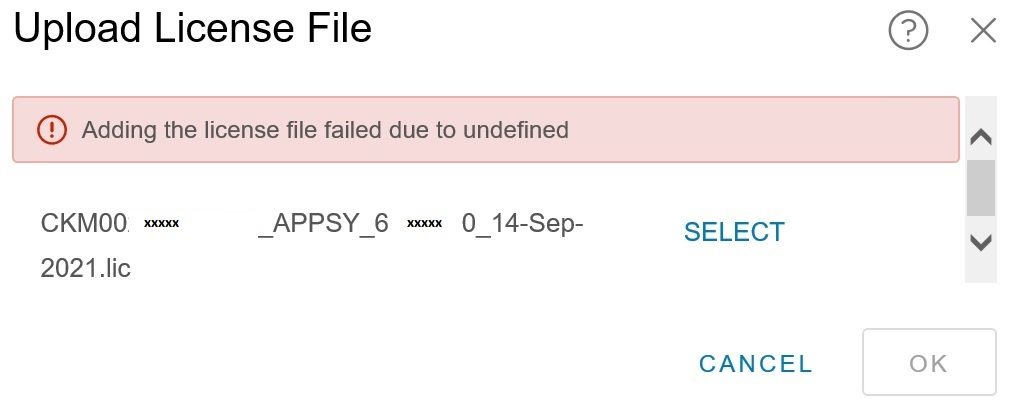
Adding the license file failed due to undefined.
Causa
The specific cause is not known. However, it was determined that the error was browser-related. The error displayed only when uploading the license file through AppSync UI opened in Internet Explorer or Mozilla Firefox.
Risoluzione
Workaround:
Use a Chrome browser to access the AppSync UI to upload a license.
Use a Chrome browser to access the AppSync UI to upload a license.
Proprietà dell'articolo
Numero articolo: 000191818
Tipo di articolo: Solution
Ultima modifica: 28 ott 2025
Versione: 3
Trova risposta alle tue domande dagli altri utenti Dell
Support Services
Verifica che il dispositivo sia coperto dai Servizi di supporto.