OptiPlex 3000 Thin Client Incorrect SSD Size in System Information
Riepilogo: OptiPlex 3000 Thin Client users may notice that the SSD storage size for their computer is not displaying the expected size in System Information page.
Questo articolo si applica a
Questo articolo non si applica a
Questo articolo non è legato a un prodotto specifico.
Non tutte le versioni del prodotto sono identificate in questo articolo.
Sintomi
Affected Products:
- OptiPlex 3000 Thin Client
The System Information window shows SSD size under the General Tab:
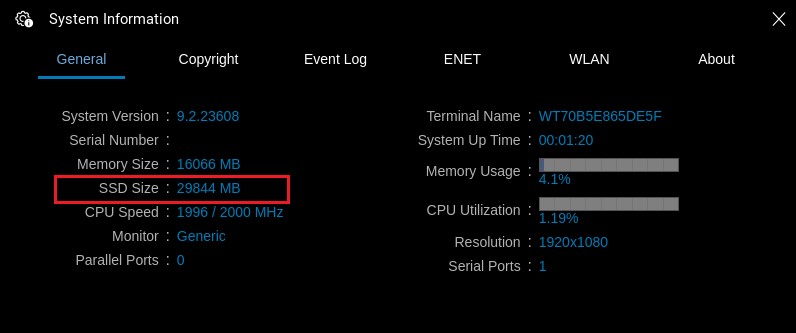
Figure 1: (English Only) System Information
Note: SSD Size in the System Information menu references the storage device where the unit’s operating system has been installed. This can be ether the eMMC memory on the motherboard or an add-in SSD.
Causa
The OptiPlex 3000 Thin Client shows the SSD size for the drive on which ThinOS is installed. If the unit was ordered with eMMC, it shows the storage size for the soldered-on drive.
Risoluzione
If an M.2 SSD device is installed after purchase, you must alter the hard drive setting in BIOS and install ThinOS on the M.2 device to see the SSD size in System information.
Prodotti interessati
OptiPlex 3000 Thin Client, Dell ThinOSProprietà dell'articolo
Numero articolo: 000196551
Tipo di articolo: Solution
Ultima modifica: 08 feb 2024
Versione: 3
Trova risposta alle tue domande dagli altri utenti Dell
Support Services
Verifica che il dispositivo sia coperto dai Servizi di supporto.