Avamar Hyper-V Plugin: How to Check for Orphan Hyper-V VM Groups and Checkpoints on a Hyper-V Host
Riepilogo: This article provides a method to determine if there are any Virtual Machine (VM) orphaned groups and checkpoints on a Hyper-V Host.
Questo articolo si applica a
Questo articolo non si applica a
Questo articolo non è legato a un prodotto specifico.
Non tutte le versioni del prodotto sono identificate in questo articolo.
Istruzioni
During the Avamar Hyper-V Plug-in backups, the VM Collection Groups and VM Recovery Checkpoints are created as part of the process. Upon backup completion, the Groups and Checkpoints are automatically deleted.
Understand that:
Steps to identify any orphan VM Groups or VM Checkpoints in the Hyper-V environment:


Understand that:
- Occasionally this automatic process may fail the deleted task due to environmental reasons. As a result, VM Groups and VM Recovery Checkpoints are left behind.
- These orphaned VM Collection Groups and VM Recovery Checkpoints may cause backup failures. The orphaned VM Recovery Checkpoints also consume space on the Hyper-V Storage.
- In this scenario, work with your Hyper-V Administrator to remove the orphaned items from the Hyper-V node. Work with Microsoft Support if necessary.
Steps to identify any orphan VM Groups or VM Checkpoints in the Hyper-V environment:
- Check that no backups are running on the hyper-v client. This may be a federated client (for Hyper-V cluster), or a stand-alone client (for Hyper-V Node in a non-clustered environment).
- Check for any Hyper-V Plugin backup job in "Running" state within the Avamar UI "Activity screen" for the client in question.
- If there is a backup running, allow it to complete before proceeding with the next step.
- On the Hyper-V Node, start the PowerShell as Administrator. Run the following commands:
- To list all VM Groups on the Node:
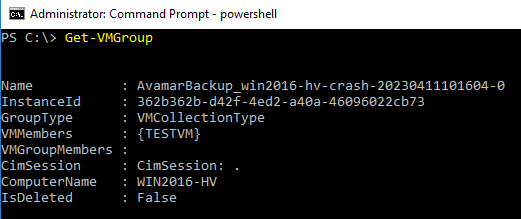
Get-VMGroup
As per the output below, there is one VM Collection Group named
AvamarBackup_win2016-hv-crash-20230411101604-0.
- To list VM Checkpoints for all VMs on the Node:
Get-VM | Get-VMSnapshot
As per the below output, there is one Recovery Checkpoint for VM (VMTEST), which was created during Avamar Backup (SnapshotType - Recovery).
Similarly, a Recovery Checkpoint is shown in Hyper-V Manager:
- In a clustered Hyper-V environment, run the commands above on each Hyper-V Node (member of the cluster).
Prodotti interessati
AvamarProdotti
Avamar ClientProprietà dell'articolo
Numero articolo: 000212171
Tipo di articolo: How To
Ultima modifica: 27 mar 2024
Versione: 3
Trova risposta alle tue domande dagli altri utenti Dell
Support Services
Verifica che il dispositivo sia coperto dai Servizi di supporto.