NetWorker: Il backup di bootstrap non riesce sul server Linux in cluster dopo l'aggiornamento "nsrauthcasm è morto con segnale 13"
Riepilogo: Il server NetWorker viene implementato su un server NetWorker Linux in cluster. Dopo l'aggiornamento di NetWorkerr, il backup di bootstrap di Server Protection ha esito negativo. Anche i comandi del servizio di autenticazione (nsrlogin, authc_config, authc_mgmt) hanno esito negativo, l'errore restituito è che il servizio di autenticazione non è disponibile con l'errore HTTP 404 (non trovato). ...
Questo articolo si applica a
Questo articolo non si applica a
Questo articolo non è legato a un prodotto specifico.
Non tutte le versioni del prodotto sono identificate in questo articolo.
Sintomi
Il server NetWorker viene implementato su un Red Hat Pacemaker (pcs) Cluster ad alta disponibilità.
Dopo aver eseguito un aggiornamento di NetWorker, si osservano i seguenti sintomi.
L'avvio del servizio NetWorker ha esito positivo, tutte le risorse del cluster vengono visualizzate come "avviate" in uno dei nodi del cluster:
root@NWrhelNodeG:~# pcs resource
* Resource Group: NW_group:
* fs (ocf::heartbeat:Filesystem): Started NWrhelNodeG.emclab.local
* ip (ocf::heartbeat:IPaddr): Started NWrhelNodeG.emclab.local
* nws (ocf::EMC_NetWorker:Server): Started NWrhelNodeG.emclab.local
nsrlogin il comando ha esito negativo con errore HTTP 404 (non trovato):
[admin@NWrhelNodeG linux_x86_64]$ nsrlogin -u Administrator
130136:nsrlogin: Please enter password: HIDDEN_PASSWORD
117849:nsrlogin: Authentication library error: GET failed with HTTP-ERROR: 404 Server Message : Could not parse server-response from json string Server Message : Make sure that server is running
Il backup di bootstrap "Server Protection" non riesce a eseguire il backup di authcdb:
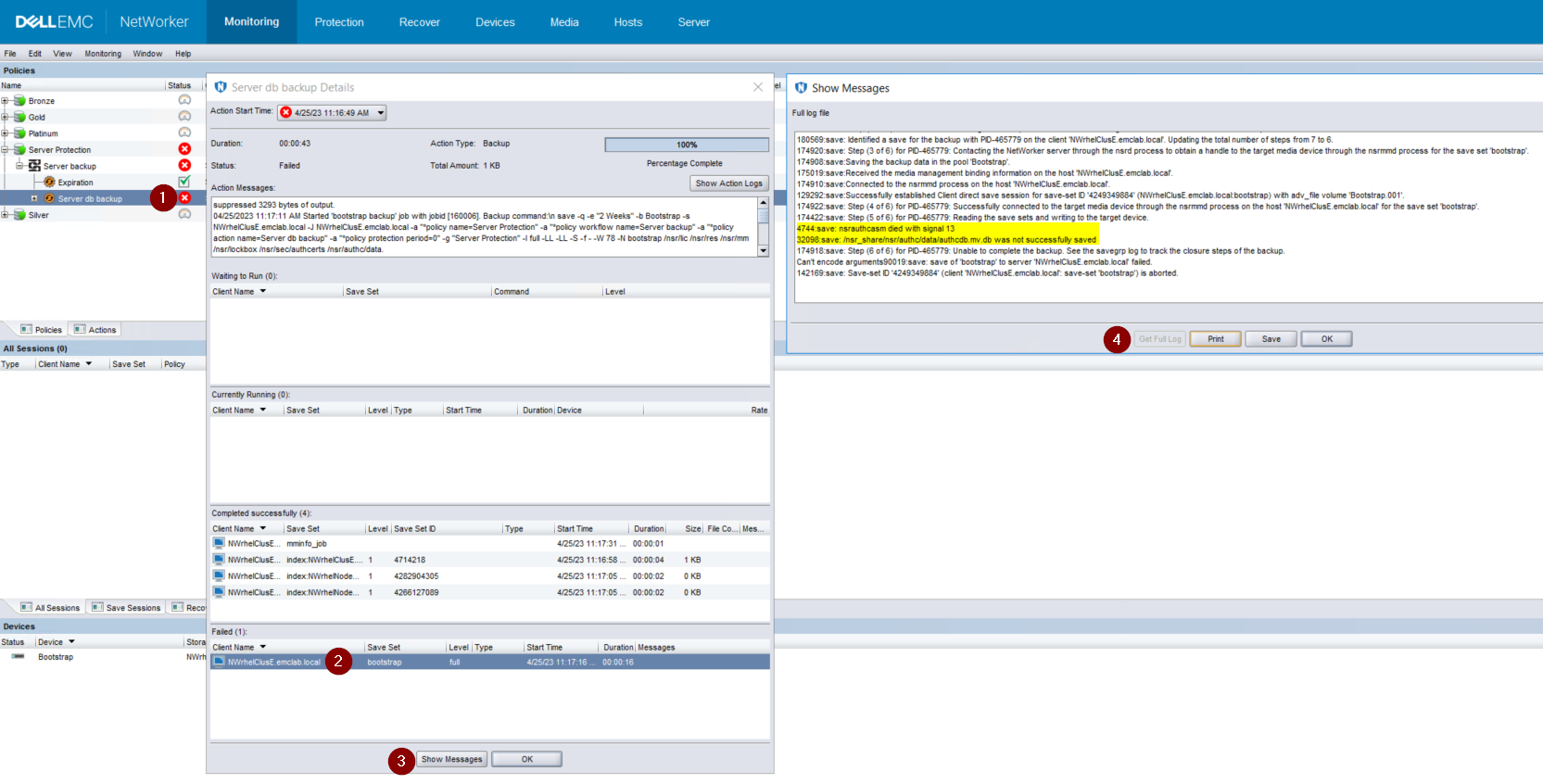
Figura 1. Il backup di bootstrap non riesce a eseguire il backup di
authcdb
Causa
Le modifiche apportate ad AUTHC durante l'aggiornamento non sono state sottoposte a commit per la condivisione del cluster authcdb. Durante il processo di aggiornamento, la risorsa PCS NWS è disabilitata o la risorsa cluster PCS è completamente arrestata. Quando NWS non è in esecuzione, il /nsr directory è simbolicamente collegata (puntando) a /nsr.NetWorker.local anziché /nsr_share.
/nsr.NetWorker.local sono i nodi fisici /nsr e contiene solo le cartelle relative al client. A /nsr.NetWorker.local/authc ma non contiene i file specifici della cartella del server NetWorker authcdb, si trova sotto /nsr_share/nsr/authc.
Dopo l'aggiornamento di NetWorker, AUTHC si aspetta la "versione B" dei file AUTHC, ma vede la "versione A" dei file precedenti l'aggiornamento.
Risoluzione
- Arrestare i servizi NetWorker:
pcs resource disable nws
- Su ogni nodo del cluster, rinominare il
/opt/nsr/authc-server/conf/h2_db.properties:
mv /opt/nsr/authc-server/conf/h2_db.properties /opt/nsr/authc-server/conf/h2_db.properties.bak
- Su ogni nodo, eseguire nuovamente il comando
/opt/nsr/authc-server/scripts/authc_configure.shper riconfigurare AUTHC. Ciò non elimina le impostazioni o le configurazioni eseguite in precedenza in AUTHC.
Sul nodo attivo, l'aspetto è simile al seguente:
root@NWrhelNodeH:~# /opt/nsr/authc-server/scripts/authc_configure.sh

Specify the directory where the Java Standard Edition Runtime Environment (JRE) software is installed [/opt/nre/java/latest]:

The installation process will install an Apache Tomcat instance. For optimum security, EMC NetWorker Authentication Service will use a non-root user (nsrtomcat) to start the Apache Tomcat instance. If your system has special user security requirements, ensure that proper operational permissions are granted to this non-root user (nsrtomcat).
Please refer to NetWorker Installation Guide.

WARNING: Port 9090 is already in use.

Do you wish to specify a different port number [y]? n

The Apache Tomcat will use "NWrhelNodeH.emclab.local" as the host name. The Apache Tomcat will use "9090" as the port number.

The NetWorker Authentication Service requires a keystore file to configure encryption and to provide SSL support.

EMC recommends that you specify a keystore password that has a minimum of six characters.

Do you want to use the existing keystore /nsr/authc/conf/authc.keystore [y]?

Specify password for the existing keystore:
The install will use the existing certificate "emcauthctomcat" for Apache Tomcat.
The install will use the existing certificate "emcauthcsaml" for Authentication Service.

Creating the installation log in /opt/nsr/authc-server/logs/install.log.

Performing initialization. Please wait...

The installation completed successfully.
Sui nodi passivi, questo aspetto è simile al seguente:
root@NWrhelNodeG:~# /opt/nsr/authc-server/scripts/authc_configure.sh

Specify the directory where the Java Standard Edition Runtime Environment (JRE) software is installed [/opt/nre/java/latest]:

The installation process will install an Apache Tomcat instance. For optimum security, EMC NetWorker Authentication Service will use a non-root user (nsrtomcat) to start the Apache Tomcat instance. If your system has special user security requirements, ensure that proper operational permissions are granted to this non-root user (nsrtomcat).
Please refer to NetWorker Installation Guide.

The Apache Tomcat will use "NWrhelNodeG.emclab.local" as the host name. The Apache Tomcat will use "9090" as the port number.

The NetWorker Authentication Service requires a keystore file to configure encryption and to provide SSL support.

EMC recommends that you specify a keystore password that has a minimum of six characters.

Do you want to use the existing keystore /nsr/authc/conf/authc.keystore [y]?

Specify password for the existing keystore:
The install will use the existing certificate "emcauthctomcat" for Apache Tomcat.
The install will use the existing certificate "emcauthcsaml" for Authentication Service.

The NetWorker Authentication Service defines automatically an administrator user account named administrator in the NetWorker Authentication Service local database. This account is specific to the administration of the NetWorker Authentication Service, and is not related to other administrator accounts on this system.

*******************************************************************************************
Password criteria: Minimum required characters - 9 and Maximum allowed characters - 126 Minimum [alphabetic - 2, Uppercase - 1, Lowercase - 1, Numeric - 1, Special character - 1]
********************************************************************************************

Specify an initial password for administrator:
Confirm the password:

Creating the installation log in /opt/nsr/authc-server/logs/install.log.

Performing initialization. Please wait...

The installation completed successfully.
NOTA: Sul nodo passivo viene richiesto di creare una nuova password per l'account amministratore NetWorker. Ciò non significa che la password esistente venga persa. Questo accade perché il
authcdb utilizzato dal cluster è in /nsr_share/nsr/authc che esiste solo sul nodo attivo. Quando un nodo passivo diventa il nuovo nodo attivo, utilizza il nodo condiviso authcdb. La colonna authc_configure.sh lo script viene eseguito su ogni nodo per ricreare il /opt/nsr/authc-server/conf/h2_db.properties che è locale per ogni nodo.
- Avviare la risorsa NWS:
pcs resource enable nws
- Verificare che la risorsa NWS sia stata avviata:
pcs resource

root@NWrhelNodeH:~# pcs resource
   * Resource Group: NW_group:
      * fs (ocf::heartbeat:Filesystem): Started
NWrhelNodeH.emclab.local
      * ip (ocf::heartbeat:IPaddr): Started
NWrhelNodeH.emclab.local
      * nws (ocf::EMC_NetWorker:Server): Started
NWrhelNodeH.emclab.local
nsrlogin I tentativi e i backup di bootstrap dovrebbero avere esito positivo.
Informazioni aggiuntive
NetWorker: Red Hat Pacemaker Cluster: come aggiornare il server NetWorker e best practice
Networker: Guida alla risoluzione dei problemi di Red Hat Cluster Service
Networker: Guida alla risoluzione dei problemi di Red Hat Cluster Service
Prodotti interessati
NetWorkerProdotti
NetWorker Family, NetWorker SeriesProprietà dell'articolo
Numero articolo: 000212755
Tipo di articolo: Solution
Ultima modifica: 12 mar 2026
Versione: 7
Trova risposta alle tue domande dagli altri utenti Dell
Support Services
Verifica che il dispositivo sia coperto dai Servizi di supporto.