Network KVM CLI Command Line Cannot Auto-Resume
Riepilogo: This article provides information about the network Keyboard/Video/Mouse (KVM) CLI command features of Dell Display and Peripheral Manager (DDPM) for macOS.
Questo articolo si applica a
Questo articolo non si applica a
Questo articolo non è legato a un prodotto specifico.
Non tutte le versioni del prodotto sono identificate in questo articolo.
Sintomi
DDPM for macOS users might experience gray UI in "KVM Settings > Manage Cluster" when the user uses the Network KVM CLI command line to set Auto Connect or Content Transfer disabled.
Scenario 1:
When the user tries to use the command line to set /NetworkKVMAutoConnect disabled, the user sees that the connected personal computer is disconnected and the Auto Connect in Manage Cluster is gray out and has not unticked.
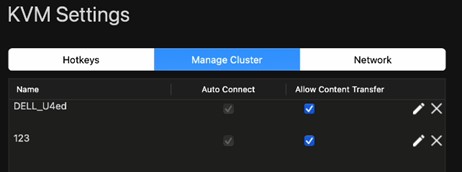
(Figure 1 - KVM Settings)
Scenario 2:
When a user tries to use, command line to set /NetworkKVMContentTransfer disabled, the user sees that the connected personal computer is disconnected and the Allowed Content Transfer in Manage Cluster is gray out and has not unticked.
Causa
When stopping Network KVM, it saves new recent cluster settings and overrides the settings that updated by CLI.
Risoluzione
Updating the DDPM to version 1.3.2.0015, A00 or later on the computer resolves the issue. To download and install the driver, reference How to Download and Install Dell Drivers.
Prodotti interessati
Dell C2423H, Dell C2723H Monitor, Dell C5519QA, Dell 24 Video Conferencing Monitor C2422HE, Dell 27 Video Conferencing Monitor C2722DE, Dell 34 Video Conferencing Curved Monitor C3422WE, Dell C5519Q, Dell C5522QT, Dell C6522QT, Dell C7520QT
, Dell C8621QT, Dell Display and Peripheral Manager, Dell P2424HEB, Dell P2425E, Dell P2425HE, Dell P2724DEB, Dell P2725HE, Dell P3424WEB, Dell 27 Plus 4K USB-C Monitor S2725QC, Dell 32 Plus 4K QD-OLED Monitor S3225QC, Dell 34 Plus USB-C Monitor S3425DW
...
Proprietà dell'articolo
Numero articolo: 000223601
Tipo di articolo: Solution
Ultima modifica: 15 set 2025
Versione: 5
Trova risposta alle tue domande dagli altri utenti Dell
Support Services
Verifica che il dispositivo sia coperto dai Servizi di supporto.