Intune kan Dell Optimizer versie 4.2.2 niet implementeren wanneer het is gedownload van de Microsoft Store
Riepilogo: Informatie over Intune die Dell Optimizer versie 4.2.2 niet implementeert als deze is gedownload uit de Microsoft Store.
Questo articolo si applica a
Questo articolo non si applica a
Questo articolo non è legato a un prodotto specifico.
Non tutte le versioni del prodotto sono identificate in questo articolo.
Sintomi
Fout bij app-versie heeft geen geldige nieuwste pakketversie
Intune geeft een foutmelding weer: 'De geselecteerde app heeft geen geldige nieuwste pakketversie' (Afbeelding 1).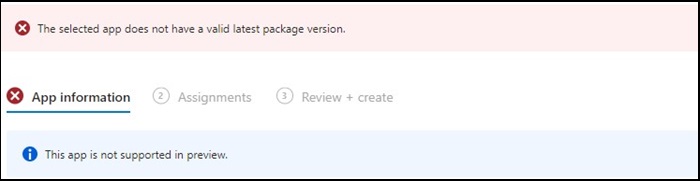
Figuur 1
Opmerking: Exclusief beschikbaar op bepaalde Dell Latitude, Precision, OptiPlex en Rugged pc's.
Causa
Dell Optimizer heeft de Intune-verificatie niet doorstaan die vereist dat apps op alle hardware (Dell en niet-Dell) geïnstalleerd moeten worden.
Risoluzione
Dell Optimizer handmatig implementeren
Als tijdelijke oplossing kan de IT-beheerder het volgende proberen om Dell Optimizer handmatig te implementeren via Intune.
- Download het Dell Optimizer-installatieprogramma van Dell.com
- Volg de onderstaande instructies:
- Installeer de software met deze opdracht:
Install command: Dell-Optimizer-Application_xxxxx_WIN_x.x.x.x_A00.EXE /passthrough /silent /InstallDotNet=true /FACTORY=TRUE

Opmerking: Om de installatie ongedaan te maken, gebruikt u de volgende opdracht:
Uninstall command: Dell-Optimizer-Application_xxxxx_WIN_x.x.x.x_A00.EXE /passthrough /silent /remove
Prodotti interessati
Alienware, Inspiron, OptiPlex, Vostro, XPS, G Series, G Series, Alienware, Inspiron, Latitude, Vostro, XPS, Fixed Workstations, Mobile WorkstationsProprietà dell'articolo
Numero articolo: 000224821
Tipo di articolo: Solution
Ultima modifica: 17 lug 2025
Versione: 7
Trova risposta alle tue domande dagli altri utenti Dell
Support Services
Verifica che il dispositivo sia coperto dai Servizi di supporto.