Dell Client Device Managerをインストールする方法
Riepilogo: この記事では、Dell Client Device Manager (DCDM)のインストールについて説明します。
Questo articolo si applica a
Questo articolo non si applica a
Questo articolo non è legato a un prodotto specifico.
Non tutte le versioni del prodotto sono identificate in questo articolo.
Istruzioni
対象製品:
- Dell クライアントデバイスマネージャ
- ダウンロード と 解凍:
- 管理者としてコマンド プロンプトを実行します。
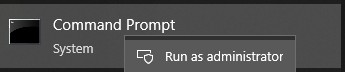
- DCDMを解凍した場所にディレクトリーを変更(cd)します。

- 必要に応じて、以下のパラメーターまたは例を使用して 、PowerShellスクリプトを実行します
powershell.exe -executionpolicy Bypass -windowstyle hidden -noninteractive -nologo -file "dcdm_deployment.ps1" -action -modules

| パラメータ | 説明 |
|---|---|
| -help | オプション:パラメーターの説明を表示します |
| -アクション | 必須:実行するアクション(インストールまたはアンインストール)を指定します |
| -モジュール | オプション 含めるモジュールを指定します。デフォルト(DCDMCS、DCDMU、DCDMS) |
| -logpath | オプション:デフォルトはC:ProgramData\Dell\ClientDeviceManagerです。ログ ファイルのパスを指定します |
| -詳細ログ | オプション:コンソールでのログ表示を有効にします(TrueまたはFalse) |
| -debuglevel | オプション:デフォルトはallです。デバッグ情報のレベルを指定します |
| -テレメトリー同意 | 省略可能: 既定値は true です。テレメトリーの同意を示します |
| モジュール | 説明 | モジュールは次に依存します |
|---|---|---|
| DCDMCsの | Dell Client Device Managerコア サービス(旧Dell Core Service(DCS)) | 該当なしコア コンポーネントが必要 |
| DCDMSの | Dell Client Device Manager Security(旧Dell Trusted Device(DTD)) | DCDMCsの |
| DCDMUの | Dell Client Device Manager Update(旧Dell Command Update(DCU)) | DCDMCS、DCDMS |
例:
すべてのモジュールをインストールまたはアップデートし、DCDMUのテレメトリーを送信する
powershell.exe -executionpolicy Bypass -windowstyle hidden -noninteractive -nologo -file "dcdm_deployment.ps1" -action "install"
テレメトリーなしですべてのモジュールをインストールまたはアップデートする
powershell.exe -executionpolicy Bypass -windowstyle hidden -noninteractive -nologo -file "dcdm_deployment.ps1" -action "install" -telemetryconsent "false"
Dell Client Device Managerのインストールまたはアップデート |セキュリティ(DCDMS)
powershell.exe -executionpolicy Bypass -windowstyle hidden -noninteractive -nologo -file "dcdm_deployment.ps1" -action "install" -modules "DCDMS"
Dell Client Device Managerのアンインストール |セキュリティ(DCDMS)
powershell.exe -executionpolicy Bypass -windowstyle hidden -noninteractive -nologo -file "dcdm_deployment.ps1" -action "uninstall" -modules "DCDMS"
すべてのモジュールをアンインストールする
powershell.exe -executionpolicy Bypass -windowstyle hidden -noninteractive -nologo -file "dcdm_deployment.ps1" -action "uninstall"
Prodotti interessati
Dell Client Device ManagerProprietà dell'articolo
Numero articolo: 000299185
Tipo di articolo: How To
Ultima modifica: 22 mag 2026
Versione: 3
Trova risposta alle tue domande dagli altri utenti Dell
Support Services
Verifica che il dispositivo sia coperto dai Servizi di supporto.