Windows Studio-effekter mangler på en bærbar Dell-computer
Riepilogo: Få mere at vide om, hvordan du gendanner Windows Studio-effekter, der mangler på en bærbar Dell-pc.
Questo articolo si applica a
Questo articolo non si applica a
Questo articolo non è legato a un prodotto specifico.
Non tutte le versioni del prodotto sono identificate in questo articolo.
Sintomi
Windows Studio Effects-indstillinger mangler muligvis i afsnittet USB-videoenhed i Indstillinger.
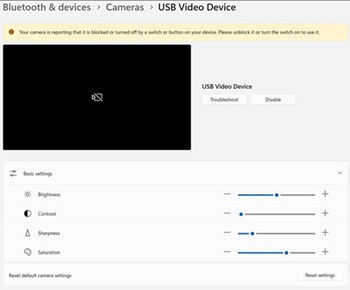
Berørte platforme:
- Dell 14 DC14255
- Vigtige Dell Pro 14-PV14255
- Dell Pro 14 PC14255
- Dell Pro 16 PC16255
Causa
Ingen tilgængelige oplysninger om årsag.
Risoluzione
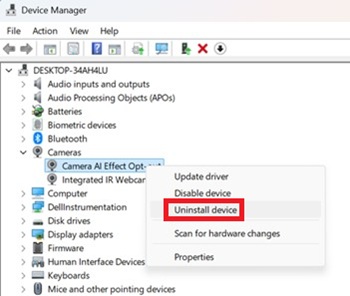
- Åbn Enhedshåndtering. Højreklik på Fravalg af Camera AI Effect, og vælg Afinstaller enhed.
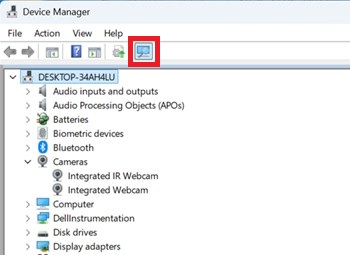
- Tryk på scanningsknappen for at sikre, at der findes et integreret IR-webkamera .
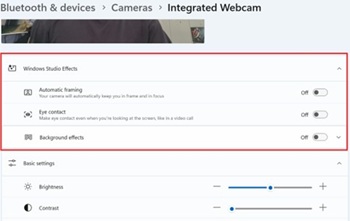
- Bekræft, om indstillingerne for Windows Studio-effekter er tilgængelige under Indstillinger.
Prodotti interessati
Dell 14 DC14255, Dell Pro 14 PC14255, Dell Pro 16 PC16255, Dell Pro 14 Essential PV14255Proprietà dell'articolo
Numero articolo: 000407521
Tipo di articolo: Solution
Ultima modifica: 09 gen 2026
Versione: 1
Trova risposta alle tue domande dagli altri utenti Dell
Support Services
Verifica che il dispositivo sia coperto dai Servizi di supporto.