如何确定 Dell Encryption Enterprise 或 Dell Encryption Personal 版本
요약: 了解如何按照以下说明识别 Dell Encryption Enterprise 或 Dell Encryption Personal 的版本。
이 문서는 다음에 적용됩니다.
이 문서는 다음에 적용되지 않습니다.
이 문서는 특정 제품과 관련이 없습니다.
모든 제품 버전이 이 문서에 나와 있는 것은 아닙니다.
지침
了解 Dell Encryption Enterprise(以前称为 Dell Data Protection Enterprise Edition)或 Dell Encryption Personal(以前称为 Dell Data Protection Personal Edition)的版本使用户能够:
- 识别已知问题
- 确定UI差异
- 了解工作流程更改
- 验证系统要求
受影响的产品:
- Dell Encryption Enterprise
- Dell Encryption Personal
- Dell Data Protection Enterprise Edition
- Dell Data Protection Personal Edition
受影响的操作系统:
- Windows
可以通过产品用户界面 (UI) 或产品安装程序确定版本。单击相应的选项卡以了解更多信息。
UI
注意: 必须先安装 Dell Encryption Enterprise 或 Dell Encryption Personal,然后才能通过 UI 识别版本。
- 登录 Windows 计算机。
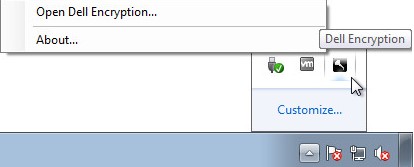
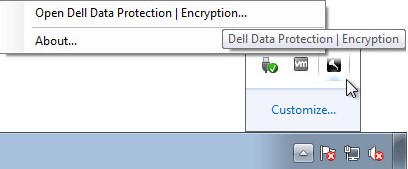
- 在 Windows 系统托盘中,右键单击 Dell Encryption (以前称为 Dell Data Protection |加密)图标,然后选择 Open Dell Encryption 或 Open Dell Data Protection |加密。
- 下图显示了 Dell Encryption选项。
- 下图显示了 Dell Data Protection Encryption选项。
- 下图显示了 Dell Encryption选项。
- 在产品 UI 中,单击问号图标,然后记录 About Version后显示的版本号。前三个数字是要记录的最为重要的数字。在此示例中,8.15.0 即为前三个数字。
 注意: 您的客户端的版本可能与上面的屏幕截图不同。
安装程序
注意: 有关下载安装程序的信息,请参阅如何 下载 Dell Encryption Enterprise 或 Dell Encryption Personal。
- 右键单击安装程序>,<然后选择属性。
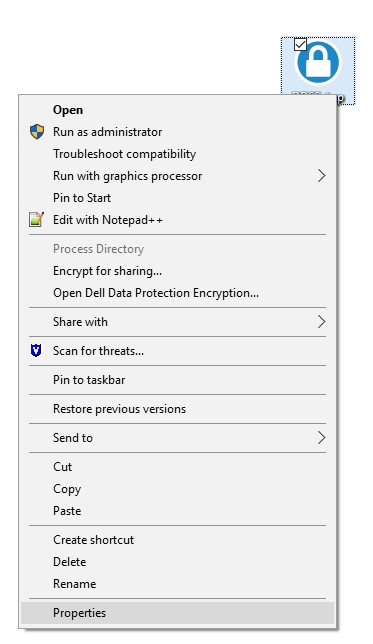 注意: <安装程序> =
- Dell Encryption Enterprise =
DDSSetup.exe - Dell Encryption Personal =
DDSSetup.exe - Dell Data Protection Enterprise Edition =
DDPSetup.exe - Dell Data Protection Personal Edition =
DDPSetup.exe
- Dell Encryption Enterprise =
- 单击详细信息选项卡。

- 记下产品版本。前三个数字是要记录的最为重要的数字。在示例图像中,8.15.0 是前三个数字。
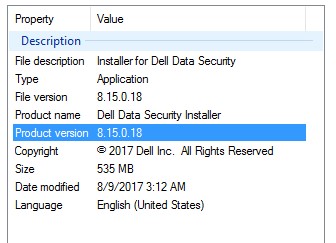 注意: 您的客户端的版本可能与上面的屏幕截图不同。
추가 정보
비디오
해당 제품
Dell Encryption문서 속성
문서 번호: 000124591
문서 유형: How To
마지막 수정 시간: 15 7월 2026
버전: 13
다른 Dell 사용자에게 질문에 대한 답변 찾기
지원 서비스
디바이스에 지원 서비스가 적용되는지 확인하십시오.