How to Stop and Start Services in Dell Security Management Server Virtual
요약: Learn about how to stop or start Dell Security Management Server Virtual services by following these step-by-step instructions.
이 문서는 다음에 적용됩니다.
이 문서는 다음에 적용되지 않습니다.
이 문서는 특정 제품과 관련이 없습니다.
모든 제품 버전이 이 문서에 나와 있는 것은 아닙니다.
지침
This article covers how to stop and start services in Dell Security Management Server Virtual (formerly Dell Data Protection | Virtual Edition).
Affected Products:
- Dell Security Management Server Virtual
- Dell Data Protection | Virtual Edition
Dell Security Management Server Virtual services may be stopped and started for:
- Modifications to the server
- Maintenance
- Troubleshooting
The process to stop and start Dell Security Management Server Virtual services varies between v11.3.0 and Later, v10.2.13 to 11.2.0, v10.2.10 to 10.2.12, v10.1.0 to 10.2.9, v9.11.0 to 10.0.0, and v9.10.1 and Earlier. Click the appropriate version for specific steps. For versioning information, reference How to Identify the Dell Data Security Server Version.
v11.3.0 and Later
A Dell Security Management Server Virtual administrator can either Stop Services or Start Services. Click the appropriate task for more information.
Stop Services
- Log in to the Dell Enterprise Server Virtual administration console.
 Note:
Note:- The default credentials for Dell Security Management Server Virtual are:
- Username:
delluser - Password:
delluser
- Username:
- An administrator can change the default password within the product’s virtual appliance menu.
- The default credentials for Dell Security Management Server Virtual are:
- From the Main Menu, select Basic Configuration and then press Enter.
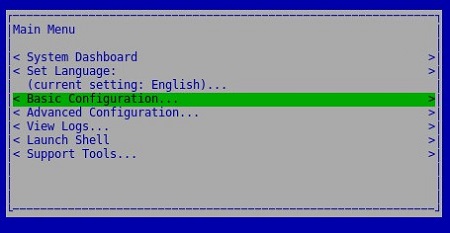
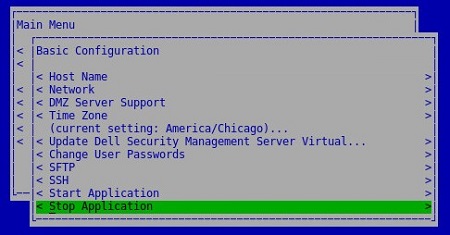
- Select Stop Application and then press Enter.
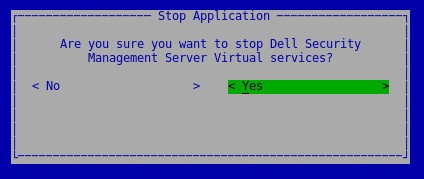
- Select Yes and then press Enter.
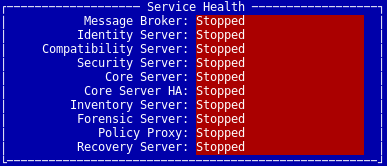
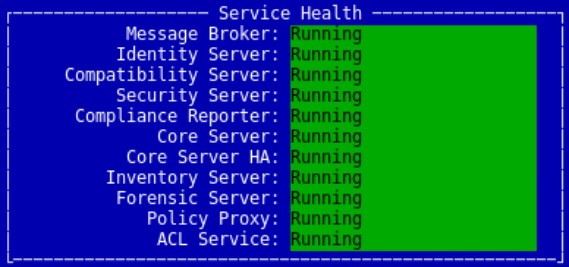
- It may take several minutes for the services to stop. Once services are fully stopped, all services show a status of Stopped.
Start Services
- Log in to the Dell Enterprise Server Virtual administration console.
 Note:
Note:- The default credentials for Dell Security Management Server Virtual are:
- Username:
delluser - Password:
delluser
- Username:
- An administrator can change the default password within the product’s virtual appliance menu.
- The default credentials for Dell Security Management Server Virtual are:
- From the Main Menu, select Basic Configuration and then press Enter.
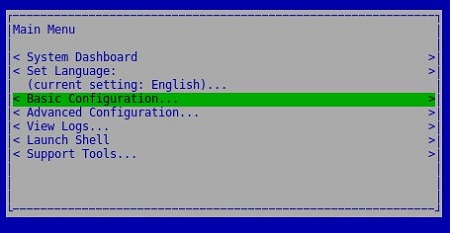
- Select Start Application and then press Enter.
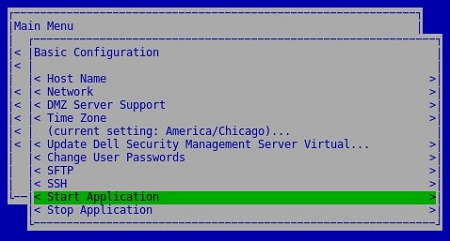
- Select Yes and then press Enter.
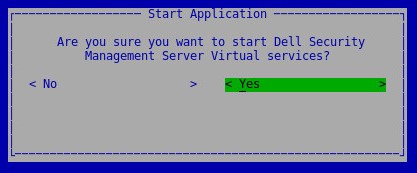
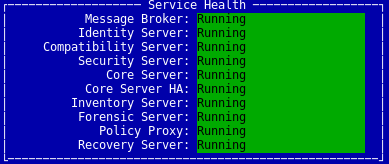
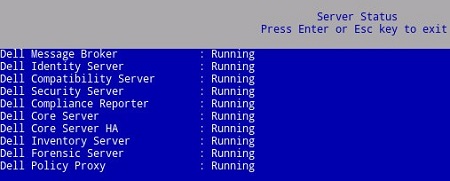
- It may take several minutes for the services to start. Once services are fully started, all services show a status of Running.
v10.2.13 to 11.2.0
A Dell Security Management Server Virtual administrator can either Stop Services or Start Services. Click the appropriate task for more information.
Stop Services
- Log in to the Dell Enterprise Server Virtual administration console.
 Note:
Note:- The default credentials for Dell Security Management Server Virtual are:
- Username:
delluser - Password:
delluser
- Username:
- An administrator can change the default password within the product’s virtual appliance menu.
- The default credentials for Dell Security Management Server Virtual are:
- From the Main Menu, select Basic Configuration and then press Enter.
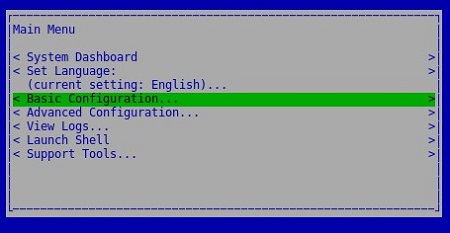
- Select Stop Application and then press Enter.
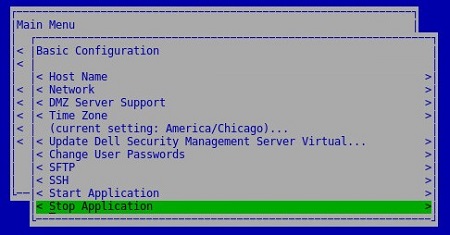
- Select Yes and then press Enter.
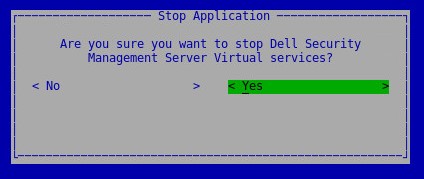
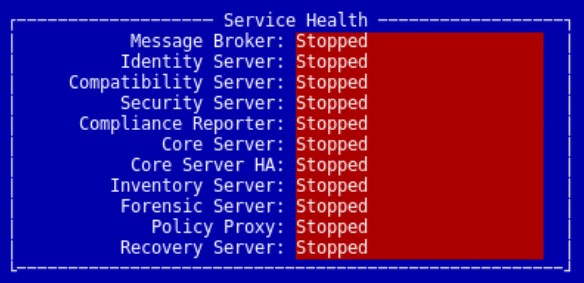
- It may take several minutes for the services to stop. Once services are fully stopped, all services show a status of Stopped.
Start Services
- Log in to the Dell Enterprise Server Virtual administration console.
 Note:
Note:- The default credentials for Dell Security Management Server Virtual are:
- Username:
delluser - Password:
delluser
- Username:
- An administrator can change the default password within the product’s virtual appliance menu.
- The default credentials for Dell Security Management Server Virtual are:
- From the Main Menu, select Basic Configuration and then press Enter.
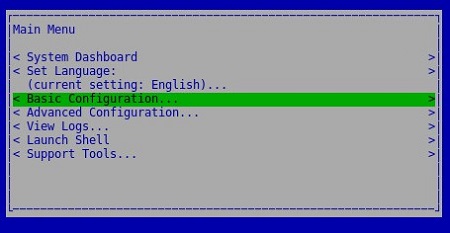
- Select Start Application and then press Enter.

- Select Yes and then press Enter.
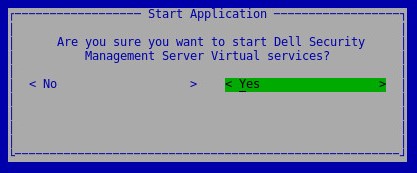
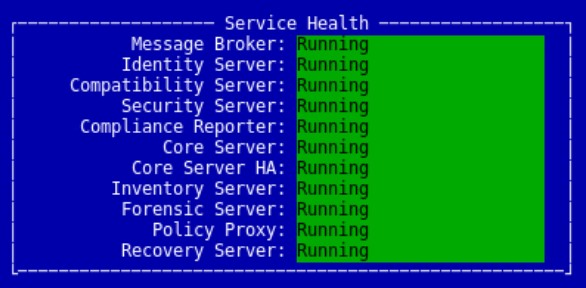
- It may take several minutes for the services to start. Once services are fully started, all services show a status of Running.
v10.2.10 to 10.2.12
A Dell Security Management Server Virtual administrator can either Stop Services or Start Services. Click the appropriate task for more information.
Stop Services
- Log in to the Dell Enterprise Server Virtual administration console.
 Note:
Note:- The default credentials for Dell Security Management Server Virtual are:
- Username:
delluser - Password:
delluser
- Username:
- An administrator can change the default password within the product’s virtual appliance menu.
- The default credentials for Dell Security Management Server Virtual are:
- From the Main Menu, select Basic Configuration and then press Enter.
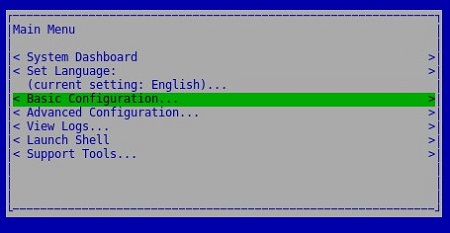
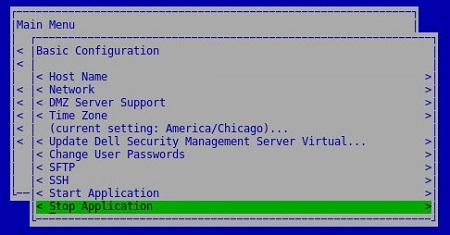
- Select Stop Application and then press Enter.
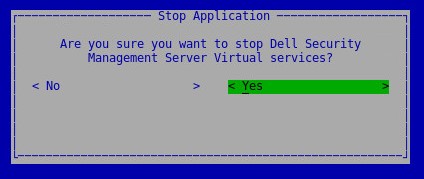
- Select Yes and then press Enter.
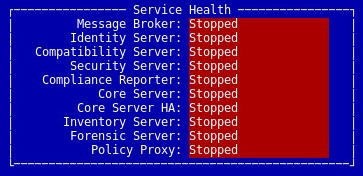
- It may take several minutes for the services to stop. Once services are fully stopped, all services show a status of Stopped.
Start Services
- Log in to the Dell Enterprise Server Virtual administration console.
 Note:
Note:- The default credentials for Dell Security Management Server Virtual are:
- Username:
delluser - Password:
delluser
- Username:
- An administrator can change the default password within the product’s virtual appliance menu.
- The default credentials for Dell Security Management Server Virtual are:
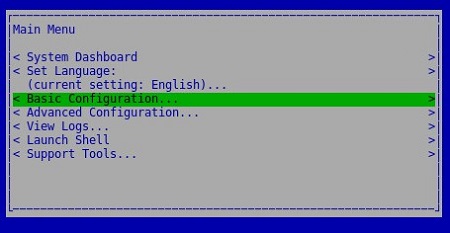
- From the Main Menu, select Basic Configuration and then press Enter.
- Select Start Application and then press Enter.

- Select Yes and then press Enter.
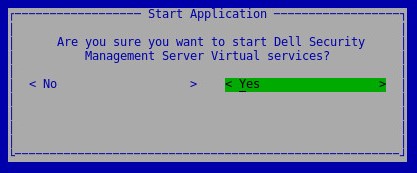
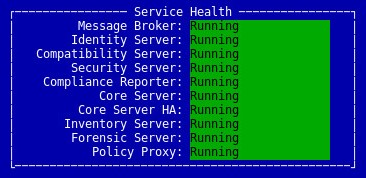
- It may take several minutes for the services to start. Once services are fully started, all services show a status of Running.
v10.1.0 to 10.2.9
A Dell Security Management Server Virtual administrator can either Stop Services or Start Services. Click the appropriate task for more information.
Stop Services
- Log in to the Dell Enterprise Server Virtual administration console.
 Note:
Note:- The default credentials for Dell Security Management Server Virtual are:
- Username:
delluser - Password:
delluser
- Username:
- An administrator can change the default password within the product’s virtual appliance menu.
- The default credentials for Dell Security Management Server Virtual are:
- From the Main Menu, select Basic Configuration and then press Enter.
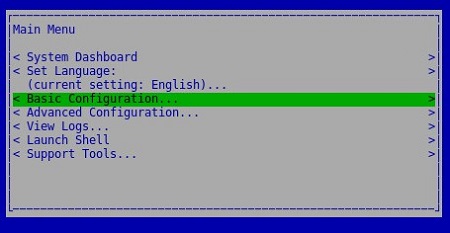
- Select Stop Application and then press Enter
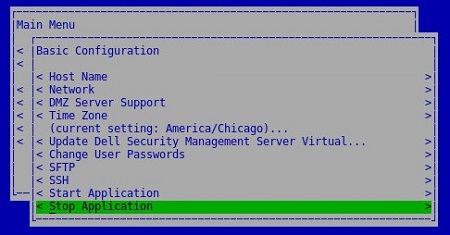
- Select Yes and then press Enter.
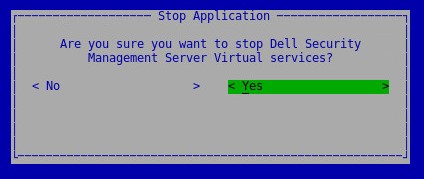
- It may take several minutes for the services to stop. Once services are fully stopped, all services show a status of Stopped.

Start Services
- Log in to the Dell Enterprise Server Virtual administration console.
 Note:
Note:- The default credentials for Dell Security Management Server Virtual are:
- Username:
delluser - Password:
delluser
- Username:
- An administrator can change the default password within the product’s virtual appliance menu.
- The default credentials for Dell Security Management Server Virtual are:
- From the Main Menu, select Basic Configuration and then press Enter.
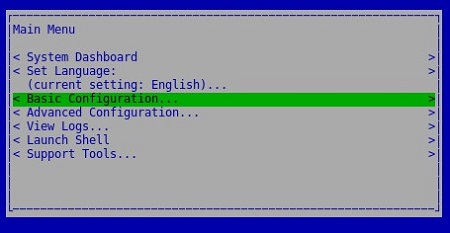
- Select Start Application and then press Enter.
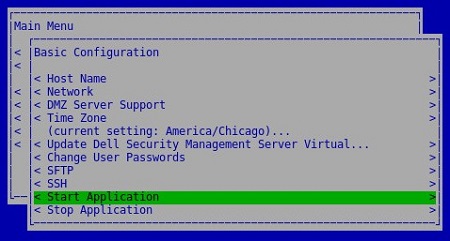
- Select Yes and then press Enter.
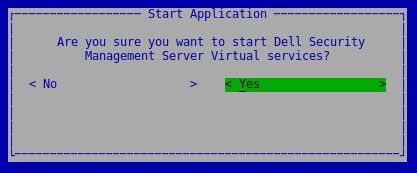
- It may take several minutes for the services to start. Once services are fully started, all services show a status of Running.
v9.11.0 to 10.0.0
A Dell Security Management Server Virtual administrator can either Stop Services or Start Services. Click the appropriate task for more information.
Stop Services
- Log in to the Dell Enterprise Server Virtual administration console.
 Note:
Note:- The default credentials for Dell Security Management Server Virtual are:
- Username:
delluser - Password:
delluser
- Username:
- An administrator can change the default password within the product’s virtual appliance menu.
- The default credentials for Dell Security Management Server Virtual are:
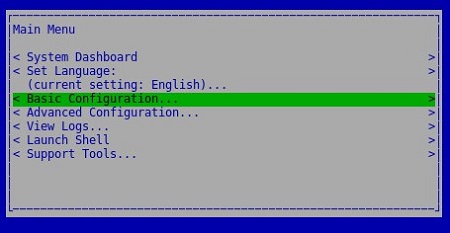
- From the Main Menu, select Basic Configuration and then press Enter.
- Select Stop Application and then press Enter.

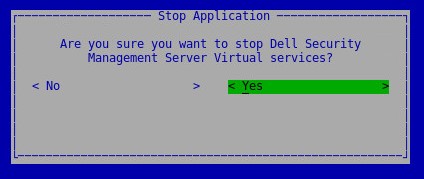
- Select Yes and then press Enter.
- It may take several minutes for the services to stop. Once services are fully stopped, all services show a status of Stopped.

Start Services
- Log in to the Dell Enterprise Server Virtual administration console.
 Note:
Note:- The default credentials for Dell Security Management Server Virtual are:
- Username:
delluser - Password:
delluser
- Username:
- An administrator can change the default password within the product’s virtual appliance menu.
- The default credentials for Dell Security Management Server Virtual are:
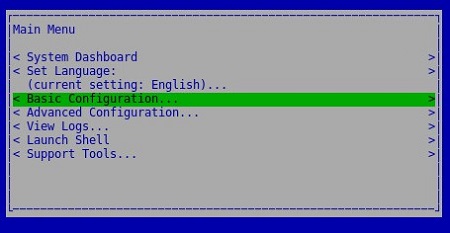
- From the Main Menu, select Basic Configuration and then press Enter.
- Select Start Application and then press Enter.
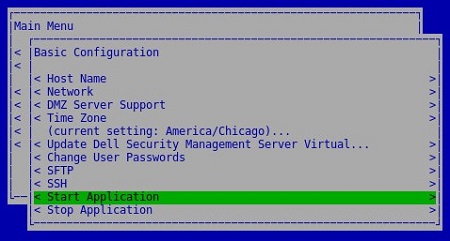
- Select Yes and then press Enter.

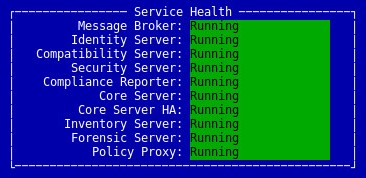
- It may take several minutes for the services to start. Once services are fully started, all services show a status of Running.
v9.10.1 and Earlier
A Dell Security Management Server Virtual administrator can either Stop Services or Start Services. Click the appropriate task for more information.
Stop Services
- Log in to the Dell Enterprise Server Virtual administration console.
 Note:
Note:- The default credentials for Dell Security Management Server Virtual are:
- Username:
ddpuser - Password:
ddpuser
- Username:
- An administrator can change the default password within the product’s virtual appliance menu.
- The default credentials for Dell Security Management Server Virtual are:
- From the Main Menu, select Basic Configuration and then press Enter.
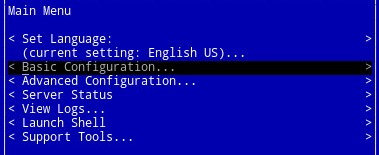
- Select Stop Application and then press Enter.

- Select Yes and then press Enter.
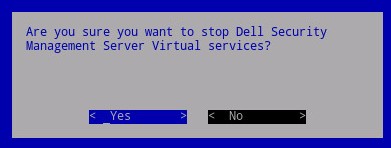
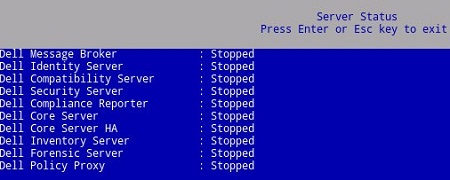
- It may take several minutes for the services to stop. Once services are fully stopped, all services show a status of Stopped.
Start Services
- Log in to the Dell Enterprise Server Virtual administration console.
 Note:
Note:- The default credentials for Dell Security Management Server Virtual are:
- Username:
ddpuser - Password:
ddpuser
- Username:
- An administrator can change the default password within the product’s virtual appliance menu.
- The default credentials for Dell Security Management Server Virtual are:
- From the Main Menu, select Basic Configuration and then press Enter.
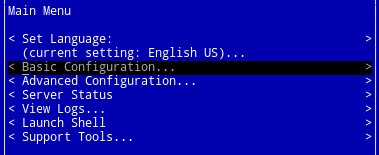
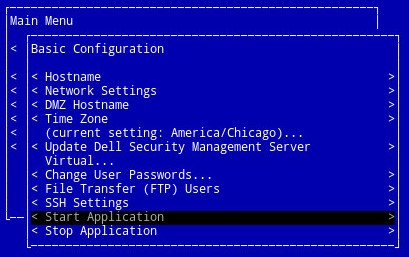
- Select Start Application and then press Enter.
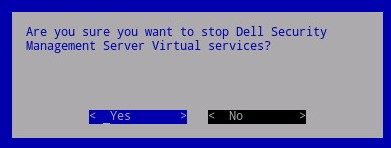
- Select Yes and then press Enter.
- It may take several minutes for the services to start. Once services are fully started, all services show a status of Running.
To contact support, reference Dell Data Security International Support Phone Numbers.
Go to TechDirect to generate a technical support request online.
For additional insights and resources, join the Dell Security Community Forum.
해당 제품
Dell Encryption문서 속성
문서 번호: 000124905
문서 유형: How To
마지막 수정 시간: 05 6월 2025
버전: 15
다른 Dell 사용자에게 질문에 대한 답변 찾기
지원 서비스
디바이스에 지원 서비스가 적용되는지 확인하십시오.