How to boot to an external device using USB TYPE-C connection
요약: BIOS settings to select to boot to an external device using USB TYPE-C connection for XPS, Precision, and Latitude laptops.
이 문서는 다음에 적용됩니다.
이 문서는 다음에 적용되지 않습니다.
이 문서는 특정 제품과 관련이 없습니다.
모든 제품 버전이 이 문서에 나와 있는 것은 아닙니다.
증상
Follow the steps provided in this article to boot to an external device using USB TYPE-C connection for XPS, Precision, and Latitude laptops.
Cannot boot to an external USB-C Connected device.
XPS, Precision, and Latitude users may report that they are unable to boot to externally connected USB Type-C devices.
The computer may report a "Device not identified" error.
원인
The default specification bypasses the USB boot sequence to reduce the boot times in the default configuration. Due to this default configuration, the computer does not boot to the external device.
해결
Enable below two options to support boot from an external device.
- At boot, Press the F2 key (or alternately press the F12 key then select the option to enter the BIOS setup).
- In POST Behavior, Select - Fastboot the select the Thorough option (Figure 1):
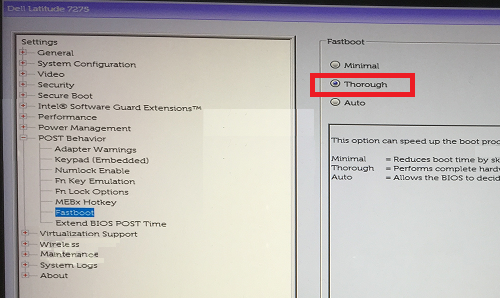
Figure 1: Select the Thorough setting for the Fastboot configuration in the BIOS - In System Configuration -Select USB/Thunderbolt Configuration -Enable Thunderbolt Boot Support (Figure 2):

Figure 2: Enable Thunderbolt Boot Support under the USB/Thunderbolt Configuration settings in the BIOSNote: You may also need to check to Enable USB Boot Support to recognize the USB boot device. - In the General Tab, Advanced Boot Configuration, check Enable Legacy Option ROMs & Enable UEFI Network Stack if not already checked (Figure 3):

Figure 3: Enable UEFI Network Stack under the Advanced Boot Options settings in the BIOS - Reboot the computer, the USB Type-C device should now appear in the boot options.
See these Dell Knowledge Base articles for related information:
해당 제품
Latitude 7275, Precision 3520, Precision 5520, Precision 3510, Precision 5510, XPS 12 9250문서 속성
문서 번호: 000131221
문서 유형: Solution
마지막 수정 시간: 19 4월 2025
버전: 10
다른 Dell 사용자에게 질문에 대한 답변 찾기
지원 서비스
디바이스에 지원 서비스가 적용되는지 확인하십시오.