PowerFlex: Resource Contention Troubleshooting
요약: PowerFlex Resource Contention Issues and Troubleshooting
이 문서는 다음에 적용됩니다.
이 문서는 다음에 적용되지 않습니다.
이 문서는 특정 제품과 관련이 없습니다.
모든 제품 버전이 이 문서에 나와 있는 것은 아닙니다.
증상
Abnormal behavior from the PowerFlex processes results when PowerFlex processes run into resource contention with other software or hardware components.
The symptoms here can be many and varied. This is a partial list of the symptoms and results
MDM Issues:
- MDM ownership failover occurs as MDM processes become stuck and lose communication with the other MDMs
From exp.0:
Panic in file /emc/svc_flashbld/workspace/ScaleIO-RHEL7/src/mos/umt/mos_umt_sched_thrd.c, line 1798, function mosUmtSchedThrd_SuspendCK, PID 36721.Panic Expression ALWAYS_ASSERT Scheduler guard seems to be dead.

From trc.*
24/02 15:54:16.087919 0:schedThrdGuard_SampleLivnes:01463: WARNING: pThread 0x106d9360(0) in scheduler 0x7fff580c4880, running UMT 0x7f39ad00ceb8, found to be stuck.
24/02 15:54:16.088226 ad417eb8:actorLoop_IsSchedThredStuck:10932: Stuck scheduler thread identified
24/02 15:54:16.088253 ad417eb8:actor_Loop:11257: Lost quorum. ourVoters: 0 votersOwnedByOther: [0,0]
24/02 15:54:16.088299 ---Planned crash, reason: Lost quorum, going down to let another MDM become master ---
- MDM process will disconnect and reconnect constantly over some time
2017-02-23 14:00:43.241 MDM_CLUSTER_LOST_CONNECTION 	WARNING  	The MDM, ID 089012db4d536880, lost connection
2017-02-23 14:00:43.422 MDM_CLUSTER_CONNECTED     	INFO     	The MDM, ID 089012db4d536880, connected
2017-02-23 23:05:25.852 MDM_CLUSTER_LOST_CONNECTION 	WARNING  	The MDM, ID 089012db4d536880, lost connection
2017-02-23 23:05:26.422 MDM_CLUSTER_CONNECTED     	INFO     	The MDM, ID 089012db4d536880, connected
2017-02-24 15:54:16.141 MDM_CLUSTER_LOST_CONNECTION 	WARNING  	The MDM, ID 089012db4d536880, lost connection
2017-02-24 15:54:16.238 MDM_CLUSTER_CONNECTED    	INFO     	The MDM, ID 089012db4d536880, connected
SDS Issues:
- SDS will disconnect and reconnect constantly over some time
2017-02-15 13:18:16.881 SDS_RECONNECTED           INFO     	 SDS: siosds2 (ID 1eb052fe00000001) reconnected
2017-02-16 03:37:37.327 SDS_DECOUPLED             ERROR    	 SDS: siosds2 (id: 1eb052fe00000001) decoupled.
2017-02-16 03:39:54.300 SDS_RECONNECTED           INFO     	 SDS: siosds2 (ID 1eb052fe00000001) reconnected
2017-02-17 04:03:41.757 SDS_DECOUPLED             ERROR    	 SDS: siosds2 (id: 1eb052fe00000001) decoupled.
2017-02-17 04:09:13.604 SDS_RECONNECTED           INFO     	 SDS: siosds2 (ID 1eb052fe00000001) reconnected
- SDS may show oscillating errors in trc files regarding connectivity loss to other SDS nodes:
14/02 19:13:24.096983 1be7eb8:contNet_OscillationNotif:01675: Con 1eb052fe00000005 - Oscillation of type 5 (RPC_LINGERED_1SEC) reported
14/02 19:13:24.196814 1be7eb8:contNet_OscillationNotif:01675: Con 1eb053000000000b - Oscillation of type 5 (RPC_LINGERED_1SEC) reported
14/02 19:13:24.296713 1be7eb8:contNet_OscillationNotif:01675: Con 1eb0530000000007 - Oscillation of type 5 (RPC_LINGERED_1SEC) reported
14/02 21:48:43.917218 afb28eb8:contNet_OscillationNotif:01675: Con 1eb052fe00000007 - Oscillation of type 1 (SOCKET_DOWN) reported
14/02 21:48:43.917296 afb28eb8:contNet_OscillationNotif:01675: Con 1eb052fe00000005 - Oscillation of type 1 (SOCKET_DOWN) reported
- SDS may show deadlocked or stuck threads in trc files:
14/02 19:13:24.147938 9aa4eeb8:netPath_IsKaNeeded:01789: DEBUG ASSERT, Reason:Socket deadlocked. Crashing.
14/02 19:13:24.148113 9aa4eeb8:netPath_IsKaNeeded:01789: DEBUG ASSERT, Reason:Socket deadlocked. Crashing.
14/02 19:13:24.148121 9aa4eeb8:netPath_IsKaNeeded:01789: DEBUG ASSERT, Reason:Socket deadlocked. Crashing.

14/02 20:52:54.097765 242f0eb8:kalive_StartIntr:00346: KA aborted due to stuck sched thread
14/02 21:48:43.510602 7fa30eb8:kalive_StartIntr:00346: KA aborted due to stuck sched thread
14/02 21:48:44.776713 1b67ceb8:kalive_StartIntr:00346: KA aborted due to stuck sched thread

14/02 02:44:41.532007 e2239eb8:contNet_OscillationNotif:01675: Con 1eb052fd00000001 - Oscillation of type 3 (RCV_KA_DISCONNECT) reported
14/02 02:44:43.799135 0:schedThrdGuard_SampleLivnes:01463: WARNING: pThread 0x1a0de10(0) in scheduler 0x7fff01bec400, running UMT 0x7f94e221eeb8, found to be stuck.
14/02 02:44:43.799155 0:schedThrdGuard_SampleLivnes:01463: WARNING: pThread 0x1a0e050(1) in scheduler 0x7fff01bec400, running UMT 0x7f94e2227eb8, found to be stuck.
14/02 02:44:43.799257 e0e38eb8:cont_IsSchedThredStuck:01678: Stuck scheduler thread identified
14/02 02:44:43.799267 e0e38eb8:kalive_StartIntr:00346: KA aborted due to stuck sched thread
- SDS may show "error forking" in trc files:
01/09 00:37:51.329020 0x7f1001c58eb0:mosDbg_BackTraceAllOsThreads:00673: Error forking.
- SDS cannot start due to failure to allocate required memory.
The following are reported in exp log files:
07/09 00:41:52.713502 Panic in file /data/build/workspace/ScaleIO-SLES12-2/src/mos/usr/mos_utils.c, line 235, function mos_AllocPageAlignedOrPanic, PID 25342.Panic Expression pMem != ((void *)0) .
- OS may have some symptoms too in /var/log/messages or System Event logs:
/var/log/messages:
Feb  14 13:25:08 ScaleIO-192-168-1-2 kernel: [7461116.683555] TCP: Possible SYN flooding on port 7072. Sending cookies.
Feb  14 13:25:08 ScaleIO-192-168-1-2 kernel: [7461116.683561] TCP: Possible SYN flooding on port 7072. Sending cookies.
Feb  14 13:25:08 ScaleIO-192-168-1-2 kernel: [7461116.683566] TCP: Possible SYN flooding on port 7072. Sending cookies.
Feb  14 13:25:08 ScaleIO-192-168-1-2 kernel: [7461116.683570] TCP: Possible SYN flooding on port 7072. Sending cookies.
Feb  14 13:27:39 ScaleIO-192-168-1-2 kernel: [7461266.566145] sched: RT throttling activated
The "SYN flooding on port 7072" messages mean that network data packets are being sent to the SDS on this host and the SDS cannot accept the packets on that port. The SDS uses port 7072 by default.
The "RT throttling activated" is a message that the OS scheduler has identified some Real-Time threads hogging the CPU and starving other threads. The OS does this in an attempt to throttle those real-time tasks and keep the OS from hanging or crashing.
SDC Issues:
The SDC can also suffer IO errors when the SDSes disconnect frequently or cannot respond to the SDC quickly enough and are still trying to service the IO blocks it owns.
Impact
The above symptoms can result in DATA_DEGRADED, DATA_FAILED events as well as CLUSTER_DEGRADED.
원인
If all the above symptoms match, it is most likely a CPU or Memory resource starvation issue. Look for third-party applications or processes running that may be starving the CPU and memory from the MDM or SDS processes.
In a virtual environment, a couple of times the CPU had poor performance. This is caused by the SVMs being defined under the same resource pool.
In such cases, we should advise not to put the SVMs under resource pool but to have their dedicated resources as defined in the SVM.
해결
Make sure that the PowerFlex components (MDM, SDS, SDC) have been tuned for performance settings. Consult the Performance "Fine-Tuning" and "Troubleshooting" guides found here.
Configuration review:
- First, confirm the SVM CPU and RAM settings are per best practice:
- SVM CPU settings: (Can be set on the fly)
- Cores per Socket: all in one socket, so "Sockets" has a value of "1". (The overall number of cores is determined by the needs of the SDS it hosts: All-flash, FG, DASCache, Cloudlink, 3.5, etc., all impact (increase) the CPU requirement.)
- Reservation: Select the "Maximum" value in the dropdown
- Shares: High
- This should look like this:
- SVM CPU settings: (Can be set on the fly)
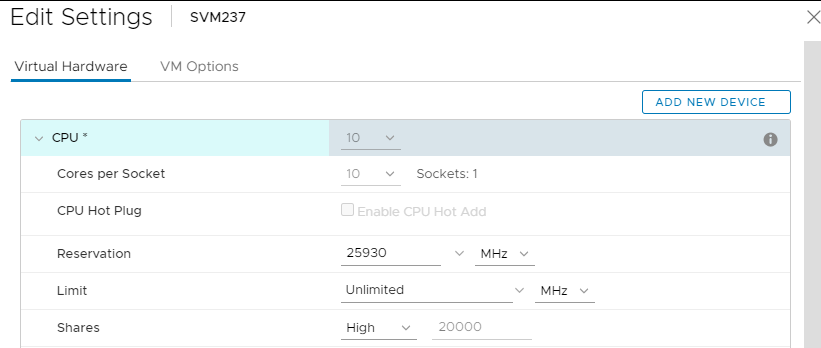
b. SVM RAM settings: (Can be set on the fly)
- Check "Reserve all guest memory (All locked)"
- Shares: High
- This should look like this:

c. In-guest SVM OS memory overcommit settings: (Requires reboot)
-
- Run sysctl -a|grep overcommit to confirm the overcommit settings are correct:
# sysctl -a|grep overcommit vm.overcommit_memory = 2 vm.overcommit_ratio = 100 -
If the above values are not set, some SVM memory will be unusable to the SDS process. Correct this by editing /etc/sysctl.conf and editing/adding the above values
- Place the SDS into maintenance mode, and reboot the SVM to apply the settings
- Confirm by running "cat /etc/sysctl.conf|grep overcommit" after reboot
- Exit maintenance mode
- Run sysctl -a|grep overcommit to confirm the overcommit settings are correct:
- To find these in logs:
- SVM config (vmsupport):
-
A correctly configured SVM's .vmx file will contain the following:
-
- SVM config (vmsupport):
sched.cpu.units = "mhz"
sched.cpu.affinity = "all"
sched.cpu.min = "25930"     (nonzero value that's equal to core speed * the # of cores allocated)
sched.cpu.shares = "high"
sched.mem.min = "24576"     (nonzero value that's a full allocation of configured memory)
sched.mem.minSize = "24576" (nonzero value that's a full allocation of configured memory)
sched.mem.shares = "high"
cpuid.coresPerSocket = "10" (value equal to total # of cores allocated, so they're all in one socket)
sched.mem.pin = "TRUE"
- Incorrect (outdated) SVMconfigs will have the following:
sched.cpu.min = "0"
sched.cpu.shares = "normal"
sched.mem.pin = "FALSE"
sched.mem.shares = "normal"
cpuid.coresPerSocket = "4" (value less than total # of cores allocated, usually 1/2 or 1/4)
In-guest OS configuration (getinfo):
-
Correctly configured memory overcommit:
The file server/sysctl.txt contains:
vm.overcommit_memory = 2
vm.overcommit_ratio = 100
-
PowerFlex uses a considerable amount of RAM for each of the services to run in memory and at high speed. This is why it does not support the use of swap to be used to offload any of the PowerFlex services.
The default setting which is expected for the Storage Only and SVM’s in an HCI solution is an overcommit memory of 2. This way the kernel will not oversubscribe memory, and without settings on no swap being used, ensures no commit_as value is larger than total free/available memory.
The ratio of 100 ensures no swap is also being used as well, for more control to block swap being used.
-
Incorrectly configured memory overcommit:
The file server/sysctl.txt contains:
vm.overcommit_memory = 0  (value not 2)
vm.overcommit_ratio = 50  (value less than 95)
Other possible workarounds:
- Stop the applications causing the CPU/memory resource starvation or check with the application vendor for updates to alleviate the resource hogging.
- Use CPU/Memory trending tools (top/sar/cron jobs/etc.) to find out which application is taking the resources. Intervals of 1 second are recommended to obtain the granularity necessary to show when the issue happens and who is responsible
- Upgrade the host CPU and/or memory to give it more resources
- Re-architect to a two-layer setup rather than a converged system (if SDS/SDC are on the same host)
추가 정보
문서 속성
문서 번호: 000167765
문서 유형: Solution
마지막 수정 시간: 24 11월 2025
버전: 5
다른 Dell 사용자에게 질문에 대한 답변 찾기
지원 서비스
디바이스에 지원 서비스가 적용되는지 확인하십시오.