OptiPlex 7071 Tower: Visual Guide to Your Computer
요약: This article is a visual guide to the external ports and features on the various form factors of the Dell OptiPlex 7071 Tower desktop.
이 문서는 다음에 적용됩니다.
이 문서는 다음에 적용되지 않습니다.
이 문서는 특정 제품과 관련이 없습니다.
모든 제품 버전이 이 문서에 나와 있는 것은 아닙니다.
증상
The following article provides a visual guide to your OptiPlex 7071 Tower Computer and lists the external ports and features of your computer.
원인
Not applicable
해결
Note: For a more detailed description of each location, go to the system manuals at www.dell.com/support.
Table of Contents:
Front View
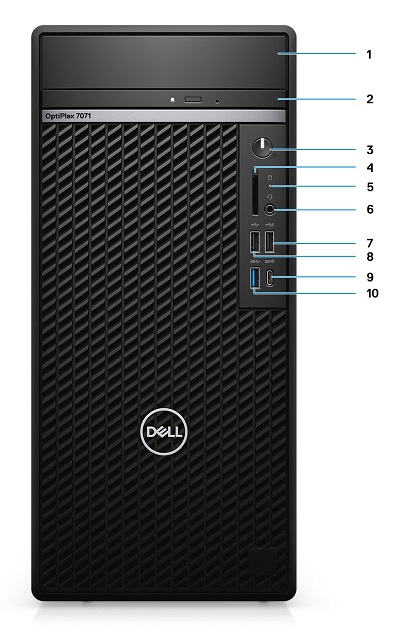
Figure 1: Front View
| 1 | Hard Drive Bracket Cover | 2 | Optical Disc Drive (ODD) |
| 3 | Power Button | 4 | SD 4.0 Card Reader (Optional) |
| 5 | Hard Driver Activity LED | 6 | Headset/Universal Audio Jack Connector |
| 7 | USB 2.0 Connector w/PowerShare | 8 | USB 2.0 Connector |
| 9 | USB 3.1 Gen2 Type-C Connector w/PowerShare | 10 | USB 3.1 Gen1 Connector |
Rear View

Figure 2: Rear View
| 1 | Line-Out Audio Connector | 2 | DisplayPort v1.2 Connector x2 |
| 3 | Optional Module (HDMI 2.0, DP, VGA, or USB Type-C Alt Mode) | 4 | Serial Connector |
| 5 | PS/2 Keyboard Connector | 6 | PS/2 Mouse Connector |
| 7 | USB 3.1 Gen1 Connector x4 | 8 | USB 2.0 Connector w/Smart PowerOn x2 |
| 9 | PCI Expansion Slot | 10 | PCI Express Expansion Slot x3 |
| 11 | Power Connector | 12 | Power Supply (PSU) Diagnostic LED |
| 13 | SMA Connectors x 2 (Optional) | 14 | Kensington Lock |
| 15 | Network (NIC) Ethernet Connector | 16 | Padlock Loop |
| 17 | Release Latch |
Additional Info:
- OptiPlex 7071 Tower Online Manuals and Documents
- OptiPlex 7071 Tower Teardown/Removal guide for customer replaceable units (CRUs)
해당 제품
OptiPlex 7071 Tower문서 속성
문서 번호: 000175208
문서 유형: Solution
마지막 수정 시간: 03 7월 2023
버전: 6
다른 Dell 사용자에게 질문에 대한 답변 찾기
지원 서비스
디바이스에 지원 서비스가 적용되는지 확인하십시오.