Cached User Credentials are not Working for Endpoints with Dell Encryption Enterprise
요약: Once Dell Encryption Enterprise Policy Based Encryption is installed, the user is unable to unlock the endpoint leveraging the cached credential.
이 문서는 다음에 적용됩니다.
이 문서는 다음에 적용되지 않습니다.
이 문서는 특정 제품과 관련이 없습니다.
모든 제품 버전이 이 문서에 나와 있는 것은 아닙니다.
증상
Affected Products:
- Dell Encryption Enterprise
Affected Operating Systems:
- Windows
원인
Not Applicable
해결
On a computer with Dell Encryption Enterprise Policy Based Encryption that is not connected to the Domain network. The user can successfully log in the endpoint at boot time, but cannot unlock the endpoint once it is locked manually or by screensaver or hibernation.
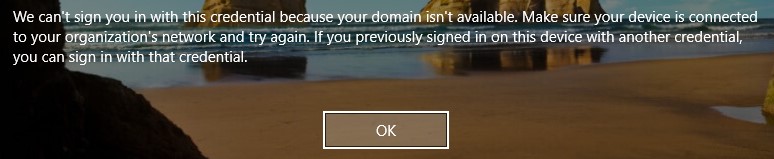
Figure 1: (English Only) Dell Encryption Enterprise Policy base encryption error
The Policy-Based Encryption policies below are enabled for this endpoint on the Dell Data Security administration console:
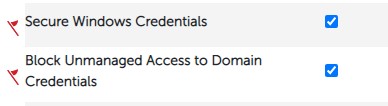
Figure 2: (English Only) Polciy-based encryption policies
The user is logging into the endpoint with username@upn.
The Shield is not activated for this user due to an unknown UPN in the username. The Device Activation ID in the Shield local console is Red:
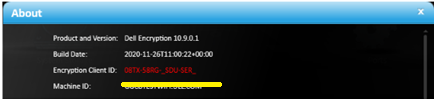
Figure 3: (English Only) About
In the CMGShieled.log in C:\ProgramData\Dell\Dell Data Protection\Encryption, it is possible to see the error below:
[04.16.21 14:38:16:017 XmlRpcActivate.: 129 H] Activation - Requesting activation for user@upn.com
[04.16.21 14:38:16:126 XmlRpcActivate.: 184 H] Activation - Sending activation request for user@upn.com
[04.16.21 14:38:16:456 XmlRpcActivate.: 207 E] Activation - Activation request failed [device server fault:0x13ec]: Auth failure: Error authenticating user user@upn.com
[04.16.21 14:38:16:456 Activator.cpp: 858 E] Activation - Unable to activate new user DOMAIN\user [MS error = 5100]
[04.16.21 14:38:16:456 Activator.cpp: 871 E] Activation - Verify network connectivity to the Dell Security Server at "servername.DOMAIN.local" and Dell Device Server at "https:// servername.DOMAIN.local:8443/xapi/"
The issue occurs due to the presence of the policy Block Unmanaged Access to Domain Credentials and an unmanaged logged in user.
To fix the issue, add the missing UPN on the Remote Management Console following the steps below:
- From a web browser, go to the Dell Data Security administration console at https://servername.DOMAIN.local:8443/webui.
Note: The example, servername.DOMAIN.local, may differ from the server DNS in your environment. The port, 8443, may differ from the Remote Management Console port in your environment. For more information about accessing the Remote Management Console, reference How to Access the Dell Data Security or Dell Data Protection Server Administration Console.
- Sign in to the Dell Data Security administration console.
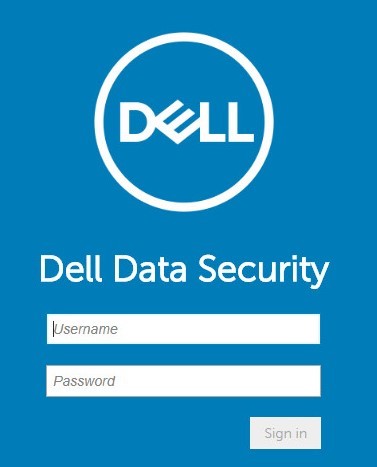
Figure 4: (English Only) Dell Data Security Sign In.
- From the left menu pane, click Populations, and then Domains.
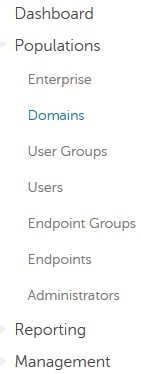
Figure 5: (English Only) Click Domains.
- Click DOMAIN name:
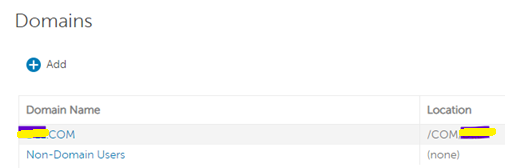
Figure 6: (English Only) Click the Domain name.
- Click the Settings tab and follow the steps below:

Figure 7: (English Only) Click Settings.
- Populate the password of the domain service account.
- Input each missing UPN suffix to the Alias field and click Add.
- Click Update Domain.
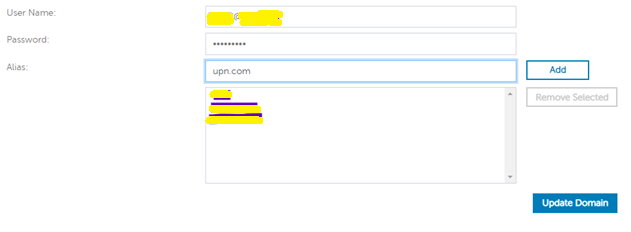
Figure 8: (English Only) Update Domain information.
Note: It is best practice to list all the UPNs used in the AD Domain on the Dell Data Security administration console.
Alternatively, as workaround, it is possible to disable the Policy-Based Encryption policy below on the Dell Data Security administration console:
Block Unmanaged Access to Domain Credentials.
This does not fix the activation issue for the users, but allows them to use the cached credentials.
To contact support, reference Dell Data Security International Support Phone Numbers.
Go to TechDirect to generate a technical support request online.
For additional insights and resources, join the Dell Security Community Forum.
해당 제품
Dell Encryption문서 속성
문서 번호: 000185556
문서 유형: Solution
마지막 수정 시간: 03 6월 2024
버전: 11
다른 Dell 사용자에게 질문에 대한 답변 찾기
지원 서비스
디바이스에 지원 서비스가 적용되는지 확인하십시오.