Dell Encryption Agent Reporting a Different Hostname in Dell Data Security Server Console
요약: This article provides steps to correct an issue with inventory reporting as the wrong hostname with Windows clients.
이 문서는 다음에 적용됩니다.
이 문서는 다음에 적용되지 않습니다.
이 문서는 특정 제품과 관련이 없습니다.
모든 제품 버전이 이 문서에 나와 있는 것은 아닙니다.
증상
Affected Products:
- Dell Encryption
- Dell Endpoint Security Suite Enterprise
Affected Operating Systems:
- Windows
원인
Dell Data Security products can report the wrong hostname during inventory uploads to the server if there is a different hostname in the hosts file before the current hostname.
해결
- Edit the hosts file located at C:\Windows\System32\drivers\etc.
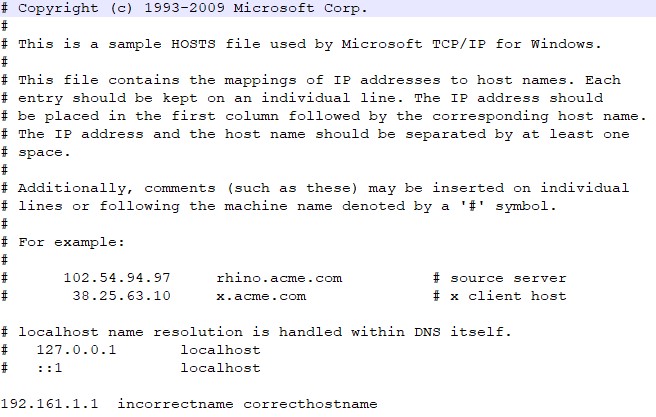
- Change the order to reflect the current hostname to be the first entry in the hosts file.
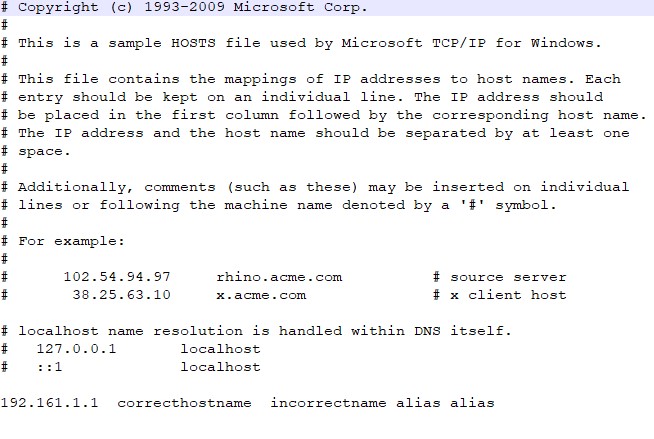
Note: You can still have other aliases in the hosts file that have to be after the current hostname.
- When finished, click File > Save.
- The hostname will change within the server upon the next inventory upload.
To contact support, reference Dell Data Security International Support Phone Numbers.
Go to TechDirect to generate a technical support request online.
For additional insights and resources, join the Dell Security Community Forum.
해당 제품
Dell Encryption, Dell Endpoint Security Suite Enterprise문서 속성
문서 번호: 000187320
문서 유형: Solution
마지막 수정 시간: 10 5월 2026
버전: 5
다른 Dell 사용자에게 질문에 대한 답변 찾기
지원 서비스
디바이스에 지원 서비스가 적용되는지 확인하십시오.