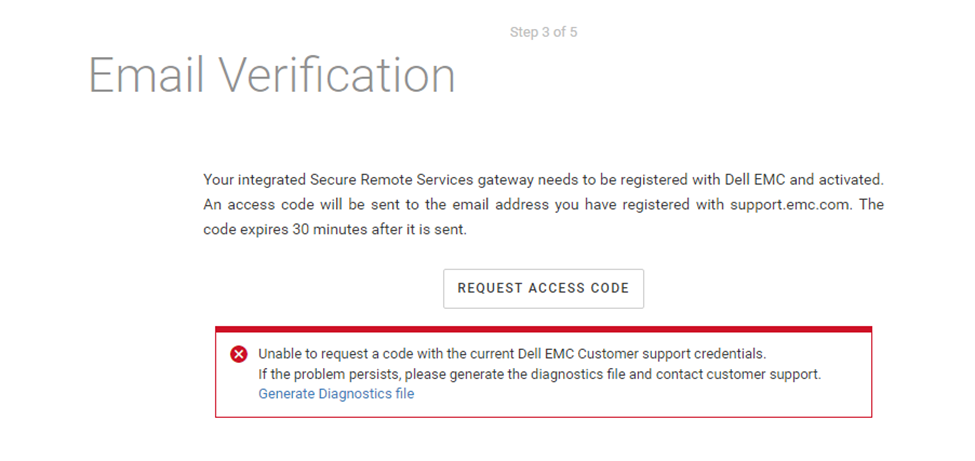
CloudIQ: Unable to request a code with the current Dell EMC Customer support credentials
요약: The above error may occur when a CloudIQ Collector is being configured to an integrated gateway.
이 문서는 다음에 적용됩니다.
이 문서는 다음에 적용되지 않습니다.
이 문서는 특정 제품과 관련이 없습니다.
모든 제품 버전이 이 문서에 나와 있는 것은 아닙니다.
증상
Customer is attempting to configure a CloudIQ Collector to an integrated gateway using the following procedure:
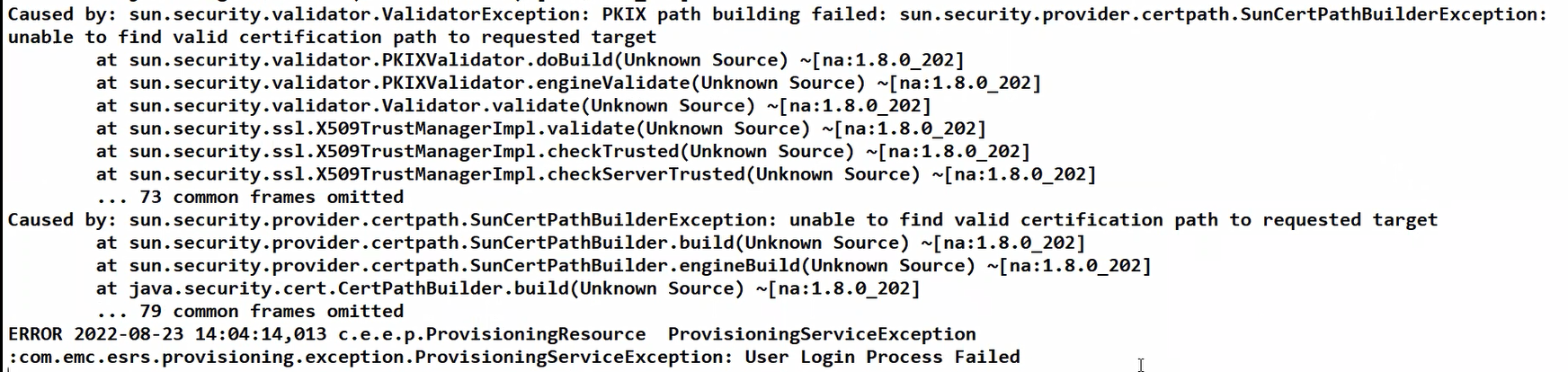
Collecting the Diagnostic file shows the following ERROR within the provisioning log (hostmnt_log > var > log > esrs).
"PKIX path building failed"
- Power on the CloudIQ Collector.
- Login to the CloudIQ Collector.
- Select Admin > Settings and the Integrated Gateway tab.
- Plug in the Dell EMC user account (email) and password (no special characters) and click on Start Provisioning.
- No proxy direct connection – leave off unless required.
- It then verifies the user account (email) and asks the customer to request an access code.
- Once the code is received the customer would then plug this in and select a site ID that is also verified.
- The integrated gateway (ISWID) is then created and the CIQ Collector is created (SWID) and placed under the gateway to be managed.
Collecting the Diagnostic file shows the following ERROR within the provisioning log (hostmnt_log > var > log > esrs).
"PKIX path building failed"
원인
Customer is utilizing an SSL interceptor or transparent proxy within their network. This will substitute the certificate authority and crack the inscription causing the issue.
해결
Options:
- Customer can enter in an exception or exclusion for the SSL interceptor (or transparent proxy) application to continue using the CloudIQ Collector’s eVE configuration.
- Customer can install a new centralized gateway and configure the CloudIQ Collector to it. The centralized gateway being used would also need an exception or exclusion for the SSL interceptor (or transparent proxy) application. This would need to be addressed by the customer and/or the customer’s network team in the same manner as in option 1 above.
추가 정보
Exceptions/exclusions must be made using a third party tool or the SSL interceptor or proxy application outside of Secure Connect Gateway (SCG).
Customers may exclude *.emc.com to cover all the domains or list each separately.
● The local system must be able to connect to the following Enterprise servers through ports 443 and 8443:
- esrs3-core.emc.com
- esrs3-coredr.emc.com
● The local system must be able to connect to the following Global access servers through ports 443 and 8443:
- esr3gduprd01.emc.com
- esr3gduprd02.emc.com
- esr3gduprd03.emc.com
- esr3gduprd04.emc.com
- esr3gduprd05.emc.com
- esr3gduprd06.emc.com
- esr3ghoprd01.emc.com
- esr3ghoprd02.emc.com
- esr3ghoprd03.emc.com
- esr3ghoprd04.emc.com
- esr3ghoprd05.emc.com
- esr3ghoprd06.emc.com
- esr3gscprd01.emc.com
- esr3gscprd02.emc.com
- esr3gscprd03.emc.com
- esr3gscprd04.emc.com
- esr3gscprd05.emc.com
- esr3gscprd06.emc.com
- esr3gckprd01.emc.com
- esr3gckprd02.emc.com
- esr3gckprd03.emc.com
- esr3gckprd04.emc.com
- esr3gckprd05.emc.com
- esr3gckprd06.emc.com
- esr3gckprd07.emc.com
- esr3gckprd08.emc.com
- esr3gckprd09.emc.com
- esr3gckprd10.emc.com
- esr3gckprd11.emc.com
- esr3gckprd12.emc.com
- esr3gspprd01.emc.com
- esr3gspprd02.emc.com
- esr3gspprd03.emc.com
- esr3gspprd04.emc.com
- esr3gspprd05.emc.com
- esr3gspprd06.emc.com
- support.emc.com
해당 제품
CloudIQ제품
CloudIQ문서 속성
문서 번호: 000202819
문서 유형: Solution
마지막 수정 시간: 15 5월 2026
버전: 8
다른 Dell 사용자에게 질문에 대한 답변 찾기
지원 서비스
디바이스에 지원 서비스가 적용되는지 확인하십시오.