AppSync: In AppSync UI customer was unable to set the logging mode to debug as Apply button stayed disabled when debug option was selected.
요약: In AppSync UI customer was unable to set the logging level to debug as Apply button stayed disabled when debug option was selected.
이 문서는 다음에 적용됩니다.
이 문서는 다음에 적용되지 않습니다.
이 문서는 특정 제품과 관련이 없습니다.
모든 제품 버전이 이 문서에 나와 있는 것은 아닙니다.
증상
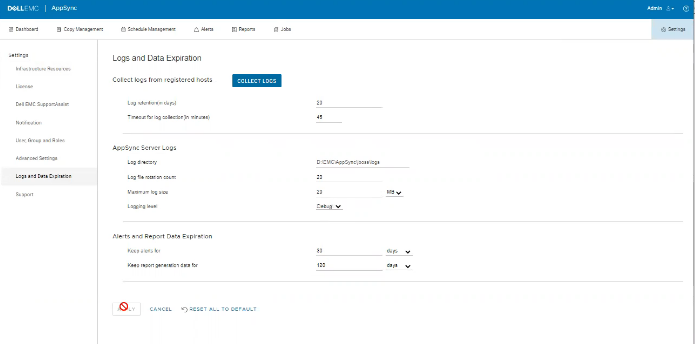
No errors in the logs but the issue can be observed on the UI as shown in the below.
원인
The Issue is because customer on the same screen, had set "Timeout for log collection(in minutes)" option value to 45 which is invalid.
해결
Set The value for "Timeout for log collection(in minutes)" option to a valid value of 90 and 120.
추가 정보
AppSync 4.5 will not allow an invalid value for "Timeout for log collection(in minutes)."
Valid values can be from 90 to 120.
Valid values can be from 90 to 120.
해당 제품
AppSync, AppSync문서 속성
문서 번호: 000203604
문서 유형: Solution
마지막 수정 시간: 09 9월 2025
버전: 8
다른 Dell 사용자에게 질문에 대한 답변 찾기
지원 서비스
디바이스에 지원 서비스가 적용되는지 확인하십시오.