Dell Unity: How to connect to Unity XT platforms over serial connection
요약: Unity XT arrays (excluding XT 380/380F) have a micro serial port in the back that can be used for a direct connection into each SP.
이 문서는 다음에 적용됩니다.
이 문서는 다음에 적용되지 않습니다.
이 문서는 특정 제품과 관련이 없습니다.
모든 제품 버전이 이 문서에 나와 있는 것은 아닙니다.
지침
Unity XT arrays (excluding XT 380/380F) have a micro serial port in the back that can be used for a direct connection into the SP. This type of connection can be used instead of IPMI. However both cannot be used simultaneously.
A Micro DB-9 serial cable can be used to connect a computer directly to an SP.
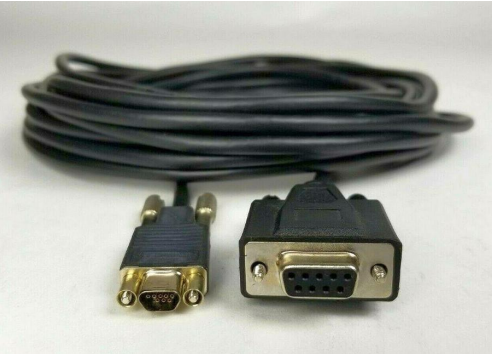
For computers that do not have a serial port a USB to DB-9 serial adapter cable can be used alongside the Micro DB-9 serial cable.

Location of serial port on each SP

Once the serial port is connected on the array open a terminal, select serial connection. Before connecting adjust the speed to 115200.
Note: Verify what COM represents the physical serial connection. Sometimes a different COM port is selected by default.

In the event strange output in the terminal is seen, turn the flow control off.

Once the putty session is opened, a login screen should be seen.

A Micro DB-9 serial cable can be used to connect a computer directly to an SP.
For computers that do not have a serial port a USB to DB-9 serial adapter cable can be used alongside the Micro DB-9 serial cable.
Location of serial port on each SP
Once the serial port is connected on the array open a terminal, select serial connection. Before connecting adjust the speed to 115200.
Note: Verify what COM represents the physical serial connection. Sometimes a different COM port is selected by default.
In the event strange output in the terminal is seen, turn the flow control off.
Once the putty session is opened, a login screen should be seen.
해당 제품
Dell EMC Unity XT 480, Dell EMC Unity XT 480F, Dell EMC Unity XT 680, Dell EMC Unity XT 680F, Dell EMC Unity XT 880, Dell EMC Unity XT 880F문서 속성
문서 번호: 000208170
문서 유형: How To
마지막 수정 시간: 28 8월 2023
버전: 1
다른 Dell 사용자에게 질문에 대한 답변 찾기
지원 서비스
디바이스에 지원 서비스가 적용되는지 확인하십시오.