NetWorker: vProxy Appliance Does Not Apply Network Parameters on Deployment
요약: vProxy appliance does not apply or retain network parameters.
이 문서는 다음에 적용됩니다.
이 문서는 다음에 적용되지 않습니다.
이 문서는 특정 제품과 관련이 없습니다.
모든 제품 버전이 이 문서에 나와 있는 것은 아닙니다.
증상
The NetWorker VMware Protection (NVP) vProxy appliance deploys successfully but did not apply network parameters set during the deployment.
원인
There is a duplicate IP address. Another device has been assigned the same address as the vProxy appliance.
해결
- On the vProxy appliance, check the status of the
wickeddservice with the below command. Wickedd is the network management service used on the vProxy appliance.
NOTE: If the vProxy is not accessible over SSH, use VMware web client to console connect to the vProxy.
systemctl status wickedd
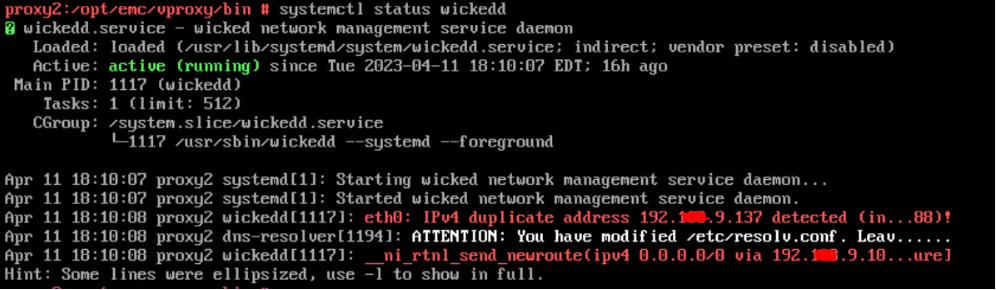
Figure 1: Message Results of
wickedd Command
To see the full messages, use the following
wickedd command:
systemctl -l status wickedd
(lower case L)
Example:

Figure 2: Message Results of Extended
wickedd Command
Write down the MAC address and work with network administrator to find the duplicate IP and resolve or assign a different IP address to the vProxy.
- Resolve duplicate IP address issue in the networking environment.
- Reconfigure the vProxy's network parameters using:
/opt/emc/vproxy/bin/network_config.sh <interface> <FQDN> <IP Address> <Netmask> <Gateway> <DNS List (comma separated)>
For more information, see: NVP vProxy: How to manually change the vProxy Appliance network interface settings
해당 제품
NetWorker제품
NetWorker Family, NetWorker Series문서 속성
문서 번호: 000212275
문서 유형: Solution
마지막 수정 시간: 27 2월 2026
버전: 3
다른 Dell 사용자에게 질문에 대한 답변 찾기
지원 서비스
디바이스에 지원 서비스가 적용되는지 확인하십시오.