Precision Workstations Have Slow Performance Under Low Workloads
요약: Information about certain Precision workstations having intermittent slow performance issues.
이 문서는 다음에 적용됩니다.
이 문서는 다음에 적용되지 않습니다.
이 문서는 특정 제품과 관련이 없습니다.
모든 제품 버전이 이 문서에 나와 있는 것은 아닙니다.
증상
Dell Precision workstation Users might experience intermittent slow response under low workload conditions in both the Operating System (OS), or in the BIOS, while the Processor speed is stuck at 0.8 GHz.
Examples of this behavior are slow or lagging mouse and keyboard operation while typing in text applications, normal use of Excel, or Word applications. Slow response in the BIOS when changing settings happens as well.
Affected Models:
- Precision 5860 Tower
- Precision 5860 XL Tower
- Precision 7960 Tower
- Precision 7960 XL Tower
- Precision 7960 Rack
- Precision 7960 XL Rack
원인
This is a known Intel issue. Intel’s Energy Preference Bias (EPB) settings are causing the slow performance as the processor stays at low speeds if the workload is not high enough.
해결
BIOS and Patch Fix
This is an industry-wide problem, and Intel has issued a patch to address it. Download and upgrade the Precision BIOS to the version listed below or newer to fix the issue.
- Precision 5860 Tower: 1.1.15 or newer
- Precision 5860 XL Tower: 1.1.15 or newer
- Precision 7960 Tower: 1.1.14 or newer
- Precision 7960 XL Tower: 1.1.14 or newer
Note: The Dell Engineering Team suggested the following workaround for the Precision 7960 Rack and Precision 7960 XL Rack systems.
Workaround:
A short-term workaround is to change the "Power Mode" setting to "High Performance."
- Use the following Microsoft steps to go to the "Power Options": Change the Power Mode for your Windows PC
- Change the "Power Plan" mode to "High Performance" (Figure 1).
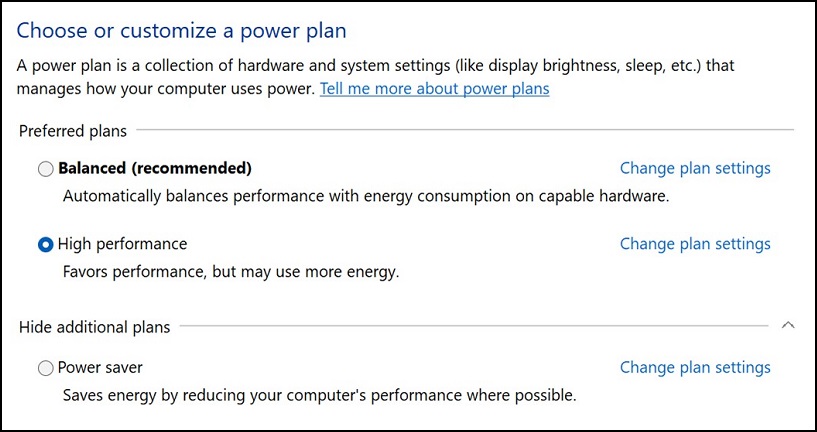
Figure 1
- Reboot the Precision workstation.

Note: This workaround does not fix the issue while in the BIOS.
해당 제품
Precision 7960 XL Rack, Precision 5860 XL Tower, Precision 7960 XL Tower, Precision 5860 Tower, Precision 7960 Rack, Precision 7960 Tower문서 속성
문서 번호: 000215172
문서 유형: Solution
마지막 수정 시간: 18 5월 2026
버전: 9
다른 Dell 사용자에게 질문에 대한 답변 찾기
지원 서비스
디바이스에 지원 서비스가 적용되는지 확인하십시오.