PowerEdge: DSS7500 - Double Fault and How to Force Online Disk
요약: This article addresses a DSS7500 double fault and how to force online disk.
이 문서는 다음에 적용됩니다.
이 문서는 다음에 적용되지 않습니다.
이 문서는 특정 제품과 관련이 없습니다.
모든 제품 버전이 이 문서에 나와 있는 것은 아닙니다.
지침
DSS7500 configuration:
- SI9361-8i RAID card
- Replaced disk28
- Disk40 hot spare is rebuilding
- Disk22 is offline
- Disk40 rebuild failed due to source driver error, there are two hard drives failed and the VD failed
- Remote check disk22 HD offline, disk28 HD unconfigured good (missing)
- RAID card log checks the VD0 degraded when the disk22 is offline and VD0 failed

Figure 1: RAID Controller Information
1034450: 23-10-28,08:06:02 BG Work:CopyBack progress on PD b4(e0x64/s32) is 99.25%(116579s)
1034451: 23-10-28,08:53:56 Info:CopyBack complete on PD b4(e0x64/s32) from PD ba(e0x64/s40)
1034452: 23-10-28,08:53:57 Info:State change on PD b4(e0x64/s32) from COPYBACK(20) to
ONLINE(18)
1034453: 23-10-28,08:53:57 Info:Global Hot Spare created on PD ba(e0x64/s40) (global,rev)
1034454: 23-10-28,08:53:57 Info:State change on PD ba(e0x64/s40) from ONLINE(18) to HOT
SPARE(2)
1034459: 23-10-31,15:05:18 Info:State change on PD a0(e0x65/s28) from ONLINE(18) to
OFFLINE(10)
1034460: 23-10-31,15:05:18 Info:State change on VD 00/0 from OPTIMAL(3) to DEGRADED(2)
1034461: 23-10-31,15:05:18 CRITICAL:VD 00/0 is now DEGRADED.
1034475: 23-10-31,15:15:02 Info:Inserted: PD a0(e0x65/s28)
1034476: 23-10-31,15:15:02 Info:Inserted: PD a0(e0x65/s28) Info: enclPd=65, scsiType=0,
portMap=00, sasAddr=5f01faf0fd32821c,0000000000000000
1034477: 23-10-31,15:15:02 Info:PD a0(e0x65/s28) Inquiry info: Info- ATA  TOSHIBA MG07ACA1
T0A0CFF9SG 11 TB
1034478: 23-10-31,15:15:02 Info:State change on PD a0(e0x65/s28) from UNCONFIGURED_BAD(1) to
UNCONFIGURED_GOOD(0)
1034481: 23-10-31,16:29:22 BG Work:Rebuild progress on PD ba(e0x64/s40) is 0.99%(5040s)
…
1034534: 23-11-01,21:31:58 Info:Unexpected sense: PD 98(e0x65/s22) Path 5f01faf0fd328216,
CDB: 88 00 00 00 00 01 6e 67 88 98 00 00 00 08 00 00, Sense: 72 03 11 00 00 00 00 0C 00 0A
80 00 00 00 00 01 6E 67 88 98
1034585: 23-11-02,07:27:28 BG Work:Rebuild progress on PD ba(e0x64/s40) is 82.17%(145326s)
1034586: 23-11-02,07:48:59 Info:Unexpected sense: PD 98(e0x65/s22) Path 5f01faf0fd328216,
CDB: 88 00 00 00 00 03 c6 b3 20 00 00 00 02 00 00 00, Sense: 72 03 11 00 00 00 00 0C 00 0A
80 00 00 00 00 03 C6 B3 22 60
1034587: 23-11-02,07:48:59 Info:Error on PD 98(e0x65/s22) (Error 02)
1034588: 23-11-02,07:48:59 Info:State change on PD 98(e0x65/s22) from ONLINE(18) to SHIELD(90)
1034589: 23-11-02,07:48:59 Info:State change on VD 00/0 from DEGRADED(2) to OFFLINE(0)
1034590: 23-11-02,07:48:59 FATAL:Controller cache pinned for missing or offline VD 00/0
1034591: 23-11-02,07:48:59 FATAL:VD 00/0 is now OFFLINE
1034592: 23-11-02,07:48:59 Info:Error on PD 98(e0x65/s22) (Error 02)
1034593: 23-11-02,07:48:59 CRITICAL:Rebuild failed on PD by(e0x64/s40) due to source drive
 error
1034594: 23-11-02,07:48:59 Info:State change on PD ba(e0x64/s40) from REBUILD(14) to HOT
SPARE(2)
1034597: 23-11-02,07:49:02 WARNING:PD 98(e0x65/s22) Path 5f01faf0fd328216  reset (Type 03)
1034598: 23-11-02,07:49:04 Info:Unexpected sense: PD 98(e0x65/s22) Path 5f01faf0fd328216,
CDB: 28 00 00 00 00 00 00 00 04 00, Sense: 70 00 06 00 00 00 00 0A 00 00 00 00 29 00 00 00
00 00
1034599: 23-11-02,07:49:04 Info:Unexpected sense: PD 98(e0x65/s22) Path 5f01faf0fd328216,
CDB: 00 00 00 00 00 00, Sense: 70 00 02 00 00 00 00 0A 00 00 00 00 04 02 00 00 00 00
1034601: 23-11-02,07:55:14 Info:Diagnostics passed for PD 98(e0x65/s22)
1034602: 23-11-02,07:55:14 Info:State change on PD 98(e0x65/s22) from SHIELD(90) to
OFFLINE(10)
How to solve the issue
- Try to force online the last offline disk. If the disk goes online, the VD can recover to degraded status.
- In this case, online disk22 in RAID Controller AVAGO MegaRAID 9361-8i Human Interface Infrastructure (HII) configuration utility Below are the steps:
- Reboot the server. While the system is in startup, press <F2> to enter System Setup.
- Click Device Settings to access the Management menu for the controller AVAGO MegaRAID 9361-8i. Use the arrow keys or the mouse to move.

Figure 2: RAID 50 Status Offline

Figure 3: Drive Port 0 - 3:01:28 hard drive Unconfigured Good

Figure 4: Drive Port 0 - 3:01:28 missing

Figure 5: Drive Port 0 - 3:01:22 Offline

Figure 6: Drive Port 0 - 3:01:22 Offline
- Choose the "Drive Port 0 - 3:01:22 hard drive" > Operation > Place Drive Online > Confirm that the operation is OK.

Figure 7: Place Drive Online
- Check that the RAID 50 Status recovers to Degraded.
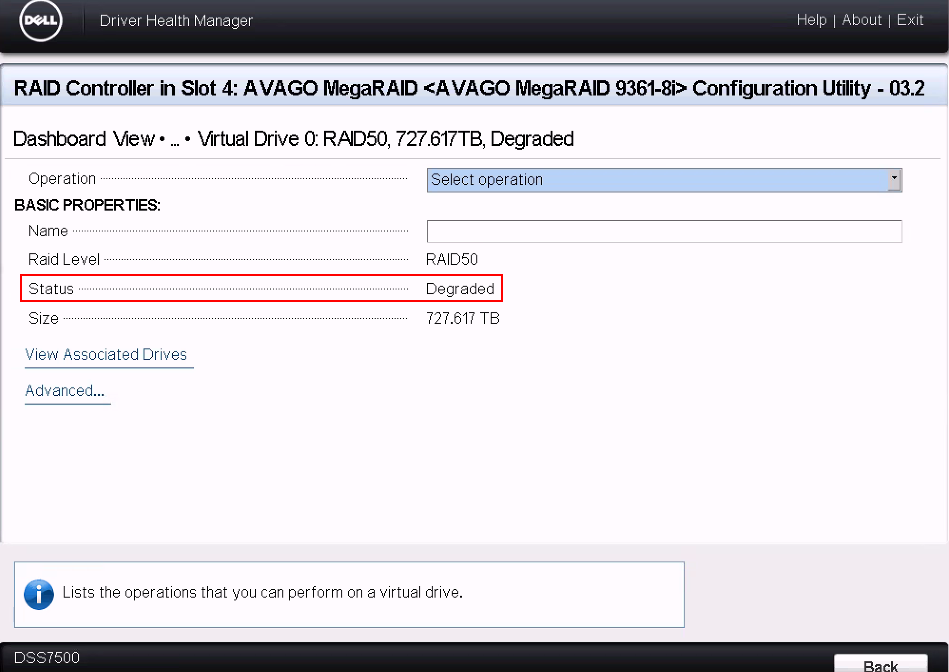
Figure 8: RAID 50 status degraded
- From the RAID Controller AVAGO MegaRAID 9361-8i management software, check that disk22 is online and that disk40 is rebuilding.
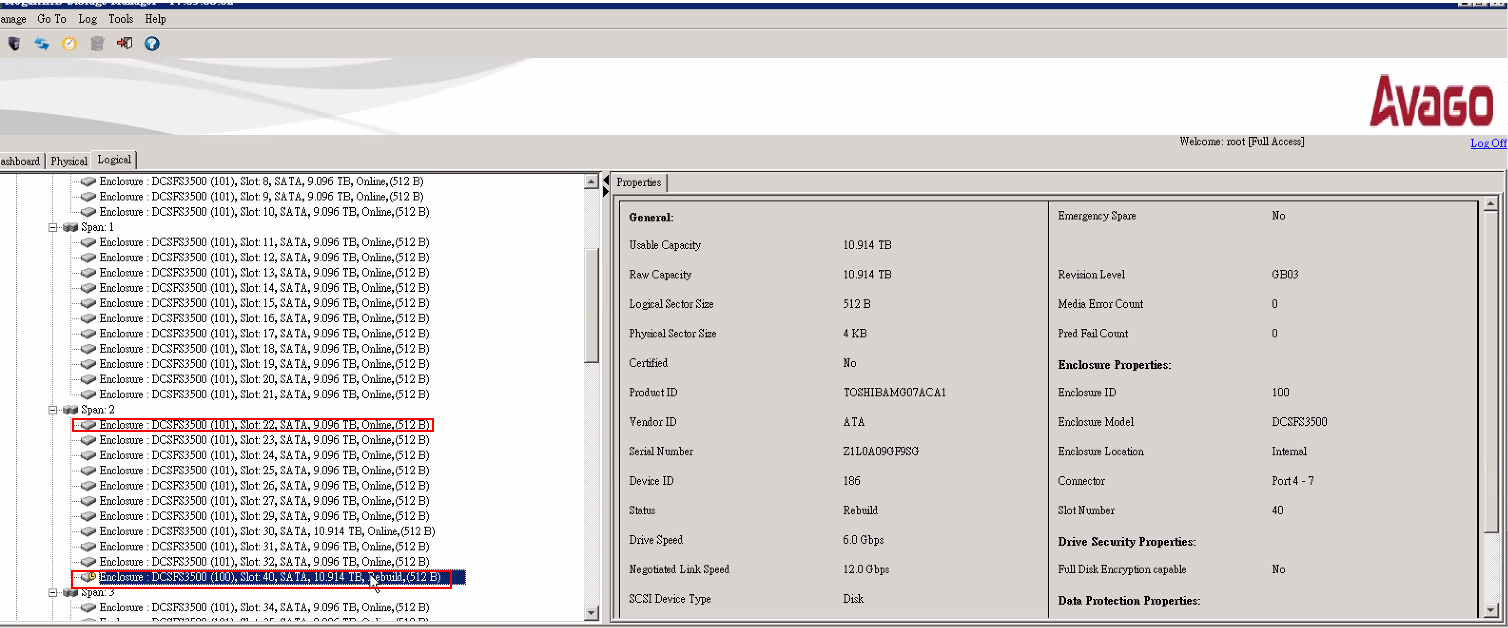
Figure 9: Disk22 is online, and disk40 is rebuilding.
- Check the disk slot information if you must replace a disk.

Figure 10: Disk Slot Information
해당 제품
DSS 7500문서 속성
문서 번호: 000219727
문서 유형: How To
마지막 수정 시간: 14 4월 2025
버전: 4
다른 Dell 사용자에게 질문에 대한 답변 찾기
지원 서비스
디바이스에 지원 서비스가 적용되는지 확인하십시오.