NVP vProxy: nsrcapinfo is Reporting the Provisioned Size of VMs
요약: The NetWorker command `nsrcapinfo` is used to collect information about backups performed on the NetWorker server. It is observed that it is reporting the provisioned size of VM backups. ...
이 문서는 다음에 적용됩니다.
이 문서는 다음에 적용되지 않습니다.
이 문서는 특정 제품과 관련이 없습니다.
모든 제품 버전이 이 문서에 나와 있는 것은 아닙니다.
증상
On the NetWorker server nsrcapinfo -r clients is run, generating a report of backup sizes of clients:
[root@nsr ~]# nsrcapinfo -r clients
"Hostname", "Client_Capacity_GB", "Application_Names"
"rhel-client01.amer.lan", "41.9844", "VMware_Filesystems"
"win-client01.amer.lan", "94.4647", "VMware_Filesystems"
"win-sql01.amer.lan", "104.9613", "VMware_Filesystems"
"sles-client01.amer.lan", "41.9841", "VMware_Filesystems"
The size shown by nsrcapinfo is within proximity to the provisioned size of the VM in VMware.
The size of the backup of NetWorker VMware Protection (NVP) backups matches what is seen on the NetWorker server with mminfo -kot.
[root@nsr ~]# mminfo -kot -r "vmname(30),savetime,ssid,sumsize"
 vm_name                        date   ssid          size
....
win-sql01.amer.lan           01/09/2025 4236268797 104 GB
sles-client01.amer.lan       01/09/2025 4219491583  41 GB
win-client01.amer.lan        01/09/2025 4202714367  94 GB
rhel-client01.amer.lan       01/09/2025 4185937151  41 GB
원인
As per the NetWorker Command Reference Guide, nsrcapinfo finds the sum of maximum unique save set size for each client from the last 60 days (default) and defines this as the client’s capacity. The sum of all client capacities provides an estimate of the total capacity.
The algorithm does not compute the total amount of data ingested by NetWorker over the period, nor does it try to estimate the impact of a file system that grows or shrinks in an incremental fashion.
The heuristic is intentionally simple, and represents the lower bound of data protected by NetWorker. For more information, see the NetWorker Command Reference Guide. NetWorker Guides are available on the Dell Support NetWorker Product Page.
해결
nsrcapinfo is working as designed. NetWorker functions (mminfo, nsrcapinfo, and so forth) generally report VMware image backups as the provisioned size of the VM. The size values shown are a conversion of byte to a decimal (1000) size. See Additional Info for a more detailed breakdown of the unit conversion.
nsrcapinfo can report the VM backup sizes in GiB which will reflect the provisioned size of the VM in VMware. Use the -y command-line option with nsrcapinfo.
nsrcapinfo -r clients -yExample:
[root@nsr ~]# nsrcapinfo -r clients -y
"Hostname", "Client_Capacity_GiB", "Application_Names"
"rhel-client01.amer.lan", "40.0395", "VMware_Filesystems"
"win-client01.amer.lan", "90.0885", "VMware_Filesystems"
"win-sql01.amer.lan", "100.0989", "VMware_Filesystems"
"sles-client01.amer.lan", "40.0392", "VMware_Filesystems"
The sizes shown should match the provisioned sizes of the VMs in VMware.
NOTE: This does not accurately reflect the amount of data sent per backup. For more information about VM backup reporting, see: NVP vProxy: Understanding VMware VM backup levels and sizes shown in NetWorker
추가 정보
There is a discrepancy in the "provisioned size" reported in VMware vs. the "provisioned size" (backup size) reported in NetWorker.
The provisioned size in VMware is shown in binary kilo (1024) from bytes. The values shown are in units of MiB, GiB, TiB, and so forth.
The provisioned size in NetWorker is shown in metric kilo (1000) from KiB. The values shown are in units of MB, GB, TB, and so forth.
Example Scenario:
If we look at one specific VM, from VMware the provisioned size is 100 GB:
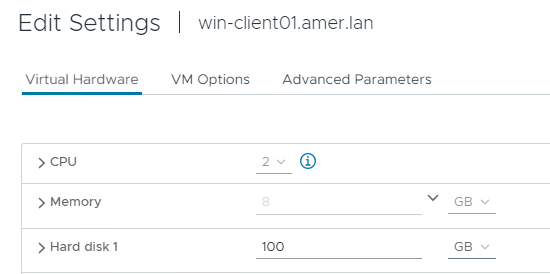
The provisioned size (backup size) in NetWorker is converted from KiB to metric units to report as 104 GB:
[root@nsr ~]# mminfo -kot -q vmname=win-client01.amer.lan
 volume        type   vm_name         date     time         size ssid      fl backup_size
VMBackupPool.001 Data Domain win-client01.amer.lan 09/23/2024 05:10:00 PM 104 GB 4260485415 cr 104 GB
...
If we report the backup size in bytes, we can convert it to report the GiB value matching what it is seen in VMware:
[root@nsr ~]# mminfo -kot -q vmname=win-client01.amer.lan -r "savetime,ssid,sumsize,sumsize(15)"
  date   ssid          size           size
09/23/2024 4260485415 104 GB   107479386588
The formula for this is:
Size_in_Bytes / 1024 = KiB / 1024 = MiB / 1024 = GiB
Using this formula for the example save set shown, this is:
107479386588 / 1024 / 1024 / 1024 = 100.09 GiB
The provisioned size reported in NetWorker matches the provisioned size in VMware when using the same byte conversion method. When a VM is multiple TB, the reported discrepancy is larger; regardless, when converting the size in NetWorker from bytes to TiB (1024), the sizes should be near identical between NetWorker and VMware.
NOTE: The backup size reported in NetWorker is always the provisioned size of the VM. It does not report nor reflect the actual size of the backup. VMware Change Block Tracking (CBT) is used when performing an Incremental VM backup. The backup session only sends the changed data to Data Domain. This is covered in greater detail in the following article: NVP vProxy: Understanding VMware VM backup levels and sizes shown in NetWorker
해당 제품
NetWorker제품
NetWorker Family문서 속성
문서 번호: 000228905
문서 유형: Solution
마지막 수정 시간: 13 1월 2025
버전: 4
다른 Dell 사용자에게 질문에 대한 답변 찾기
지원 서비스
디바이스에 지원 서비스가 적용되는지 확인하십시오.