Resolving Dell Data Protection Encryption Uninstallation Error - Decrypt Agent TEMP Registry Key
Samenvatting: This article describes the solution to a common error message received during the Dell Data Protection removal process affecting users upgrading to Windows 10.
Dit artikel is van toepassing op
Dit artikel is niet van toepassing op
Dit artikel is niet gebonden aan een specifiek product.
Niet alle productversies worden in dit artikel vermeld.
Symptomen
Affected Products:
- Dell Data Protection | Encryption
Dell Data Protection | Encryption Uninstallation Error: "Decrypt agent TEMP Registry Key"
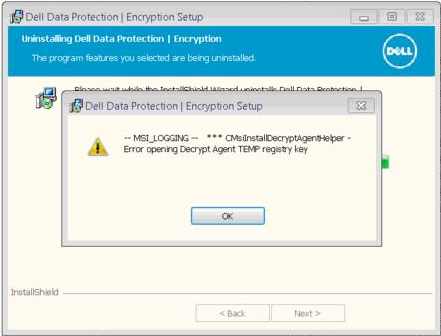
Some users have reported receiving an error stating: -- MSI_LOGGING -- *** CMsiInstallDecryptAgentHelper – Error opening Decrypt Agent TEMP registry key during the standard Dell Data Protection | Encryption uninstallation process
Example of message received during the removal process:
Oorzaak
A Microsoft Security fix which resolves a vulnerability that could potentially allow elevation of privilege is the cause of this. If the Windows Installer service runs custom action scripts in an unsafe way and could allow an attacker to have full administrative rights according to: https://support.microsoft.com/en-us/kb/3072630
Oplossing
Warning: The next step is a Windows Registry edit:
- Back up the Registry before proceeding, reference How to Back Up and Restore the Registry in Windows
.
- Editing the Registry can cause the computer to become unresponsive on the next reboot.
- Contact Dell Data Security International Support Phone Numbers for assistance if you have concerns about performing this step.
Temporarily undo the security fix and then reenable after the Dell Data Protection removal is complete.
Note: Follow the steps in this section carefully and perform this for the customer on a remote session whenever possible to avoid serious issues which can result from modifying the registry incorrectly.
- Click Start, click Run, type regedit in the Open box, and then click OK.
- Locate and then click the following subkey in the registry:
HKEY_LOCAL_MACHINE\SOFTWARE\Policies\Microsoft\Windows\InstallerNote: If this subkey does not exist, create it. - On the Edit menu, select New, and then click
DWORD Value. - For the DWORD name, type
RemappedElevatedProxiesPolicy, and then press Enter - Right-click
RemappedElevatedProxiesPolicy, and then click Modify. - In the Value data box, type
1, and then click OK. - Install the required application.
- After the application installs successfully, reset the
RemappedElevatedProxiesPolicyDWORD value to0to reenable the security fix for KB 3072630.
Source: https://support.microsoft.com/en-us/kb/3072630
To contact support, reference Dell Data Security International Support Phone Numbers.
Go to TechDirect to generate a technical support request online.
For additional insights and resources, join the Dell Security Community Forum.
Getroffen producten
Dell EncryptionArtikeleigenschappen
Artikelnummer: 000132874
Artikeltype: Solution
Laatst aangepast: 23 jul. 2024
Versie: 10
Vind antwoorden op uw vragen via andere Dell gebruikers
Support Services
Controleer of uw apparaat wordt gedekt door Support Services.