How to Identify the CrowdStrike Falcon Sensor Version
Samenvatting: Learn to identify the CrowdStrike Falcon Sensor version for issue solutions, process changes, or system requirements. Follow the steps for Windows, Mac, or Linux.
Dit artikel is van toepassing op
Dit artikel is niet van toepassing op
Dit artikel is niet gebonden aan een specifiek product.
Niet alle productversies worden in dit artikel vermeld.
Symptomen
Knowing the CrowdStrike Falcon Sensor version allows you to:
- Identify known issues
- Understand process changes
- Understand system requirements
Affected Products:
- CrowdStrike Falcon Sensor
Affected Operating Systems:
- Windows
- Mac
- Linux
Oorzaak
Not applicable
Oplossing
For instructions about how to identify the CrowdStrike Falcon Sensor version, click on Windows, Mac, or Linux.
Note:
- The CrowdStrike Falcon Sensor must be installed before identifying the version. For information about the installation process, reference How to Install CrowdStrike Falcon Sensor.
- For more information about checking the CrowdStrike Falcon Sensor, reference https://supportportal.crowdstrike.com/s/article/Checking-Falcon-Sensor-Version-Locally
.
Windows
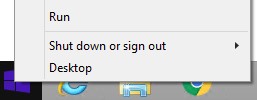
- Right-click the Windows start menu, and then click Run.
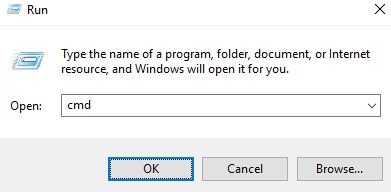
- In the Run UI, type
cmd, and then press OK.
- In Command Prompt, type
"C:\Program Files\CrowdStrike\CSSensorSettings.exe" –versionand then press Enter.

- Record the Version. In the example, 7.04.17605.0 is the Version.

Note: The Version of your sensor may differ from the above screenshot.
Mac
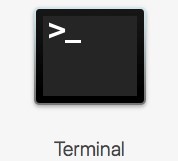
- Locate and then double-click Terminal.
- In Terminal, type
sysctl cs.versionand then press Enter.

- Record the version. In the example, the version is 4.18.8013.0.

Note: The Version of your sensor may differ from the above screenshot.
Linux
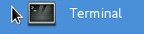
- On the targeted endpoint, open Terminal.
- In Terminal, type
sudo /opt/CrowdStrike/falconctl -g --versionand then press Enter.

- Populate the sudo account Password and then press Enter.
- Record the version. In the example, 4.20.6602.0 is the version.

Note: The Version of your sensor may differ from the above screenshot.
To contact support, reference Dell Data Security International Support Phone Numbers.
Go to TechDirect to generate a technical support request online.
For additional insights and resources, join the Dell Security Community Forum.
Getroffen producten
CrowdStrikeArtikeleigenschappen
Artikelnummer: 000126120
Artikeltype: Solution
Laatst aangepast: 26 jan. 2024
Versie: 21
Vind antwoorden op uw vragen via andere Dell gebruikers
Support Services
Controleer of uw apparaat wordt gedekt door Support Services.