Upgrading Dell Security Management Server Virtual Appears to Stop Responding
Samenvatting: Learn what to do if a Dell Security Management Server Virtual upgrade appears to stop responding during a GRUB update.
Dit artikel is van toepassing op
Dit artikel is niet van toepassing op
Dit artikel is niet gebonden aan een specifiek product.
Niet alle productversies worden in dit artikel vermeld.
Symptomen
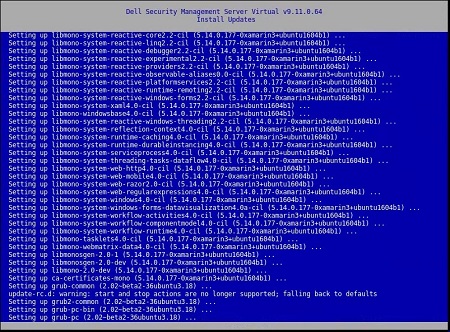
Upgrading Dell Security Management Server Virtual may fail due to a migration that appears to stop responding.
Affected Products:
- Dell Security Management Server Virtual
Dell Security Management Server Virtual requires end-user input to upgrade to a new version (v2) of Grand Unified Bootloader (GRUB). During the upgrade process, Dell Security Management Server Virtual may appear to stop responding on Setting up grub-pc.
Oorzaak
Not applicable
Oplossing
Press Enter after the Setting up grub-pc message appears to proceed with the GRUB v2 update and allow the Dell Security Management Server Virtual v10.0 upgrade to continue.
Note: Do not press any keys other than Enter while the
grub-pc package is installing the GRUB v2 update.
To contact support, reference Dell Data Security International Support Phone Numbers.
Go to TechDirect to generate a technical support request online.
For additional insights and resources, join the Dell Security Community Forum.
Getroffen producten
Dell EncryptionArtikeleigenschappen
Artikelnummer: 000130824
Artikeltype: Solution
Laatst aangepast: 03 jul. 2025
Versie: 11
Vind antwoorden op uw vragen via andere Dell gebruikers
Support Services
Controleer of uw apparaat wordt gedekt door Support Services.