安裝 Dell Encryption 後的 Microsoft Excel 樞紐分析表問題
Sammendrag: 使用 Dell Encryption 時,與 Microsoft Excel 資料分析表相關的問題。
Denne artikkelen gjelder for
Denne artikkelen gjelder ikke for
Denne artikkelen er ikke knyttet til noe bestemt produkt.
Det er ikke produktversjonene som identifiseres i denne artikkelen.
Symptomer
受影響的產品:
- Dell Encryption
受影響的作業系統:
- Windows
Årsak
在儲存並重新開啟使用樞紐分析表的 Microsoft Excel 檔案後,當使用者嘗試重新整理資料時,Microsoft Excel 可能會發生錯誤。
範例錯誤:
We could not refresh the connection: XML parsing failed
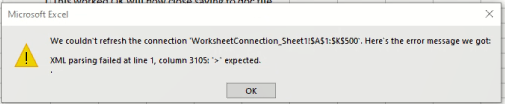
圖 1:(僅英文) Microsoft Excel 錯誤
或者
An issue with the Data Model is preventing Microsoft Excel from opening this workbook.嘗試重新啟動 Microsoft Excel。
Oppløsning
在使用樞紐分析表期間,系統會在 %Userprofile%\AppData\Local\Temp 目錄中快速建立和更新暫存檔案。在此過程中,我們必須同時同步和更新我們的中繼資料檔案,以反映資料夾中每個檔案的適當加密狀態。在快速建立、刪除和更新檔案的作業期間,我們透過 DebugView 擷取發現,在暫存資料夾更新中繼資料時會發生檔案損毀的情況。Dell Encryption 需要進行此動作,才能為每個檔案提供適當的加密狀態。
目前的因應措施是為使用者在「通用加密」下的下列原則中排除此目錄。
-^3%ENV:Userprofile%\appdata\local\Temp
如要聯絡支援部門,請參閱 Dell Data Security 國際支援電話號碼。
請前往 TechDirect,以線上產生技術支援要求。
如需更多深入見解與資源,請加入 Dell 安全性社群論壇。
Tilleggsinformasjon
Videoer
Berørte produkter
Dell EncryptionArtikkelegenskaper
Artikkelnummer: 000184333
Artikkeltype: Solution
Sist endret: 08 mai 2026
Versjon: 10
Få svar på spørsmålene dine fra andre Dell-brukere
Støttetjenester
Sjekk om enheten din er dekket av støttetjenestene.