NMM: SQL Flat File Restore from Clone copy is not possible in the SQL plug-in UI
Sammendrag: NetWorker Module for Microsoft (NMM) SQL Flat File Restore from Clone copy is not possible in the SQL plug-in UI.
Denne artikkelen gjelder for
Denne artikkelen gjelder ikke for
Denne artikkelen er ikke knyttet til noe bestemt produkt.
Det er ikke produktversjonene som identifiseres i denne artikkelen.
Symptomer
NetWorker Module for Microsoft (NMM) SQL Flat File Restore from Clone copy is not possible in the SQL plug-in UI.
Årsak
NetWorker Module for Microsoft (NMM) SQL Flat File Restore from Clone copy is not possible in the SQL plug-in UI.
This is working as intended.
Oppløsning
The select restore pool option is disabled in the UI during flat file restores.
Workaround:
The only workaround is to perform command-line flat file restore. This procedure explains the steps necessary to generate a script and edit the script to use a clone pool instead of the primary backup pool.
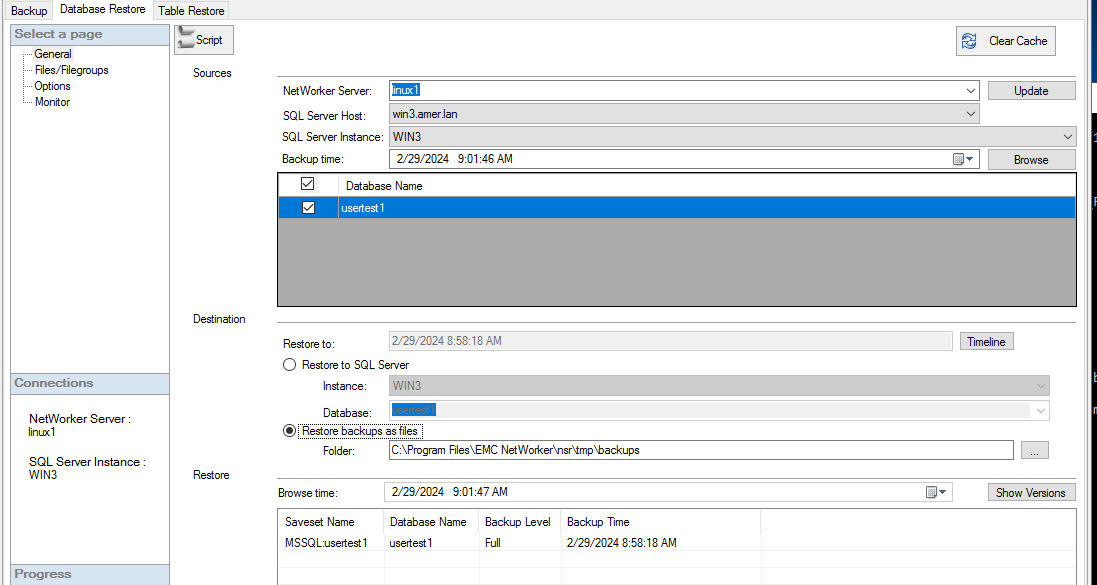
- Open NMM SQL plug-in UI.
- Select Clear Cache. This clear previous selections and starts with new parameters.
- Enter the NetWorker Server name. Click Update.
- Select SQL Server host.
- Select SQL Server instance.
- Select the save set (database to restore).
- Select the save time - this is important. Do this first before the next step.
- Select Restore backups as files - leave the restore Folder for now, edit this later in the script.
- Click Script button.
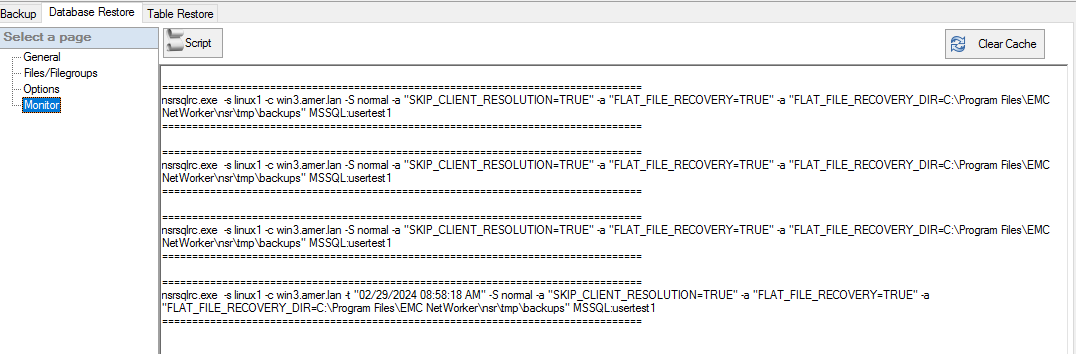
- Copy the script. Open Notepad editor or similar text editor and paste the output script into the editor.
- Add the following to the script;
-b clonepoolname
- Edit the
FLAT_FILE_RECOVERY_DIR="NewDestination"for example,FLAT_FILE_RECOVERY_DIR="D:\RecoveryData"
NOTE: The
RECOVERY_DIR location specified must already exist.
- Save the script as batch file, for example, testsql.bat.
- Open Command Prompt with Run as Administrator and run the testsql.bat script.
For example this generated script:
nsrsqlrc.exe -s linux1 -c win3.amer.lan -t "02/29/2024 08:58:18 AM" -S normal -a "SKIP_CLIENT_RESOLUTION=TRUE" -a "FLAT_FILE_RECOVERY=TRUE" -a "FLAT_FILE_RECOVERY_DIR=C:\Program Files\EMC NetWorker\nsr\tmp\backups" MSSQL:usertest1
After it is edited, it would have something like this to reflect -b clonepool and new recovery folder.
nsrsqlrc.exe -s linux1 -c win3.amer.lan -t "02/29/2024 08:58:18 AM" -S normal -b ddclone -a "SKIP_CLIENT_RESOLUTION=TRUE" -a "FLAT_FILE_RECOVERY=TRUE" -a "FLAT_FILE_RECOVERY_DIR=C:\sharepoint\backup” MSSQL:usertest1
Berørte produkter
NetWorker, NetWorker Module for MicrosoftProdukter
NetWorker Family, NetWorker ModuleArtikkelegenskaper
Artikkelnummer: 000222645
Artikkeltype: Solution
Sist endret: 14 apr. 2026
Versjon: 3
Få svar på spørsmålene dine fra andre Dell-brukere
Støttetjenester
Sjekk om enheten din er dekket av støttetjenestene.